
Put an explicit lifetime on development processes started by coding agents.
ProcLease is a Rust CLI and a portable skill for Codex and Claude Code. Start a foreground service with a deadline; inspect its status and bounded logs from later tool calls; explicitly extend it or let it expire. Reading logs never renews it.
Status: experimental, MIT-licensed open source. Runtime tests cover macOS
arm64, Linux aarch64 in a non-root container, and native Linux x86_64. Real-agent
results depend on the execution profile. Install a
prebuilt binary, or build the CLI with Cargo; see Build.
Domain: proclease.com; no hosted service is required.
Source and issues: jaredchu/proclease. Website: proclease.com.
Download and review the v0.1.9 installer, then run:
sh install.sh --skills both
proclease --version
It selects your macOS/Linux ARM64 or x64 archive, verifies its SHA-256 checksum,
and installs to ~/.local/bin without sudo or Rust. Add that directory to PATH
if needed. --skills both links the portable skill for Codex and Claude Code;
use codex, claude or omit the option for CLI-only installation. Existing
unrelated skill folders and symlinks are preserved. Restart the agent session
to discover a new skill.
For manual installation, download an archive from the
experimental prerelease,
verify it against SHA256SUMS, extract it and place proclease on PATH. Each
archive includes the skill, README and MIT license. See the
release notes
for tested platforms and signing limits.
Building from source needs Rust 1.89 or newer; current stable Rust/Cargo is recommended. The prebuilt installer above does not need Rust. To build the CLI from the crates.io registry:
cargo install proclease --version 0.1.9 --locked
proclease --version
Version 0.1.4 fixes the macOS Rust/Cargo 1.89 procedural-macro loading failure without requiring a profile override. Only build-time helpers are left unstripped; the installed CLI retains stripping and thin LTO. See verification for the tested scope and the older 0.1.3 caveat.
To build from a Git checkout instead:
git clone https://github.com/jaredchu/proclease.git
cd proclease
cargo install --path . --locked
proclease --version
Cargo installs only the proclease CLI. Set up the skill separately: see
Install the skill, using a source checkout or an extracted
release archive for the skill folder.
cd your-project
proclease run --owner claude --task preview --ttl 2h -- npm run dev
proclease list
proclease list --json
proclease list --json --resources
proclease list --all
proclease logs JOB_ID --tail 50
proclease extend JOB_ID --by 1h
proclease stop JOB_ID
proclease stop --all --task preview --dry-run
proclease watch
proclease prune --dry-run
The table shows CPU/RSS usage, compact countdowns, state colors, project/task
details and preview URLs. It switches to a stacked layout in narrow terminals. Colors are automatic
for terminals; NO_COLOR, TERM=dumb or --color never disables them, and
--color always forces them. Redirected output and JSON stay uncolored by default.
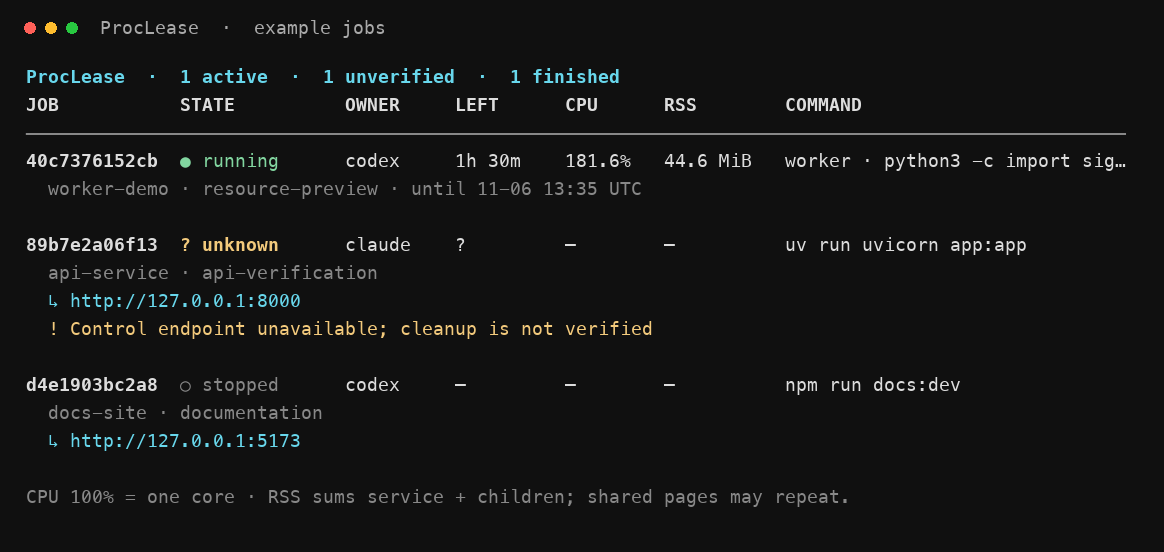
A real disposable worker and synthetic history rows shown with
proclease watch --all; the default view briefly shows recently finished jobs
before hiding them.
All commands accept --json. watch --once --json produces one bounded snapshot.
The JSON envelope has schema_version: 1; command errors return a nonzero exit
code and an error field when --json was supplied. Argument-parser errors use
Clap's standard stderr output and exit code 2.
Commands are argument vectors after --, without implicit shell evaluation.
The service inherits the launching caller's directory, environment and execution
restrictions. Standard input is closed; interactive programs are not supported.
--owner, --task, --name and --url are declared metadata. A running state
means the program spawned, not that a web endpoint is ready.
Available in v0.1.6 and later. run can optionally wait after launch until the
service looks ready:
proclease run --task preview --wait-for-port 5173 -- npm run dev
proclease run --task preview --wait-for-log "ready in" --wait-timeout 1m -- npm run dev
--wait-for-port PORTsucceeds once a TCP connection to127.0.0.1:PORTor[::1]:PORTis accepted. Only literal loopback addresses are used; no name is resolved and no data is sent. A connection cannot prove which process owns the port or that the application is healthy.--urlremains metadata only.--wait-for-log TEXTsucceeds once captured output contains TEXT as literal bytes (not a regular expression or shell pattern), including retained output from earlier in the job. TEXT must be 1 to 512 bytes without control characters. Output discarded after the capture cap cannot match.- With both flags, both must be satisfied, and the port is probed again after the
log text matches, so a listener that has since closed does not count.
--wait-timeout(default 30s, at most 5m) requires at least one criterion and starts when waiting starts, after the supervisor has started. Invalid values are rejected before anything launches. Without these flags,runoutput and behavior are unchanged. - Waiting happens in the foreground CLI after the launch lock is released. It never changes, extends or renews the lease, relaunches, persists readiness or kills anything. The lease still dates from launch. The wait stops early when the job exits, fails, starts stopping, expires or its supervision becomes unverified; a job in any of those states is never reported ready, even if its retained output or a reused port matches.
- Every connection attempt and supervisor probe is bounded by the wait budget;
captured-output reads are bounded to 1 MiB per poll and 16 MiB in total, and
the budget is rechecked between 64 KiB chunks. The budget is checked again
before success, so work that crosses the deadline reports
timed_out. A capture path that is not a regular file (for example a FIFO) reportsobservation_failedinstead of blocking. - Keep
--wait-timeoutbelow your agent host's command timeout. JSON mode prints only at the end, so if the CLI is killed first, find the job withproclease list --all --jsonby matching owner, task, cwd and argv, or retry the same--keywith the same command and context. - Exit status is 0 only when ready. Otherwise it is 1, the job keeps running
under its original deadline where applicable, and the output keeps the job ID
and current record so you can inspect or stop it. Human output prints the job
table and a readiness summary. JSON adds
readiness(and, when not ready, anerrorstring) to the usualjob/reusedenvelope:
{"schema_version": 1, "reused": false, "job": {"id": "0123456789ab", "state": "running", "...": "..."},
 "readiness": {"status": "timed_out", "ready": false, "timeout_ms": 30000, "waited_ms": 30001,
               "port": {"port": 5173, "satisfied": false, "address": null},
               "log": {"text": "ready in", "satisfied": true, "logs_truncated": false},
               "error": null},
 "error": "readiness not confirmed: timed_out"}
status is ready, timed_out, lease_expired, job_finished, job_stopping,
supervision_unavailable or observation_failed; port or log is null when
not requested. A keyed retry can add, change or drop readiness flags: they are
invocation-time checks, not part of launch identity, so the retry observes the
retained job again without creating or renewing it.
Human list and watch show CPU percentage and resident memory (RSS) for the
service and children still in its managed process group. ProcLease's two
supervisors are excluded. CPU 100% means one core; totals can exceed 100%.
RSS adds each process's resident bytes, so shared pages may be counted more than
once. Children that leave the group are outside these measurements.
One-shot views take two samples roughly 200ms apart. Live watch warms up on its
first frame; … means CPU is still sampling and — means unavailable. Finished
or unverified jobs do not retain live metrics. Counters are read on demand,
without saving a usage history, changing deadlines or starting a monitoring daemon.
Ordinary JSON stays unchanged and avoids the sampling delay. Request metrics with
proclease list --json --resources or
proclease watch --once --json --resources. Each job then includes resources
with cpu_percent, memory_rss_bytes, processes and sample_interval_ms;
unavailable values are null. An unavailable group has resources: null.
- Default duration: 2h. Maximum total lifetime: 24h from creation.
extend --by 1hadds one hour to the current deadline, atomically.- Listing, reading logs and opening the terminal view do not renew a lease.
- On expiry, stop or command exit, the supported process group receives TERM,
followed by KILL after a default two-second grace.
--gracecan be set up to 10s. - Elapsed wall time includes sleep. An overdue job is stopped when execution
resumes. No process can enforce a deadline while the machine is powered off.
If startup is delayed past the deadline, the job finishes
expiredwithout running the command. - Killing either supervision process triggers fail-closed group cleanup. There is no automatic restart or recovery that resumes a service after supervision fails.
- Each run is a separate job. Assign
--key REQUEST_IDon the initial run to make retries idempotent for that command, directory, environment and launch policy. Reuse the same key unchanged. Adding a key later does not identify an earlier keyless job. A retained retry never renews or resurrects a job; a different context is rejected. A retry of a failed launch returns thatfailedrecord and exits nonzero. Empty interrupted-launch reservations and those containing only private generated atomic-write temporary files are ignored without deleting state; unreadable/ambiguous launch metadata still fails closed. - From v0.1.8: a rejected keyed retry names the differing
fields (
command,directory,owner,task,name,url,ttl,grace,log limitorenvironment), never their values. Some agent hosts change per-call environment variables between tool calls, so an exact retry can differ only inenvironment.run --reuse --key REQUEST_IDis an explicit observation-only retry for that case. It returns the retained job withreused: trueonly when the command, canonical directory and every other launch option above match. It does not compare the new environment; the job keeps its original launch environment. It never reserves, launches, renews or resurrects: an absent, collected or incomplete key fails with nothing started, and a stopped, expired or failed job is returned as recorded (a failed record exits nonzero). Readiness flags remain observational. Ordinary keyed retries still reject any environment change; use--reuseonly when keeping the original environment is intended. If you want the application to run with a changed environment, that is a new request, not a retry.--reusewithout--keyis a parser error. Real Codex CLI and Claude Code sessions in the tested macOS sandbox profiles passed this retry with a local source build; see the compatibility matrix. - Stop during shutdown returns lifecycle state; extension of a stopping job is
rejected. If a response is lost, inspect
listbefore retrying an operation.
stop --all is available in v0.1.5 and later. stop requires exactly one target:
a job ID, or --all. Filters and --dry-run are accepted only with --all.
proclease stop --all --task preview --dry-run --json
proclease stop --all --owner claude --task preview --json
proclease stop --all- Selection covers active (
starting,running,stopping) and unverified (unknown) jobs in the selected state directory only. It never scans or signals other OS processes.--ownerand--taskare exact matches, combined with AND. They are declared labels, not identity or authorization. - The selection is fixed once, under a brief hold of the root launch lock, before any control. Jobs launched afterwards are not included. Finished jobs are ignored.
- A non-dry-run bulk stop also takes a shared retention lock under that brief hold.
Until every result is captured, history collection of all job directories is
deferred, so completion records of selected jobs cannot be collected before they
are reported. Keepers and launches still proceed. A bulk stop that completes
normally releases the lock, then runs one normal collection pass. If it crashes
or is killed, the OS releases the lock and no final pass runs; ordinary
opportunistic collection resumes on the next trigger, such as a launch, a job
completion or
prune. If protection cannot be acquired (for example, the.retentionlock file is a symlink), the command fails before contacting any job. A missing record is never reported as a successful stop. - Retention protection is cooperative. Older clients and keepers already running
from an older build ignore
.retentionand can still collect selected records; upgrading the foreground CLI does not change them. Protection holds only when every process that prunes the same state directory, including running keepers, includes it. --dry-runreports the exact selection without sending Stop, changing leases, deleting history or deferring collection.- Each job uses the same supervisor socket and TERM, grace, KILL lifecycle as a
single stop. Unknown jobs are reported as
unverifiedand never signalled. Astartingjob is polled briefly until running; already stopping jobs are awaited; jobs that finished since selection succeed without a request. - A record is identified only by its job directory. A record whose embedded ID names another job is a scan warning and is never selected or controlled.
- Every socket operation has an absolute deadline that trickled bytes cannot
extend: 0.5 seconds per availability probe, and 2 seconds per control exchange
(connect, request and reply, at most 1 MiB). Up to 8 workers send Stop; each job
gets at most about 6 seconds to leave
startingand at most two exchanges, so one unresponsive job occupies a worker for at most about 12 seconds. Every dispatched job is then polled together until its own grace (capped at 10 seconds, therunmaximum, even if metadata says otherwise) plus 2 seconds; a polling pass can add up to 0.5 seconds per unresponsive pending job. Typical total time is the longest selected grace plus 2 seconds. Many unresponsive supervisors lengthen dispatch in batches of 8. Local file reads are not separately bounded. Shutdown is not atomic or instantaneous. - Exit status is 0 only when every selected job is confirmed finished (or, in a dry run, would be stopped) and the scan had no warnings. An unreadable record is a warning even with filters, because it could match. An empty selection with no warnings succeeds.
Bulk JSON (schema_version: 1) retains every result instead of a single error:
{"schema_version": 1, "dry_run": false,
 "filters": {"owner": "claude", "task": "preview"}, "complete": true,
 "results": [{"id": "0123456789ab", "selected_state": "running",
              "status": "finished", "ok": true, "error": null, "job": {"...": "..."}}],
 "warnings": []}
status is would_stop (dry run), finished, unverified or failed; job
is the latest observed record. Single-ID stop JOB_ID --json output is unchanged.
Lease deadlines are based on system wall time; moving the clock backwards can delay expiry. Forward jumps can expire jobs sooner. This is an explicit initial limit.
State defaults to $XDG_STATE_HOME/proclease, or ~/.local/state/proclease when
that variable is unset. Override it with an absolute PROCLEASE_HOME or
--state-dir path. The root and job directories must be private (0700); metadata
and logs use 0600. Long paths can exceed the Unix socket limit; ProcLease reports
that error rather than selecting a different directory silently.
Each state directory is a separate registry. Normal agent launches should use
the same configured state as your terminal, so ordinary proclease watch can see
them. Reserve a custom state directory for deliberately isolated jobs or tests,
and use it consistently for every command. If the default view is empty after a
custom launch, use proclease --state-dir /same/path watch. Do not move a live
job's state directory; its supervisors still use the original path.
Combined stdout/stderr capture defaults to 1 MiB per job. Once full, newer
output is drained and discarded so neither disk usage nor a blocked output pipe
can grow indefinitely. Status and log output expose logs_truncated, including
output discarded during shutdown. Set
--log-limit BYTES at launch, up to 16 MiB. Terminal control characters are escaped
when displaying logs. Logs and argv may contain private application data; keep the
state directory out of repositories. Full environment values are not persisted.
Confirmed finished metadata and logs are automatically removed after 24 hours
or beyond the 100 newest finished jobs, whichever comes first. Collection runs
on run, list, each watch refresh and job completion. Without CLI activity or
job completion, overdue history is collected on the next use; there is no separate
background cleanup service. Active jobs, unverified state and jobs whose supervisors
cannot be verified absent are preserved. From v0.1.8, a job whose own
keeper observed the managed process group absent before writing its final record
is collected under these limits without checking saved PIDs, so new history
stays bounded after a reboot or PID-namespace change. On Linux, finished records
without that keeper marker (from earlier versions, or whose keeper did not
complete its final write or could not observe its group absent) stay, with their
retry keys, when their
saved PIDs come from another or unverifiable PID context,
including after a reboot, until you remove them. Filesystem errors defer deletion with a
warning, so protected or failed-cleanup data can exceed the normal history bound.
On Linux, jobs active or stopping at reboot can remain unknown afterwards.
Unreadable procfs (for example, a restrictive hidepid mount) also prevents
PID-derived absence checks and makes resource metrics unavailable. Protocol
controls and expiry still work when their supervisors remain reachable.
There is no forced-history deletion command. Retain unverified records until an
operator independently establishes that no supervisor or managed group can use
them. Removing a job directory discards its logs and retry key as well; agents
must not remove unverified history merely to hide a row.
While a bulk stop runs, collection of job directories is deferred and prune --json
reports "deferred": true; normal retention resumes on the next collection trigger
after it exits (including after a crash or kill).
Use proclease prune --dry-run to preview eligible jobs, or proclease prune to
collect them now. Collection deletes their metadata and logs. Retry keys only
deduplicate while their records remain: a purged key can start a new job. Reconcile
current jobs before retrying an old request. Interrupted deletions are retried
without exposing partial records as launchable jobs.
Normal list and watch show active and unverified jobs, plus up to five newest
finished jobs for 30 seconds after completion. Then they leave the everyday
view. If interrupted supervision leaves a saved stopping record, the default
view can still hide it once the keeper and managed group are verified absent:
the record file's last modification time anchors the same 30-second window and
five-job cap. This is the last lifecycle write, not an exact completion time;
finished_at_ms remains null and no lifecycle metadata is rewritten. These
records remain protected from history collection. Unverified jobs and other
records without completion timestamps remain visible. An unavailable or
future modification time also keeps the interrupted record visible. Use
list --all or watch --all for retained history;
this also applies to JSON output. Agents checking completion should use
list --all --json. Hiding a job does not delete its logs or retry identity.
Use a filesystem that preserves atomic file replacement for the state directory.
VM shared folders can violate that requirement; use native Linux storage when
running inside a Linux VM or container.
The same skill folder works as an instruction-only
skill in both hosts. With proclease on the executor's PATH, link the folder into
each host you use:
mkdir -p ~/.agents/skills ~/.claude/skills
ln -s /absolute/path/to/proclease/skills/proclease ~/.agents/skills/proclease
ln -s /absolute/path/to/proclease/skills/proclease ~/.claude/skills/proclease
Inspect any existing destination before installing; do not overwrite another
skill. Invoke $proclease in Codex or /proclease in Claude Code. Host permissions
still apply. A skill guides use; it does not intercept every command or grant
local execution to a chat that does not already have it.
Available in v0.1.9 and later. Earlier releases do not include run --foreground;
check proclease run --help for --foreground before using an older installation.
The default run is unchanged: it returns after startup, the job keeps running
on its own, and control uses the job's Unix-domain socket.
Some agent sandboxes end every process a tool call started when that call returns, or deny Unix-domain sockets. A foreground session is for hosts that can keep one command running for the life of a native session, such as a Codex execution session or a Claude Code background Bash task:
proclease --json run --foreground --ttl 45m --owner codex --task preview \
--wait-for-port 5173 -- npm run dev -- --host 127.0.0.1- The invocation holds the session until the job finishes. With
--jsonit writes exactly one startup object (withreadinesswhen requested) and flushes it before waiting; nothing else is written to stdout, and application output goes only to the job's log. Read the final state withlist. - Exit status after the job finishes:
0when the command exited 0, was stopped or expired;1when it failed, readiness was not confirmed, supervision was lost or the outcome is unverified;128 + nafter an ordinary signaln(SIGINT, SIGTERM, SIGHUP). - Ending the invocation ends the job. The same keeper/guardian pair still owns
expiry and TERM, grace, KILL cleanup of the process group. On SIGINT, SIGTERM
or SIGHUP the invocation asks the keeper to stop the job and waits a bounded
time for its final record; an unread stdout/stderr pipe or a blocked startup
report cannot delay that cleanup or the exit, and the signal notices are best
effort. If the invocation is killed, the keeper sees its
pipe close and stops the job, unobserved. If the host destroys the whole
sandbox or client at once, the job and its supervisors can be killed before
any final record is written;
listthen shows it as interrupted orunknown, never as verified cleanup. - A foreground job lasts at most as long as its session and its lease. There is no promise that it keeps running after the client or session exits. Cleanup on exit is best effort: ProcLease stops the job when it can observe the exit, and a host that tears down the whole sandbox can end everything first, leaving cleanup unverified.
stop,extend,list,logsandstop --allwork from other invocations, exactly as for default jobs. Status, log and readiness reads never renew the lease; only an explicitextendchanges the deadline. Registries may mix default and foreground jobs.- Foreground jobs never create or probe a Unix socket. Control uses small
request and reply files in the private job directory; a live guardian is
proven only by the process-lifetime lock it holds, not by any timestamp.
Only
stopandextendexist. A request that was never taken is withdrawn and reported as not applied; one that was taken without a reply is reported as unknown and is never resent, so inspectlistbefore retrying an extension. Extensions are never replayed automatically. - Each request has a random ID and a creation time, and is valid only from 1 second before that time until 2 seconds after it. The guardian remembers an applied ID until that window closes, so a copy of the same request is never applied twice; afterwards the copy is refused as stale. If too many recent requests are still inside their windows, new ones are refused with an error and not applied, rather than forgetting an ID early. A client also sends nothing when the control directory already holds 64 entries; clients checking at the same moment can each add one more, so that is a per-client check, not an exact global cap.
- This file control is private same-user state, like the rest of the state directory. It does not identify or authenticate an agent. Deduplication protects cooperating clients from applying one request twice; it is not a defence against a hostile process running as the same user, which can write an entirely new request.
- File control carries only
stopandextend. It does not forward application ports or join another call's network namespace. Where each tool call gets its own private localhost, as in the strict Linux Claude Code sandbox, an HTTP or--wait-for-portcheck from a later call can fail while file control and log reads from that call still work. Foreground sessions do not make Vite, Next.js or any port reachable across such calls. - The mode is part of a key's launch policy and must match. A keyed retry
whose mode differs is rejected with
differs: mode, even with--reuse. A matching retry or--reuse(for a foreground job, that means passing--foregroundagain) returns the retained job immediately and never attaches to, blocks on, launches or renews it.--reusestill keeps the original launch environment; ordinary retries still compare it exactly. - The host must still allow the same things as before: running the binary, writing the state directory and starting the command. Foreground mode needs no extra sandbox permission, and you should not widen one for it. It does not make a host keep a session open, and there is no automatic fallback from default mode to foreground mode.
In the tested macOS Codex CLI and Claude Code sandbox profiles, Next.js 16.4.5
with default Turbopack failed with unable to start FSEvent stream. Opting the
application into polling for both of its watcher layers kept Turbopack and
the host sandbox unchanged, and served both the initial and the edited page.
ProcLease does not change application config, packages or bundlers itself.
-
Merge a top-level
watchOptionsentry into your existingnext.config.mjs. Next.js passes it to Turbopack's watcher (source):const nextConfig = { // ...your existing options watchOptions: { pollIntervalMs: 250 }, }; export default nextConfig;
-
Set
WATCHPACK_POLLINGfor Next.js's Watchpack layer (source) with an explicit command prefix on the first launch. The environment is part of launch identity, so adding it later is a new request:env WATCHPACK_POLLING=250 proclease run --task preview --key preview-next-1 \ --wait-for-port 3000 -- npm run dev -- --hostname 127.0.0.1 --port 3000
With a build that supports
--reuse, retry with the same prefix and command plus--reuse. Host permission rules may need to allow that exact prefix.
In one probe, Turbopack polling alone ended in a Watchpack EMFILE error
without serving a page. Polling does not repair native FSEvents. The tested
logs still showed nonfatal watch diagnostics for missing optional paths. Check HTTP content, not just the port.
Other Next.js versions, applications and hosts are untested; see the
compatibility matrix.
The targets are macOS and Linux foreground Node/Vite/Next-style servers. Runtime
tests have run on macOS arm64, a non-root Linux aarch64 container and native
Linux x86_64; agent-profile limits are recorded below.
Hosted macOS and Ubuntu checks run in GitHub Actions.
The real-agent compatibility matrix records the
macOS Codex/Claude profiles tested with v0.1.7 and their retry and default
Next.js failures. It also records passes for the same profiles with pre-v0.1.8 source builds of
run --reuse and the Next.js polling opt-in.
Native Linux testing passed the default-Claude workflow and found blockers in
the tested Codex workspace sandbox and strict Claude sandbox; see the matrix
for profile versions, retained unknown state and cleanup limits.
Those two profiles are unsupported. ProcLease needs a Unix-domain control socket
and supervisors that outlive the launching tool call, which requires a
host-documented persistent execution context. Version 0.1.8 adds fail-closed
diagnostics but does not make these profiles work. run now launches nothing
when it cannot create a control socket. Saved PIDs from another or unverifiable
PID context, such as a per-call PID namespace, are never probed, used for
metrics or used to infer shutdown. See PID context.
Native Linux checks of the initial remediation build in both profiles reported
these fail-closed results; they are diagnostics, not compatibility passes.
Version 0.1.9 adds foreground sessions
with file-based control for hosts that can keep one command running; they
last only as long as that session, and default mode still needs the socket.
There is no privileged or login-wide execution daemon. Jobs are supervised only
after being launched through ProcLease. A descendant that deliberately creates a
new session/process group can escape group cleanup. Docker, PID adoption,
automatic cross-task reuse, reverse proxying and auto-restart are out of scope.
An unavailable control endpoint is not permission to kill a PID copied from disk.
Existing tools already cover much of general process management. See the comparison with GNU timeout, systemd-run and rentctl and architecture for ProcLease's narrower expiry focus and the evidence needed before making comparative claims.
cargo fmt --check
cargo clippy --all-targets -- -D warnings
cargo test --locked
Integration tests require /usr/bin/python3 and launch disposable
loopback services. Set PROCLEASE_TEST_ROOT to place fixtures on a chosen volume
and CARGO_TARGET_DIR to keep build outputs outside the checkout. Tests stop their
own jobs. Never point a test at your normal ProcLease state directory.
Readiness and expiry tests use separate budgets: a fixture may take time to start,
while the lease still runs from creation. Failure output includes the relevant
fixture metadata and bounded supervisor/output logs.
Start contributor work with project context. See verification for completed checks and current limits. Bug reports and pull requests are welcome. Include your OS, ProcLease version, reproduction commands and observed lifecycle state when reporting a process issue. See contributing and commit attribution.
Created and maintained by Jared Chu, with OpenAI Codex and Claude contributing to the project. Codex led the initial implementation and documentation. Claude, through Claude Code, contributed independent review and validation. See the contribution and attribution policy.
Released under the MIT license.