
A lightweight, Letos-style SQL playground in the browser backed by real MariaDB 11.4 LTS isolated workspaces.




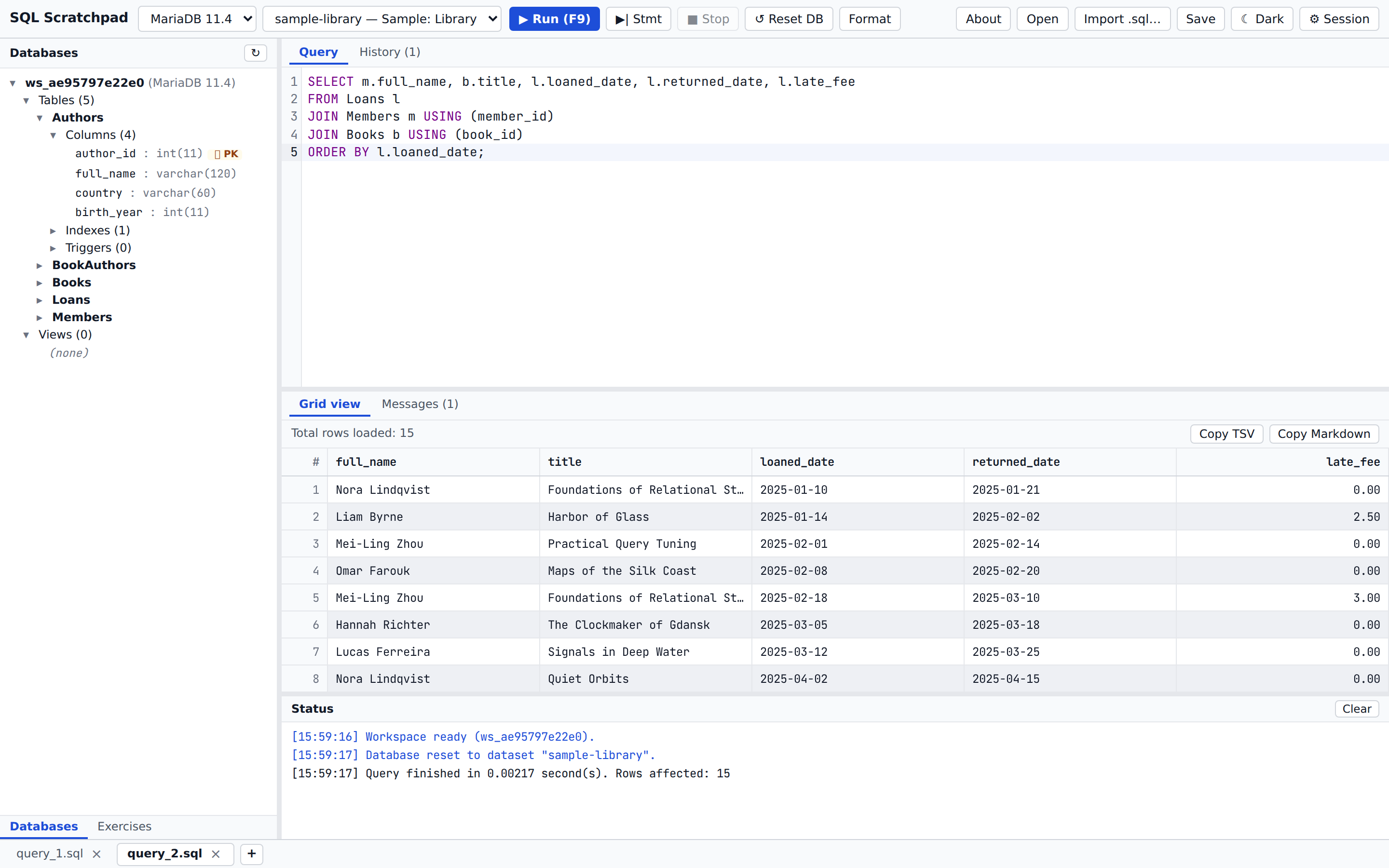
- Desktop-style layout: resizable schema tree (tables, columns with PK/FK/UNI badges, indexes, triggers, views), multi-tab SQL editor, virtualized result grid, Messages pane, and Letos-style status log.
- CodeMirror 6 SQL editor: MySQL/MariaDB syntax highlighting, schema-aware table/column autocomplete, error-line highlighting, SQL formatting (
Ctrl+Shift+F), run selection/script (F9/Ctrl+Shift+Enter), and run statement under cursor (Ctrl+Enter). - Real MariaDB 11.4 isolation: each workspace gets its own MariaDB database and dedicated least-privilege database user (
ws_<hex>) with pinned connections so transactions, session variables, and temporary tables persist across runs. - Session toggles: toggle
sql_safe_updates,ONLY_FULL_GROUP_BY,STRICT_TRANS_TABLES,autocommit, and transaction isolation levels directly from the Session drawer. - Bring your own SQL: import
.sqlscripts up to 6 MB / 60,000 statements (via the Import .sql… toolbar button or drag-and-drop onto the schema tree). - Built-in datasets:
sample-library— an original 5-table library schema (Authors,Books,BookAuthors,Members,Loans; 60 rows, 5 foreign keys,CHECKconstraint,DATEandDECIMALcolumns) written from scratch in portable SQL for both MariaDB 11.4 and SQLite 3.empty— a blank database for writing DDL from scratch or importing your own.sqlfiles.
- Self-contained frontend: fonts (JetBrains Mono) and assets are bundled locally — zero external CDN or font requests at runtime.
Use Open to load a .sql file into an editor tab, or Import .sql… (or drag and drop a .sql file onto the schema tree) to populate a workspace database directly:
- Choose Fresh workspace (resets to an empty database first) or Add to current.
- Detects read-only query scripts (files containing only
SELECT/WITH…SELECT/SHOW/EXPLAIN/DESCRIBEor comments with no DDL/DML) before executing and offers Open in editor (or Import anyway). - Runs strictly under the workspace's own unprivileged MariaDB user (never as admin), keeping all isolation and statement-time limits active.
- Supports
DELIMITERblocks for triggers and stored routines (including UTF-8 BOM files). - Automatically skips non-applicable dump headers (
CREATE DATABASE,USE,DROP DATABASE,SET GLOBAL,LOCK/UNLOCK TABLES, and session/charset/*!40101 SET … *//DISABLE KEYSheaders) while executing real conditional-comment DDL (/*!50001 CREATE … VIEW */,/*!50003 CREATE TRIGGER */). - Automatically strips
DEFINER=<user>@<host>andSQL SECURITY DEFINERfrom imported views, triggers, procedures, functions, and events and reports every skipped or rewritten statement in the summary. - Surfaces contextual dataset hints on
ER_NO_SUCH_TABLE(1146) import errors and offers an Open in editor button on failed imports (≤ 256 KB).
- No accounts and no analytics.
- No SQL text or imported file contents are logged.
- Ephemeral server state: workspaces exist only while in use and are deleted automatically when idle (2 h idle TTL, 12 h max lifetime in public deployments).
- Browser-local state: editor tabs, query history, and UI preferences stay exclusively in your browser's
localStorage.
Prerequisites: Docker Engine and Docker Compose v2.
git clone https://github.com/hexawulf/sql-scratchpad.git
cd sql-scratchpad
cp deploy/db.env.example deploy/db.env
cp deploy/app.env.example deploy/app.env
Generate strong random passwords (for example with openssl rand -base64 32), put matching SQLSCRATCHPAD_ADMIN_PASSWORD values in deploy/db.env and deploy/app.env, set MARIADB_ROOT_PASSWORD only in deploy/db.env, lock down permissions, and start the stack:
chmod 600 deploy/db.env deploy/app.env
docker compose -f deploy/docker-compose.yml pull ; docker compose -f deploy/docker-compose.yml up -d
SQL Scratchpad listens on http://127.0.0.1:5050 by default using prebuilt multi-arch (linux/amd64, linux/arm64) images from Docker Hub (0xwulf/sql-scratchpad and 0xwulf/sql-scratchpad-db). To build from source instead, use deploy/docker-compose.build.yml. See docs/SELF-HOSTING.md for configuration, reverse-proxy setup, and maintenance.
MIT — see LICENSE. Bundled font and library notices are listed in THIRD_PARTY_NOTICES.md.