



Three progressively harder autonomous navigation challenges for a TurtleBot3 Burger in Gazebo, unified into a single continuous run by one controller node that owns /cmd_vel throughout — no handoff race conditions between separate processes.
The full pipeline runs end-to-end successfully: corridor exit → line following → target lock → ball search → alignment → push, all in one uninterrupted mission, using only LiDAR and a single onboard camera.
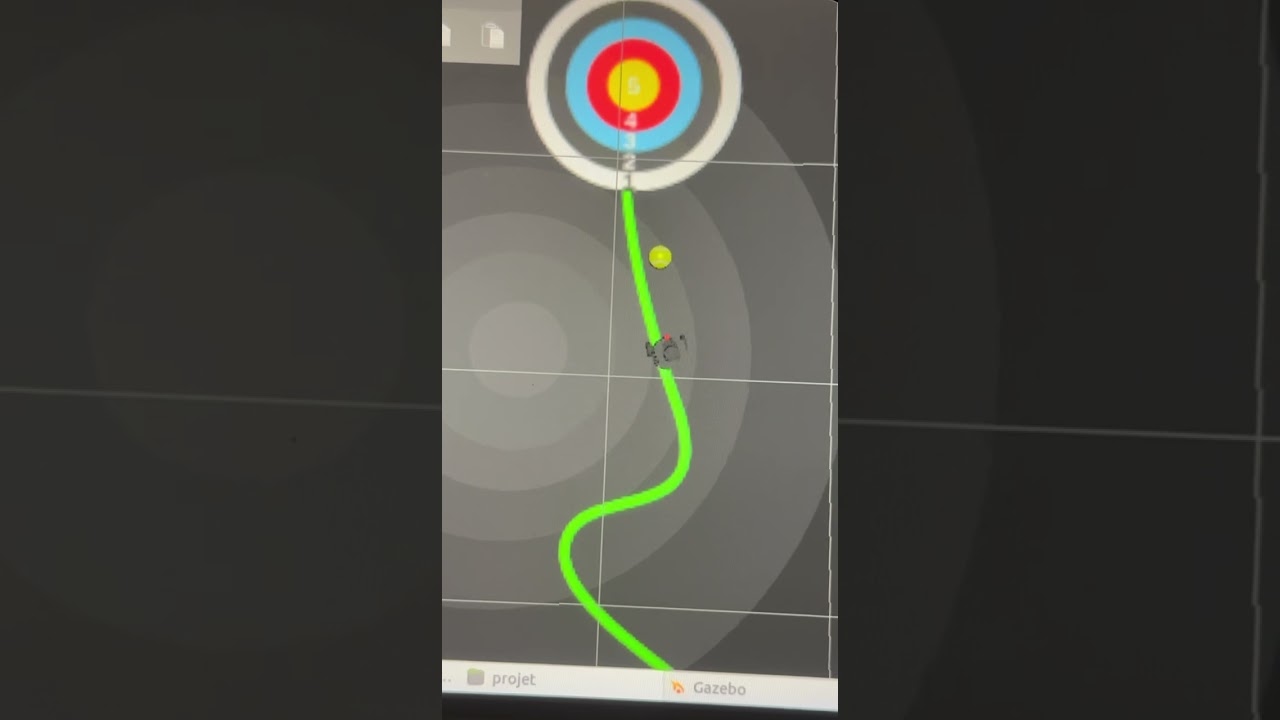
| # | Challenge | Sensing | Core technique |
|---|---|---|---|
| 1 | Corridor navigation | 2D LiDAR | Reactive gap-centering + side-wall repulsion, continuous steering (no discrete 90° turn state) |
| 2 | Line following | Camera (HSV) | Green-line centroid tracking, target-ring detection to stop precisely on the second marker |
| 3 | Ball pushing | Camera + LiDAR + odometry | Visual search, waypoint-based approach around the ball, push to a target position |
The project started with three independent nodes (corridor_node, line_follow_node, ball_push_node), each also runnable standalone via its own launch file. Running two of them simultaneously to hand off control caused race conditions on /cmd_vel: both nodes could publish velocity commands during the handoff window, producing jerky or contradictory motion.
main_node.py solves this by inheriting the corridor controller directly (class MainController(CorridorNavigator)) and internally switching its own state machine from corridor logic to line-following logic to ball-pushing logic — all inside one ROS node, one publisher, zero cross-node handoff.
stateDiagram-v2
    [*] --> RUNNING

    %% Challenge 1 — corridor
    RUNNING --> RECOVERY: stuck detected
    RECOVERY --> RUNNING: unstuck
    RUNNING --> EXIT_APPROACH: exit / yellow target detected
    EXIT_APPROACH --> LINE_PAUSE: corridor target reached

    %% Challenge 2 — line following (same node, new phase)
    LINE_PAUSE --> LINE_BOOTSTRAP: short pause elapsed
    LINE_BOOTSTRAP --> LINE_FOLLOW: green line acquired
    LINE_FOLLOW --> LINE_TARGET_LOCK: 2nd yellow target detected
    LINE_TARGET_LOCK --> LINE_DONE: centred on target

    %% Challenge 3 — ball push (can also start early, see note)
    LINE_DONE --> CH3_PAUSE
    LINE_FOLLOW --> CH3_PAUSE: ball seen early (SDF or vision trigger)
    CH3_PAUSE --> CH3_SEARCH_BALL
    CH3_SEARCH_BALL --> CH3_GO_SIDE1: ball located
    CH3_GO_SIDE1 --> CH3_GO_SIDE2
    CH3_GO_SIDE2 --> CH3_GO_BEHIND
    CH3_GO_BEHIND --> CH3_FACE_TARGET
    CH3_FACE_TARGET --> CH3_PUSH
    CH3_PUSH --> CH3_DONE
    CH3_DONE --> [*]
Note on the early-trigger path: Challenge 3 doesn't have to wait for Challenge 2 to fully complete. If the ball is detected mid-line-following (either visually or, when enabled, by reading the ball's exact pose from the Gazebo SDF model — a pragmatic simulation shortcut used alongside the vision-based approach), the controller jumps straight into the ball-pushing phase once the robot is close enough. params.yaml exposes both paths (ch2_ball_trigger_enabled for vision-only, ch2_sdf_ball_trigger_enabled for the pose-based trigger) so either strategy can be toggled independently.
The corridor is an S-shaped maze. An early design used a discrete "TURNING" state for 90° corners, but this got confused on the maze's continuous bends — a curve isn't a single discrete turn. The final design instead:
- continuously steers toward the most open direction ahead, using the LiDAR scan directly (gap-centering) rather than pre-classifying the corridor shape;
- applies side-wall repulsion so the robot doesn't hug either wall;
- falls back to single-wall following when only one wall is in range;
- includes an anti-stuck recovery state: if the robot hasn't moved more than
stuck_distinstuck_timeseconds, it reverses and turns to break out, then resumes centering; - switches to camera-based final approach near the exit: aligns on the yellow target color, detects the target ring in a narrow bottom-center region of interest, then continues by odometry for a calibrated camera-to-base offset distance so the robot's body (not just the camera) ends up centered on the target.
stateDiagram-v2
    [*] --> BOOTSTRAP
    BOOTSTRAP --> FOLLOW: green line visible
    FOLLOW --> TARGET_LOCK: 2nd yellow target detected
    TARGET_LOCK --> DONE: centred on target
    DONE --> [*]
After Challenge 1 ends, the robot is stopped inside the first target and the green line may not yet be visible in the camera's region of interest. A short bootstrap phase drives straight until the line is acquired, avoiding a premature "line lost" failure. The FOLLOW phase then tracks the green line's centroid in HSV space with a proportional angular controller, and switches to TARGET_LOCK once the second yellow target ring is confirmed over several consecutive frames (avoiding false triggers from a single noisy detection).
stateDiagram-v2
    [*] --> SEARCHING
    SEARCHING --> ALIGNING: ball detected
    ALIGNING --> PUSHING: aligned + close enough
    PUSHING --> DONE: target area threshold reached
    DONE --> [*]
The standalone ball_push_node implements a simpler 4-state version (search / align / push / done) using only camera HSV detection and area-based distance proxies. The version integrated into main_node (and full_run_node) is more elaborate: it plans a waypoint path around the ball (GO_SIDE1 → GO_SIDE2 → GO_BEHIND → FACE_TARGET) so the robot approaches from behind the ball relative to the target, rather than pushing from an arbitrary direction — this matters because pushing from the wrong side sends the ball away from, not toward, the target.
projet/
├── corridor_node.py      Challenge 1 — standalone reactive corridor navigator
├── line_follow_node.py   Challenge 2 — standalone green-line follower
├── ball_push_node.py     Challenge 3 — standalone ball pusher (simple 4-state version)
├── main_node.py          Challenges 1+2+3 combined in one continuous controller (recommended)
└── full_run_node.py      Alternative single-file combined controller (all 3 challenges, self-contained)

launch/
├── challenge1.launch.py  Standalone Challenge 1
├── challenge2.launch.py  Standalone Challenge 2
├── challenge3.launch.py  Standalone Challenge 3
├── main.launch.py        Full run via main_node (recommended entry point)
└── full_challenge.launch.py  Full run via full_run_node (alternative controller)

config/params.yaml        All tunable parameters for every node, namespaced by node/challenge
- ROS 2 architecture: multi-node vs. single-node design trade-offs, parameter files, launch-file composition with
IncludeLaunchDescription, QoS profile tuning for sensor topics - Reactive control: proportional gap-centering and wall-repulsion from raw LiDAR scans, without a pre-built map or planner
- Classical computer vision: HSV color segmentation, region-of-interest cropping, centroid/area-based target confirmation with temporal debouncing (multi-frame confirmation to reject noise)
- State-machine design: cascading state machines per challenge, and a single inherited state machine spanning all three to avoid actuator-command conflicts
- Sensor fusion for navigation: combining camera detections, LiDAR ranges, and odometry-based dead-reckoning for the final centering offset that vision alone can't resolve (camera-to-base geometric offset)
- Systematic parameter tuning:
params.yamlcentralizes ~150 tunable gains/thresholds across every phase, keeping magic numbers out of the code
This package depends on an external ROS 2 package named challenge_project (declared in package.xml), which provides the Gazebo world, the TurtleBot3 Burger spawn logic, and the ball model (model2.sdf) referenced by the SDF-pose shortcut in Challenge 3. That package is course-provided infrastructure (ENSAM) and is not included in this repository — only the navigation logic developed for the challenges is included here.
The public defaults keep the optional SDF handoff and fixed second-target shortcut disabled, matching config/params.yaml. To explicitly enable the course-provided SDF handoff, set both ch2_sdf_ball_trigger_enabled and ch3_use_sdf_ball_pose to true, then set CHALLENGE_PROJECT_ROOT to the local challenge_project directory or provide ch3_ball_sdf_path; otherwise the controller remains sensor-only.
# Inside a ROS 2 workspace with challenge_project already built
colcon build --packages-select projet
source install/setup.bash

# Recommended: full run, all 3 challenges in one continuous mission
ros2 launch projet main.launch.py

# Or standalone, one challenge at a time
ros2 launch projet challenge1.launch.py
ros2 launch projet challenge2.launch.py
ros2 launch projet challenge3.launch.py

# Alternative combined controller (single self-contained node)
ros2 launch projet full_challenge.launch.pyCompleted as part of the Mechatronics engineering program at Arts et Métiers (ENSAM), by Dev Kumar and David Tovmassian.
- UR7e Reinforcement Learning Suite — robot trajectory tracking, reinforcement learning and state estimation.
- UR5e RL Pick-and-Place — simulated grasp-and-place with SAC, HER, ROS 2 and Gazebo.
- Classical Computer Vision Toolkit — tracking, pose estimation and point-cloud registration.
Apache License 2.0 — see LICENSE (matching the license declared in package.xml).