

A fast, zero-interaction file sync tool for removable drives.
Set up a pair once — plug in your drive, hear the start sound, hear the done sound, unplug.
No typing required after setup.
CLI (hsync) |
Desktop app | |
|---|---|---|
| Install | cargo install hsync |
Download installer from Releases |
| Use | Terminal commands | GUI window + system tray |
| Watcher | hsync watch --name backup |
Click Watch on a pair |
| Background | hsync watch --name backup --detach |
Runs in system tray |
| Autostart | hsync autostart enable --name backup |
Planned |
Both are built on hard-sync-core — the same sync engine, drive detection, and config file.
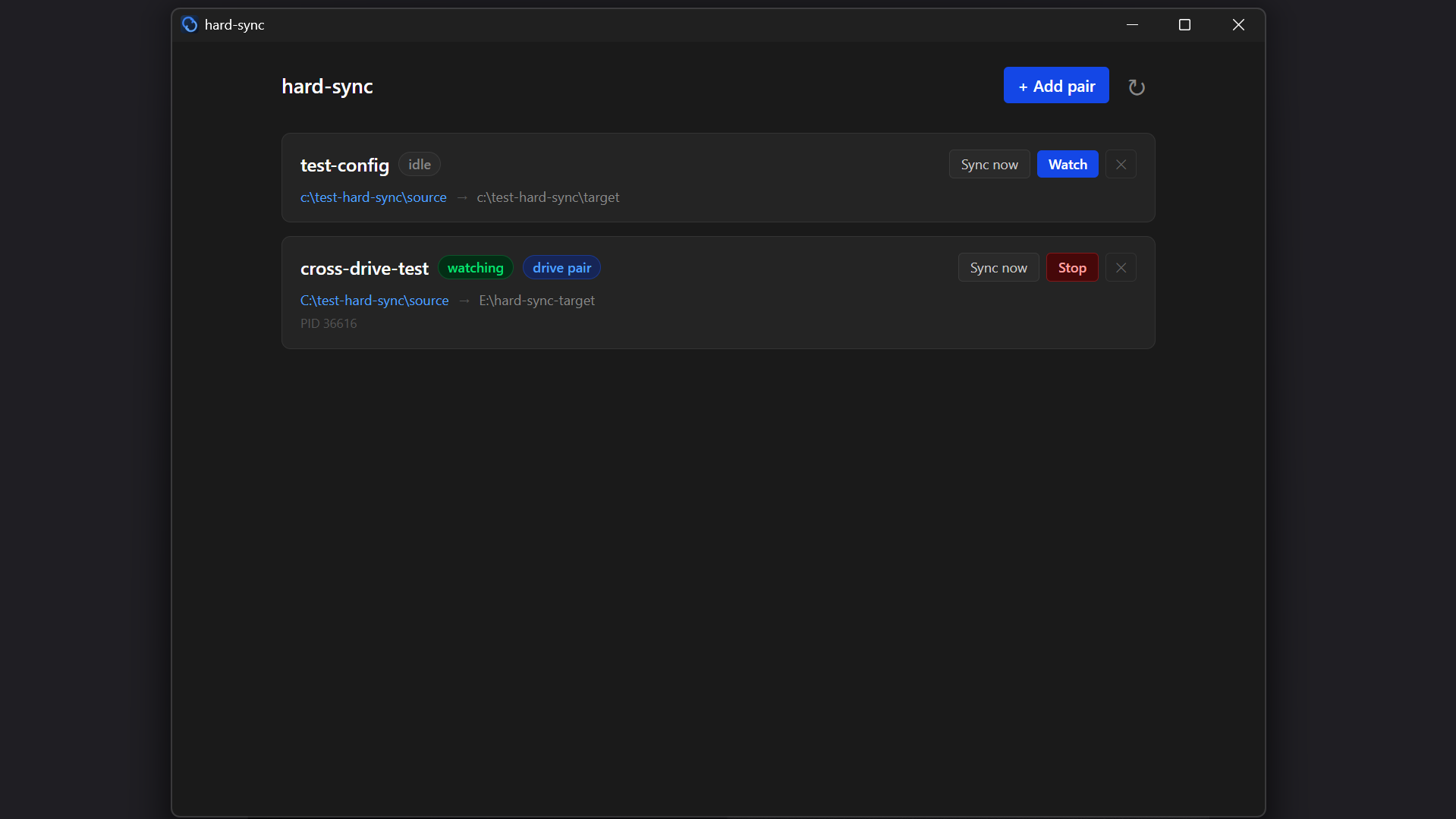
The desktop app lives in the system tray. Left-click the tray icon to open the window. From there you can:
- View all configured sync pairs and their watcher status
- Trigger a one-shot sync with Sync now
- Start or stop a watcher with Watch / Stop
- Add new pairs with folder picker dialogs
- Remove pairs
Download the latest installer from the Releases page: .exe/.msi for Windows, .AppImage/.deb/.rpm for Linux, and for macOS …_aarch64.dmg (Apple Silicon, M1 and later) or …_x64.dmg (Intel). Standalone CLI binaries are attached too (hsync-macos-aarch64, hsync-macos-x86_64, hsync-linux-x86_64, hsync-windows-x86_64.exe).
You define a sync pair: a base path and a target path, with one side designated as the source of truth. For drive pairs, hard-sync identifies the drive by UUID and volume label — not by mount path — so it finds it wherever the OS mounts it.
In watch mode:
- Same-drive pairs — file watcher triggers sync on change (debounced 500ms)
- Cross-drive pairs — drive poller detects plug-in, syncs immediately, then watches for changes until drive is removed
cargo install hsyncgit clone https://github.com/codad5/hard-sync
cd hard-sync
cargo install --path cliConfirm:
hsync --helphsync init --name <name> --base <path> --target <path> [--source base|target]Detects whether base and target are on the same drive automatically. For cross-drive pairs, stores the drive's UUID and volume label so it can be found in watch mode regardless of mount path.
Pair "backup" initialized.
  base:    /home/user/projects
  target:  /media/usb/projects
  source:  base
  drive:   MY_USB (uuid: a1b2-c3d4)
  delete:  trash
hsync sync --name <name> [--dry-run] [--verify]| Flag | Description |
|---|---|
--dry-run / -d |
Show what would change, touch nothing |
--verify / -v |
Use SHA256 comparison instead of mtime+size |
Syncing "backup"...
  + copied   src/main.rs
  ~ updated  src/config.rs
  - trashed  old_notes.txt

Done.  2 copied  1 updated  1 trashed  143 skipped  0 errors
hsync watch --name <name>           # foreground — blocks until Ctrl+C
hsync watch --name <name> --detach  # background — spawns a daemon, returns immediately
Foreground mode blocks until Ctrl+C. Background mode (--detach) writes the process PID and log output to ~/.local/share/hsync/ (macOS: ~/Library/Application Support/hsync/, Windows: %APPDATA%\hsync\) and exits.
Watching "backup"...
Press Ctrl+C to stop.

  Ready. Watching for changes...
  [14:23:01] Drive detected at E:\ — syncing...
  Done.  5 copied  0 updated  0 trashed  210 skipped
  Watching for changes...
hsync watch list                     # show all running background watchers
hsync watch attach --name <name>     # tail the log (Ctrl+C detaches, watcher keeps running)
hsync watch stop --name <name>       # stop a specific background watcher
hsync watch stop --all # stop all background watchersRegister a watcher to start automatically in the background when you log in:
hsync autostart enable --name <name>   # register with OS startup
hsync autostart disable --name <name>  # unregister
hsync autostart list                   # show enabled/disabled status for all pairs
Uses the OS-native startup mechanism (Windows registry, Linux XDG autostart, macOS launchd).
hsync listhsync drivesLists all currently mounted drives. Annotates any drive that matches a configured pair.
hsync set-source --name <name> --source base|targethsync remove --name <name>Does not delete any files — only removes the pair from config.
hsync config path    # print the path to the config file
hsync config reset # delete the config file and remove all pairsFiles deleted from target (when delete_behavior = trash) go to .hard-sync-trash/ on the target. You can inspect and clear it:
hsync trash list --name <name>
hsync trash clear --name <name>
hsync trash clear --all
Config is stored in your OS's standard config folder. All settings are managed through commands — you should not need to edit it directly.
| OS | Config file |
|---|---|
| Linux | ~/.config/hard-sync/config.json |
| macOS | ~/Library/Application Support/hard-sync/config.json |
| Windows | %APPDATA%\hard-sync\config.json |
Ignore patterns: Add a .hardsyncignore file to your base directory (gitignore syntax). Patterns can also be added per-pair in config. Always ignored: hard-sync's own files (.hard-sync-trash/, .hardsyncignore) and files the OS creates on its own — .DS_Store, ._*, .Spotlight-V100, .fseventsd, .Trashes (macOS), System Volume Information, $RECYCLE.BIN, Thumbs.db, desktop.ini (Windows). These are never copied, and never trashed from a drive.
Delete behavior (per pair, edit config directly): "trash" (default), "delete", or "ignore".
Notification sounds — built-in tones play automatically on every sync (start, done, error). No setup required. If any file fails to sync, you hear the error tone instead of "done", so "done" always means it's safe to unplug. To use your own audio files instead, edit the pair in config.json:
"sounds": {
  "sync_start": "C:\\sounds\\beep.wav",
  "sync_done":  "C:\\sounds\\chime.wav",
  "sync_error": null
}
Set any field to null to keep the built-in tone for that event. Supported formats: WAV, MP3, OGG, FLAC.
| Crate | Role |
|---|---|
hard-sync-core |
Library — all sync logic, drive detection, config, watcher |
hsync |
Binary — thin CLI wrapper over core |
Both are published on crates.io.
If you want to build your own frontend (GUI, TUI, daemon, or editor plugin), you can depend on hard-sync-core directly. The CLI and the desktop app are both thin wrappers over it.
[dependencies]
hard-sync-core = "1.0"Config — manage named sync pairs stored in config.json (location per OS: see Config):
use hard_sync_core::{add_pair, list_pairs, get_pair, remove_pair, PairConfig, SourceSide};Sync engine — one-shot sync with full report:
use hard_sync_core::{sync_pair, SyncOptions, SyncReport, SyncOutcome};

let opts = SyncOptions { dry_run: false, verify: false };
let report = sync_pair(&pair_config, &opts)?;
println!("{} copied, {} updated, {} errors", report.copied, report.updated, report.errors.len());
Drive detection — find drives by UUID/label regardless of mount path:
use hard_sync_core::{list_connected_drives, find_mounted_drive, get_drive_id, ConnectedDrive};

let drives = list_connected_drives();            // all currently mounted drives
let drive = find_mounted_drive(&pair.drive_id); // find the specific drive for a pair
Watcher — watch for file changes or drive plug-in events:
use hard_sync_core::{watch_pair, WatchEvent, WatchHandle};

let handle = watch_pair(&pair_config, move |event| {
    match event {
        WatchEvent::SyncCompleted(report) => { /* ... */ }
        WatchEvent::DriveConnected          => { /* ... */ }
        WatchEvent::DriveDisconnected       => { /* ... */ }
        WatchEvent::Error(e)                => { /* ... */ }
    }
})?;

// handle.stop() to stop watching
Sounds — play notification sounds (built-in tones by default, custom files per pair in config):
use hard_sync_core::{play_event_sound, play_event_sound_handle, SoundEvent};

play_event_sound(&pair_config.sounds, SoundEvent::SyncDone);   // fire and forget

// Short-lived process? Wait for the sound, or exiting cuts it off:
play_event_sound_handle(&pair_config.sounds, SoundEvent::SyncDone).join().ok();
Trash — inspect and clear per-pair trash:
use hard_sync_core::{list_trash, clear_trash};

let entries = list_trash(&pair_config)?;
clear_trash(&pair_config)?;| Feature | Windows | Linux | macOS |
|---|---|---|---|
| File sync | ✅ | ✅ | ✅ |
| Drive detection (by UUID/label) | ✅ | ✅ | ✅ (UUID via diskutil) |
| Watch mode | ✅ | ✅ | ✅ |
Background watcher (--detach) |
✅ | ✅ | ✅ |
| Autostart on login | ✅ (registry) | ✅ (XDG) | |
| Notification sounds | ✅ | ✅ | ✅ |
| Desktop app (Tauri) | ✅ | ✅ | ✅ (Apple Silicon and Intel builds) |
macOS has been tested on Apple Silicon: the CLI (sync, watch, background watcher, drive detection with plug/unplug) and the desktop app (sync, watch from the menu bar). Autostart on login (
Support for syncing with remote paths over SSH:
hsync ssh add --name myserver --host user@192.168.1.10 --key ~/.ssh/id_rsa
hsync init --name cloud-backup --base ~/projects --target ssh://myserver/home/user/backupMIT