





A Twitch chat bot that repeats every message back into the channel, written with a plain
socket and nothing outside Python's standard library, so you can see every line that goes
over the wire. Read twitch_chat.py from top to bottom and you will know
how Twitch chat works: connecting, logging in, joining a channel, reading messages,
answering PING, staying under the rate limit and reconnecting. No Twitch account yet? A
small fake Twitch server in this repo lets you try everything on your own computer.
- Quick start: try it with the fake server, then with real Twitch
- How Twitch chat works, step by step
- The same bot with a ready-made package (issue #1)
- Next step: EventSub, the way Twitch recommends now
- Tests · Files · Code from 2019
You need Python 3.10 or newer. The bot itself installs nothing.
git clone https://github.com/NatLee/twitch-echo-bot-with-python.git
cd twitch-echo-bot-with-pythonOpen two terminals in the repo folder. In the first one, start the fake Twitch chat:
python tools/fake_twitch_server.pyIn the second one, start the bot and point it at the fake server. The fake server takes any
token that starts with oauth:.
# macOS / Linux / Git Bash
TWITCH_IRC_HOST=127.0.0.1 TWITCH_IRC_PORT=6667 TWITCH_IRC_TLS=false \
TWITCH_CHANNEL=demo TWITCH_BOT_NAME=echo_bot TWITCH_OAUTH_TOKEN=oauth:anything \
python main.py
# Windows PowerShell
$env:TWITCH_IRC_HOST="127.0.0.1"; $env:TWITCH_IRC_PORT="6667"; $env:TWITCH_IRC_TLS="false"
$env:TWITCH_CHANNEL="demo"; $env:TWITCH_BOT_NAME="echo_bot"; $env:TWITCH_OAUTH_TOKEN="oauth:anything"
python main.pyNow type alice: hi bot! in the first terminal. You are alice, a viewer; the bot answers.
Type /ping to see the bot answer a PING, and /reconnect to watch it reconnect.
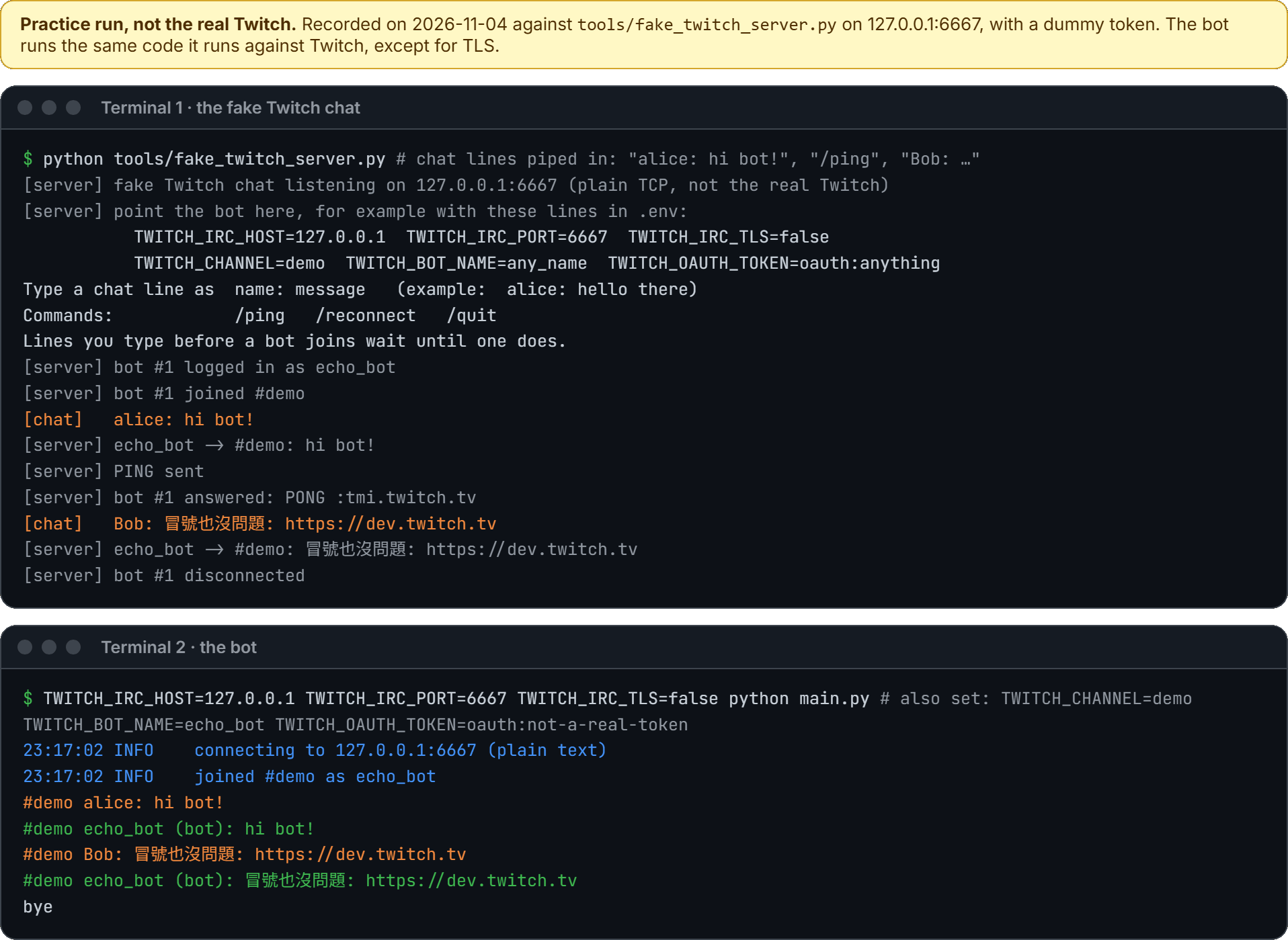
Add --debug to see every raw IRC line the bot sends (>) and receives (<). The token
is never printed. From a second practice run (the final bye left out):
23:17:07 INFO    connecting to 127.0.0.1:6667 (plain text)
23:17:07 DEBUG   > CAP REQ :twitch.tv/tags twitch.tv/commands
23:17:07 DEBUG   > PASS ***
23:17:07 DEBUG   > NICK echo_bot
23:17:07 DEBUG   < :tmi.twitch.tv CAP * ACK :twitch.tv/tags twitch.tv/commands
23:17:07 DEBUG   < :tmi.twitch.tv 001 echo_bot :Welcome, GLHF!
23:17:07 DEBUG   > JOIN #demo
(… 7 lines left out: 002 to 376 and GLOBALUSERSTATE …)
23:17:08 DEBUG   < :echo_bot!echo_bot@echo_bot.tmi.twitch.tv JOIN #demo
23:17:08 DEBUG   < :echo_bot.tmi.twitch.tv 353 echo_bot = #demo :echo_bot
23:17:08 DEBUG   < :echo_bot.tmi.twitch.tv 366 echo_bot #demo :End of /NAMES list
23:17:08 INFO    joined #demo as echo_bot
23:17:08 DEBUG   < @badge-info=;badges=;color=;display-name=echo_bot;emote-sets=0;mod=0;subscriber=0;user-type= :tmi.twitch.tv USERSTATE #demo
23:17:08 DEBUG   < @room-id=1000;slow=0 :tmi.twitch.tv ROOMSTATE #demo
23:17:08 DEBUG   < @badge-info=;badges=;color=#1E90FF;display-name=Alice;emotes=;first-msg=0;flags=;id=00000000-0000-0000-0000-000000000001;mod=0;room-id=1000;subscriber=0;tmi-sent-ts=1793747827973;turbo=0;user-id=2510;user-type= :alice!alice@alice.tmi.twitch.tv PRIVMSG #demo :hi bot!
#demo Alice: hi bot!
23:17:08 DEBUG   > PRIVMSG #demo :hi bot!
#demo echo_bot (bot): hi bot!
23:17:08 DEBUG   < @badge-info=;badges=;color=;display-name=echo_bot;emote-sets=0;mod=0;subscriber=0;user-type= :tmi.twitch.tv USERSTATE #demo
23:17:08 DEBUG   < PING :tmi.twitch.tv
23:17:08 DEBUG   > PONG :tmi.twitch.tv
Twitch chat needs a user access token for the bot's account. For this bot it needs two
scopes (permissions): chat:read to read chat and chat:edit to send messages. If you also
want to try the EventSub example, add
user:read:chat and user:write:chat.
One way that uses only Twitch's own tools:
-
Log in to the Twitch Developer Console with the bot account and register an application. Set the OAuth Redirect URL to
http://localhost:3000. Note the Client ID and create a Client Secret. -
Install the Twitch CLI and give it the two values:
twitch configure. -
Ask for a token. A browser window opens; log in as the bot and allow access.
twitch token -u -s 'chat:read chat:edit user:read:chat user:write:chat'
The command prints a User Access Token. That is what goes in TWITCH_OAUTH_TOKEN; the
oauth: in front is optional. User tokens expire, so run the command again when the bot
reports Login authentication failed.
Treat the token like a password. Anyone who has it can chat as your bot.
Copy the settings template and fill it in:
cp .env.example .envTWITCH_CHANNEL=your_channel # the channel to join, without #
TWITCH_BOT_NAME=your_bot_account # the account the token belongs to
TWITCH_OAUTH_TOKEN=... # from step 2.env is in .gitignore, so git will not pick it up. Settings already set in your shell
win over the file. Then:
python main.pyThe bot connects to irc.chat.twitch.tv:6697 with TLS, joins your channel and repeats
whatever people say. Stop it with Ctrl+C. To build your own bot, change the line marked
<- change this line in main.py.
Note
Everything in this repo was tested against the fake server and in CI, not against the real Twitch: we had no Twitch account token to test with. The fake server answers with the lines Twitch's documentation shows, but it is not Twitch. If something behaves differently on Twitch, please open an issue.
Twitch chat is an IRC server. IRC is a text protocol
from 1988: every command is one line of text that ends with \r\n. A bot opens a
connection, sends a few such lines to log in and join a channel, and from then on reads
lines from Twitch and answers some of them. The steps below match the STEP comments in
twitch_chat.py. Twitch's own description is in
IRC Concepts (read on 2026-11-04).
sequenceDiagram
    autonumber
    participant Bot as Your bot (twitch_chat.py)
    participant Twitch as Twitch chat (irc.chat.twitch.tv)
    Bot->>Twitch: open a TCP connection to port 6697 and start TLS
    Bot->>Twitch: CAP REQ :twitch.tv/tags twitch.tv/commands
    Bot->>Twitch: PASS oauth:YOUR_TOKEN
    Bot->>Twitch: NICK echo_bot
    Twitch-->>Bot: :tmi.twitch.tv CAP * ACK :twitch.tv/tags twitch.tv/commands
    alt the token is right
        Twitch-->>Bot: :tmi.twitch.tv 001 echo_bot :Welcome, GLHF!
        Note over Twitch: then 002, 003, 004, 375, 372, 376 and GLOBALUSERSTATE
    else the token is wrong or expired
        Twitch-->>Bot: :tmi.twitch.tv NOTICE * :Login authentication failed
        Note over Twitch: hangs up
    end
    Bot->>Twitch: JOIN #35;demo
    Twitch-->>Bot: JOIN #35;demo, then 353 (who is here)
    Twitch-->>Bot: 366 echo_bot #35;demo :End of /NAMES list
    Note over Bot: connect() returns: we are in the channel
- Connect.
socket.create_connectionopens the connection andsslwraps it in TLS, so nobody on the way can read your token. Port 6697 is TLS; 6667 is the same chat without encryption (the 2019 version used that). Twitch also offerswss://irc-ws.chat.twitch.tv:443for WebSocket clients such as web pages. - Ask for extras.
CAP REQasks for Twitch's additions to IRC.twitch.tv/tagsadds details to each message, such as the viewer's display name and user ID. Twitch only gives tags to bots that also ask fortwitch.tv/commands. - Log in.
PASScarries the token withoauth:in front, thenNICKgives the bot's login name in lowercase. The order matters: Twitch rejectsNICKbeforePASS. Success is a burst of numbered lines that starts with001. - Join.
JOIN #channel. Twitch confirms with366 … :End of /NAMES list. For a channel that does not exist, Twitch says nothing at all, so the bot gives up after 15 seconds of silence (HANDSHAKE_TIMEOUT) and tells you to check the name.
recv(4096) returns whatever bytes have arrived: maybe half a line, maybe five lines.
Twitch's docs even warn that what the server sends "may contain a single message or
multiple messages". So the bot keeps a buffer (LineBuffer), cuts it at \r\n and only
hands out complete lines.
It cuts the bytes first and decodes each finished line afterwards, because a character
like 你 is three bytes in UTF-8 and can be split between two packets.

parse_line() splits a line into tags (only there because we asked in step 2),
prefix (who sent it), command and params. The rule that matters: the first
" :" starts the last parameter, and everything after it belongs to that parameter. That
is why you must never cut a line with split(":"): chat text is full of colons, and every
link has one.
Tag values cannot contain spaces or ;, so Twitch writes them as escapes from the
IRCv3 message tags spec: \s is a
space, \: is ;, \\ is a backslash. unescape_tag_value() turns them back.
sequenceDiagram
    participant Twitch as Twitch chat
    participant Bot as Your bot
    Twitch-->>Bot: PING :tmi.twitch.tv
    Bot->>Twitch: PONG :tmi.twitch.tv
    Note over Twitch,Bot: no PONG? Twitch closes the connection
From time to time (Twitch does not say how often) Twitch checks that the bot is still
there. The bot answers PONG with the same text the PING carried. read_message() does
this for you and never returns a PING as a chat message. Only a line whose command is PING counts; a viewer who types
"PING :tmi.twitch.tv" in chat is just chatting.
sequenceDiagram
    participant Alice as alice (a viewer)
    participant Twitch as Twitch chat
    participant Bot as Your bot
    Alice->>Twitch: types "hi bot!"
    Twitch-->>Bot: @…display-name=Alice… :alice!alice@alice.tmi.twitch.tv PRIVMSG #35;demo :hi bot!
    Note over Bot: read_message() gives user "alice", text "hi bot!"
    Bot->>Twitch: PRIVMSG #35;demo :hi bot!
    Twitch-->>Alice: echo_bot: hi bot!
    Twitch-->>Bot: USERSTATE #35;demo (Twitch never sends your own message back)
send_message() sends PRIVMSG #channel :text. A line break in the text would end the
command and start a new one, so the bot turns line breaks into spaces first.
Twitch limits how fast a bot may talk. For a bot that is not the broadcaster, a moderator
or a VIP, the rate limits are 20 messages
in any 30 seconds and 1 message per second in a channel. Go over and Twitch ignores the
bot's messages for an hour. RateLimiter remembers recent sends and waits before the next
one would break a rule. The numbers are in DEFAULT_RATE_LIMITS; if your bot is a moderator
in the channel, Twitch allows 100 per 30 seconds and you can pass your own rate_limits.
Twitch also drops a message that is identical to the one you sent less than 30 seconds
ago; the bot logs Twitch's NOTICE when that happens.
Connections end. Twitch restarts servers and sends RECONNECT first, networks drop, and
when Twitch closes the connection recv() returns empty bytes. In all these cases
TwitchChat raises ConnectionClosed. main.py catches it, waits 1, 2, 4, 8,
16, then 30 seconds between tries (RECONNECT_DELAYS), connects again and joins the channel
again. A wrong token or channel name is different: retrying will not help, so main.py
stops and tells you what Twitch said.
Issue #1 asked why not use
an existing IRC package. For a real bot, you should.
examples/irc_library_echo.py is the same echo bot on the
irc package, about 50 lines of logic:
pip install -r examples/requirements.txt
python -m examples.irc_library_echo
It reads the same .env. Compare it with twitch_chat.py: the package opens the socket,
splits lines, parses them, answers PING and reconnects (steps 1, 5, 6, 7 and 9). You still
write the Twitch parts yourself: the oauth: password, CAP REQ, JOIN, the
display-name tag and the rate limit.
This repo keeps a raw socket on purpose. It is a lesson, and the package hides exactly the parts you came to see. The bugs fixed in the 2019 code (next section) were all in those hidden parts. Once you have seen them, using a package is the right call. For a bigger bot, also look at TwitchIO, which speaks EventSub and the Twitch API for you.
IRC still works, but Twitch's chat documentation now recommends EventSub for reading chat and the Send Chat Message API for sending. Its IRC page says IRC "has some limitations versus EventSub, and is more complicated to parse". EventSub means Twitch pushes events to you as JSON over a WebSocket. Twitch has not announced an end date for IRC (checked 2026-11-04).
examples/eventsub_echo.py is the echo bot built that way,
following Twitch's example chatbot:
sequenceDiagram
    autonumber
    participant Bot as Your bot
    participant ID as id.twitch.tv
    participant API as api.twitch.tv/helix
    participant WS as EventSub WebSocket
    Bot->>ID: GET /oauth2/validate (who am I, which scopes?)
    Bot->>API: GET /users?login=demo (channel name to user id)
    Bot->>WS: connect wss://eventsub.wss.twitch.tv/ws
    WS-->>Bot: session_welcome (session id)
    Bot->>API: POST /eventsub/subscriptions, type channel.chat.message (within 10 s)
    WS-->>Bot: notification: alice said "hi bot!"
    Bot->>API: POST /chat/messages "hi bot!"
    WS-->>Bot: notification: echo_bot said "hi bot!" (your own message, skipped)
pip install -r examples/requirements.txt
python -m examples.eventsub_echo
What changes compared with IRC:
IRC (main.py) |
EventSub (examples/eventsub_echo.py) |
|
|---|---|---|
| Scopes | chat:read, chat:edit |
user:read:chat, user:write:chat |
| Reading | PRIVMSG lines on one socket |
JSON notification messages on a WebSocket |
| Sending | PRIVMSG on the same socket |
POST /helix/chat/messages |
| Still alive? | answer PING with PONG |
expect a message every keepalive_timeout_seconds |
| Your own messages | never sent back to you | sent back: skip them or the bot echoes itself forever |
| Moving servers | RECONNECT: connect again |
session_reconnect: connect to the new URL, the subscription moves along |
The example closes the old WebSocket before it opens the new one after session_reconnect.
Twitch suggests keeping both open until the new one says welcome, so a message sent in
that moment can be lost.
The tests start a fake Twitch server on a free local port and never touch the real Twitch.
They cover each step above, the 2019 bugs below, the old twitchSocket calls, main.py
as a real process, and both examples (the EventSub one against fakes of the Twitch API and
EventSub WebSocket).
pip install -r requirements-dev.txt
pytest
ruff check .
No Python on your machine? Docker works too:
docker run --rm -v "$PWD:/src:ro" python:3.12-slim sh -c \
  'cp -r /src /w && cd /w && pip install -q -r requirements-dev.txt && pytest'
GitHub Actions runs the same on Python 3.10 to 3.14 for every push and pull request.
| File | What it is |
|---|---|
twitch_chat.py |
the lesson: the IRC client in 9 steps, standard library only |
main.py |
the echo bot: settings, the echo loop, reconnecting |
config.py |
reads settings from the environment and .env |
.env.example |
template for your .env |
tools/fake_twitch_server.py |
the fake Twitch chat, for practice and tests |
examples/ |
the same bot on the irc package, and on EventSub |
twitchSocket.py |
the 2019 names, kept so old scripts keep working |
tests/ |
pytest tests |
docs/images/src/ |
HTML sources of the pictures in this README |
Scripts written for the 2019 version still work, unchanged:
from twitchSocket import twitchSocket

ts = twitchSocket(channelName="your_channel", botName="your_bot", botAuth="oauth:...")
while True:
    username, message = ts.getMsg()
    ts.sendMsg(message)
twitchSocket now runs on twitch_chat.TwitchChat and prints a DeprecationWarning
pointing there. It stays until at least 2027-11-04; twitchSocket.py
says what to check before removing it. The new names:
| 2019 | now |
|---|---|
twitchSocket(channelName=, botName=, botAuth=) |
TwitchChat(channel=, nick=, token=), then connect() |
getMsg() returns (username, message) |
read_message() returns a ChatMessage (.user, .text, .display_name, .tags) |
sendMsg(message) |
send_message(text) |
All of these were reproduced against the fake server before the rewrite, and each has a test now.
- It crashed within minutes. A PING made
getMsg()return(None, None), andsendMsg(None)then raisedTypeError, which the loop did not catch. - Colons cut messages short.
split(":")turnedlook at this: https://example.comintolook at this. - Two lines in one packet lost the second. One
recv()was treated as one line. When a PING and a chat line arrived together, the bot reported a viewer calledtmi.twitch.tvand echoed IRC protocol text. - A character split between packets crashed it. Decoding each
recv()on its own failed on half a 你, and the error handler then failed too. - It never noticed a closed connection.
recv()returned empty bytes forever and the loop spun at full CPU. A wrong token or a misspelled channel hung the constructor. - It sent the token in plain text to the old host
irc.twitch.tv:6667, and the token lived inmain.py, onegit commitaway from being public. - It answered PONG to chat text that contained
PING :tmi.twitch.tv, always with a hard-coded reply. - No rate limit, so a busy chat could get the bot ignored for an hour.