






Agent email: IMAP and SMTP in-process, cached in SQLite, with reading and sending as separate tools.
curl -fsSL https://raw.githubusercontent.com/GhostPawJS/email/main/install.sh | shA standalone email engine for Node.js, built on SQLite.
Email treats IMAP sync, SMTP send, local caching, threading, search, and
transport errors as one coherent model instead of a grab bag of protocol
adapters. It ships as a single prebundled blob with zero runtime dependencies,
designed for three audiences at once: human developers working directly in
code, LLM agents operating through a structured soul / tools / skills
runtime, and agent operators who want a ready-to-use email CLI binary
without writing any wiring code.
Every client below starts the same stdio server: ghostpaw-email mcp.
For npm-based environments, use npx -y @ghostpaw/email mcp instead.
Cached messages live in ~/.ghostpaw/email.db unless the GHOSTPAW_EMAIL_DB
environment variable (absolute path) or --db <path> says otherwise.
Claude Code
claude mcp add ghostpaw-email -- ghostpaw-email mcpor as a plugin, which also installs the skill:
/plugin marketplace add GhostPawJS/email
/plugin install ghostpaw-email@ghostpaw-email
Email CLI (~/.email/config.toml)
[mcp_servers.ghostpaw-email]
command = "ghostpaw-email"
args = ["mcp"]
Cursor (.cursor/mcp.json), Claude Desktop (claude_desktop_config.json)
or a project .mcp.json:
{
  "mcpServers": {
    "ghostpaw-email": {
      "command": "ghostpaw-email",
      "args": ["mcp"]
    }
  }
}
Claude Desktop users can also install server.mcpb from the
latest GitHub release.
A Dockerfile is included for container hosts:
docker build -t ghostpaw-email . && docker run -i --rm -v email:/data ghostpaw-email.
The server speaks MCP 2026-07-28 (stateless, server/discover) and the
initialize-based revisions 2025-11-25, 2025-06-18, 2025-03-26 and 2024-11-05.
Network operations use the existing CLI account configuration (email account add) or
EMAIL_IMAP_HOST, EMAIL_SMTP_HOST, EMAIL_USER and EMAIL_PASS (or
EMAIL_ACCESS_TOKEN). Discovery and cached reads need no account or credentials.
The surface database defaults to ~/.ghostpaw/email.db; point --db at an
existing account cache to read it. Each network call opens and closes its IMAP
session. Connection commands do not retain a session between calls.
On POSIX, new accounts files and SQLite caches (including WAL/SHM sidecars) use mode 0600, and newly created storage directories use 0700. Existing permissions are preserved, except rewriting accounts.json sets it to 0600.
Use ghostpaw-email skill --short for a compact command cheat sheet, ghostpaw-email skill for the full reference, and ghostpaw-email skill --list to list guides.
Inside a Codex CLI --sandbox workspace-write session, the database and its
parent directory must be inside a writable root, including SQLite's -wal and
-shm side files. A default DB under ~/.ghostpaw outside those roots can fail
with SQLITE_CANTOPEN or EPERM (often exit 70; directory creation failures
may exit 2), even when normal shell permissions allow access. Put the DB inside the workspace with --db ./state/email.db,
or set GHOSTPAW_EMAIL_DB="$PWD/state/email.db" for CLI/MCP use.
To use an external DB directory, add it when starting the OpenAI Codex CLI
(replace <dir-with-db> with its absolute path):
codex exec --sandbox workspace-write --add-dir <dir-with-db> "Run the GhostPaw CLI"Alternatively, set sandbox_workspace_write.writable_roots in
~/.codex/config.toml before starting the session:
[sandbox_workspace_write]
writable_roots = ["/absolute/dir-with-db"]Both email and ghostpaw-email accept this additive command tree. Existing
account, read, search, compose, organize and sync commands retain
their flags, output and exit codes. Use mail --help for the new tree and
mail <verb> --help for parameters.
mail read | search
mail send | reply | forward | draft | update-draft | send-draft
mail mark-read | mark-unread | star | unstar | mark-answered
mail copy | move | archive | trash | junk | not-junk
mail set-labels | add-labels | remove-labels
mail create-folder | rename-folder | delete-folder | subscribe-folder | unsubscribe-folder
mail connect | disconnect | reconnect | sync | refresh-folders | watch
These 33 paths map to the 5 aligned tools. Action verbs set the tool's action;
draft sets save_draft. Search accepts its query as a positional argument.
Other fields use kebab-case flags, such as --folder INBOX --uids 1 --uids 2
and --input @message.json for a compose payload. Arrays accept repeated
flags or JSON; objects accept JSON. Values are literal, including a leading
@. Two flags read files: --input on the mail compose verbs and --body
on compose send|reply|draft. On those, @path reads the file, @- reads
stdin and @@text passes @text; help marks them (@file, @- stdin, @@ literal @). An
empty or unreadable path exits 2. A single - reads stdin JSON;
explicit flags override stdin fields. -- ends option parsing.
Global flags for the new commands: --db <path>, --json, -q, --quiet,
--compact, --help/-h, --version/-V/-v, --no-color.
Output is JSON when piped or when --json is set. -q, --quiet suppresses stdout.
completions bash|zsh|fish prints shell completion setup; version prints
the version and installation variant. The existing tools [--json], describe <tool>,
call <tool> [JSON|-], flat mail_<tool> --parameter value, mcp and skill
forms remain available.
| New command exit code | Meaning |
|---|---|
| 0 | Success or no-op |
| 1 | Tool error |
| 2 | Usage or schema error |
| 3 | Clarification needed or not found |
| 4 | Conflict or version mismatch |
| 70 | Unexpected internal error |
Offline examples, run against an empty cache:
ghostpaw-email mail search invoice --db /tmp/email-port-example.db --json
ghostpaw-email mail read --view folders --db /tmp/email-port-example.db --json
ghostpaw-email mail --help
Search returns 0 matches and folder reads return 0 folders in an empty cache.
GHOSTPAW_EMAIL_DB sets the default cache path, otherwise
~/.ghostpaw/email.db is used. Local search and cached reads need no
credentials. Network operations use email account add configuration or
EMAIL_IMAP_HOST, EMAIL_SMTP_HOST, EMAIL_USER and EMAIL_PASS (or
EMAIL_ACCESS_TOKEN). Each invocation closes its network session;
mail connect does not retain a session for later commands.
ghostpaw-email tools
ghostpaw-email call mail_read '{"view":"folders"}' --db :memory:
ghostpaw-email call mail_search '{"query":"invoice"}'
Both email and ghostpaw-email run the same CLI. Existing account, read,
search, compose, organize and sync commands remain available. The full guide
is preserved in skills/email/references/cli.md.
Agent Skill: SKILL.md and skills/email/ ship in the package; print the skill
with ghostpaw-email skill. List guides with ghostpaw-email skill --list
and print one with ghostpaw-email skill compose-and-send.
Each line downloads the latest release asset, checks it against the release's SHA256SUMS and installs it on the PATH (~/.local/bin on Linux/macOS; the Windows script adds its folder to the user PATH).
These lines never edit ~/.profile or other shell startup files: export PATH applies to the current shell only. To keep it in new shells, use the ~/.profile line below.
linux-x64:
curl -fsSL https://raw.githubusercontent.com/GhostPawJS/email/main/install.sh | sh -s -- --target linux-x64 && export PATH="$HOME/.local/bin:$PATH"linux-arm64:
curl -fsSL https://raw.githubusercontent.com/GhostPawJS/email/main/install.sh | sh -s -- --target linux-arm64 && export PATH="$HOME/.local/bin:$PATH"darwin-arm64:
curl -fsSL https://raw.githubusercontent.com/GhostPawJS/email/main/install.sh | sh -s -- --target darwin-arm64 && export PATH="$HOME/.local/bin:$PATH"darwin-x64:
curl -fsSL https://raw.githubusercontent.com/GhostPawJS/email/main/install.sh | sh -s -- --target darwin-x64 && export PATH="$HOME/.local/bin:$PATH"windows-x64 (PowerShell; persistently adds its folder to the user PATH by default):
irm https://raw.githubusercontent.com/GhostPawJS/email/main/install.ps1 | iexPinned to a release:
curl -fsSL https://raw.githubusercontent.com/GhostPawJS/email/main/install.sh | sh -s -- --target linux-x64 --version 0.5.10 && export PATH="$HOME/.local/bin:$PATH"Also adding ~/.local/bin to ~/.profile (edits ~/.profile once; skipped if it already mentions ~/.local/bin; zsh login shells read ~/.zprofile instead, so use that file name there):
curl -fsSL https://raw.githubusercontent.com/GhostPawJS/email/main/install.sh | sh -s -- --target linux-x64 && { grep -qs '.local/bin' ~/.profile || echo 'export PATH="$HOME/.local/bin:$PATH"' >> ~/.profile; } && export PATH="$HOME/.local/bin:$PATH"To skip the persistent user PATH edit (the installer still installs and prints the folder to add):
$env:GHOSTPAW_NO_MODIFY_PATH=1; irm https://raw.githubusercontent.com/GhostPawJS/email/main/install.ps1 | iex$ ghostpaw-email --version
email 0.5.10 (binary, linux-x64)
Scripts that compare versions should use --version --short or --version --json.
A session with the 0.5.1 linux-x64 binary against a local GreenMail test server on 127.0.0.1 (throwaway user, no real account) and a fresh database (output piped through jq to keep it short):
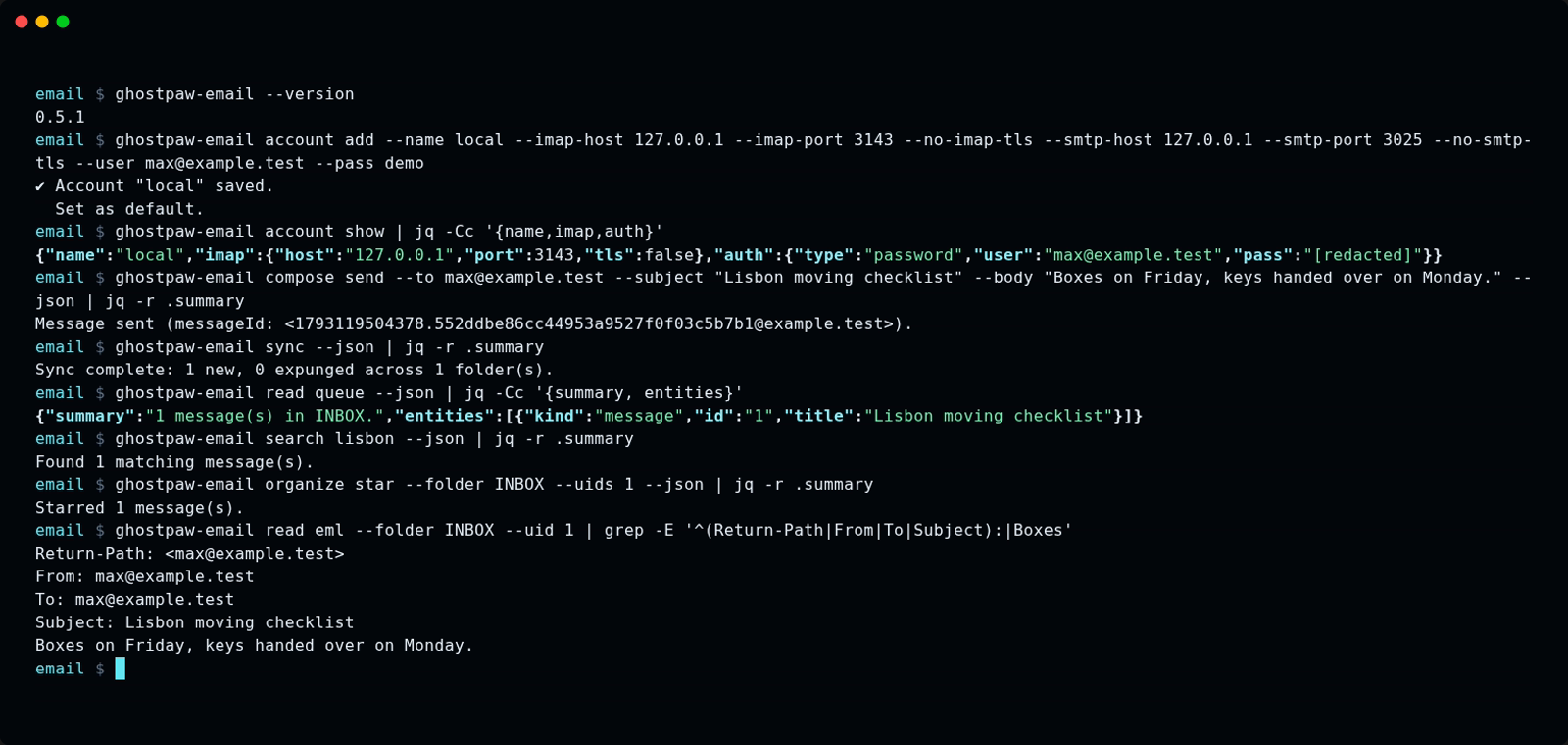
The same session as an animated GIF.
Other release installers:
mise use -g github:GhostPawJS/email
ubi --project GhostPawJS/email --exe ghostpaw-email --in ~/.local/bin
eget GhostPawJS/email
For aqua, define a
github_release package in aqua.yaml:
registries:
  - name: email
    type: local
    path: email-registry.yaml
packages:
  - name: GhostPawJS/email@v<VERSION>
registry: emailemail-registry.yaml:
packages:
  - type: github_release
    repo_owner: GhostPawJS
    repo_name: email
    asset: ghostpaw-email-{{trimV .Version}}-{{.OS}}-{{.Arch}}.tar.gz
    format: tar.gz
    replacements: { amd64: x64 }
    overrides:
      - goos: windows
        asset: ghostpaw-email-{{trimV .Version}}-windows-{{.Arch}}.zip
        format: zip
    files:
      - name: ghostpaw-email
Install scripts verify SHA256SUMS. To verify a downloaded archive's build attestation:
gh attestation verify <archive> -R GhostPawJS/emailSet GHOSTPAW_VERIFY=attestation for attestation verification in install.sh.
Binaries are unsigned; macOS binaries carry an ad-hoc signature. For a browser
download on macOS, remove quarantine with
xattr -d com.apple.quarantine /path/to/ghostpaw-email.
Linux binaries require glibc 2.28+; use npx on Alpine.
See the binary build workflow.
Sizes for 0.5.1 (Node 26.12.1 inside each binary):
| Target | Archive | Binary |
|---|---|---|
| linux-x64 | 41.7 MB tar.gz | 117.7 MB |
| linux-arm64 | 41.2 MB tar.gz | 115.4 MB |
| darwin-arm64 | 44.9 MB tar.gz | 146.9 MB |
| darwin-x64 | 46.4 MB tar.gz | 149.8 MB |
| windows-x64 | 38.5 MB zip | 105.8 MB |
Release installation is checked on ubuntu-24.04, macos-15 and windows-2025.
Requires Node 24+ (uses the built-in node:sqlite module).
The npm package is 1711 KB unpacked.
npm install @ghostpaw/email        # as a library
npm install -g @ghostpaw/email     # as a global CLI
npx @ghostpaw/email --help # one-off, no install needednpm install @ghostpaw/emailimport { Mailbox } from '@ghostpaw/email';See library usage.
import { Mailbox } from '@ghostpaw/email';

const mailbox = new Mailbox({
  imap: { host: 'imap.example.com', port: 993, tls: true },
  smtp: { host: 'smtp.example.com', port: 465, tls: true },
  auth: { user: 'user@example.com', pass: 'secret' },
  storage: 'mail.db',
});

await mailbox.connect();

const folders = mailbox.read.folders();
await mailbox.network.sync();
const messages = mailbox.read.messages('INBOX', { limit: 20 });

await mailbox.write.send({
  to: [{ address: 'bob@example.com' }],
  subject: 'Hello',
  text: 'Sent from @ghostpaw/email.',
});

await mailbox.disconnect();
connect() opens the SQLite database, initialises the schema, upserts the
account, and authenticates the IMAP session — one call does everything.
Read the manual for usage guides and the stored email model.
- Overview: what the manual covers and where to start
- Human usage: using the library directly in code
- LLM building blocks: tools, skills and the soul prompt for agents
- Accounts: one email identity and its connection
- Folders: cached IMAP mailboxes
- Messages: header records per folder and UID
- Bodies: decoded message content
- Threads: JWZ conversation trees
- Attachments: cached MIME parts
- Sync: the log of each sync pass
Repository references:
| Document | Audience |
|---|---|
| SKILL.md | Agent operators and Claude Code users running email as a bash tool |
| HUMAN.md | Human developers using the Mailbox API with read / write / network |
| LLM.md | Agent builders wiring soul, tools, and skills into LLM systems |
| docs/README.md | Architecture overview: model, invariants, protocol boundaries, source layout |
| docs/entities/ | Per-entity manuals with schema, operations, and invariants |
Seven stored concepts and three derived ones:
| Concept | Purpose |
|---|---|
| Account | One email identity with IMAP/SMTP connection config |
| Folder | One IMAP mailbox path with sync metadata and role detection |
| Message | A locally cached email header record with flags, labels, and envelope |
| Body | The decoded text/html content and raw RFC 2822 bytes of one message |
| Attachment | A decoded MIME part with on-demand binary fetch |
| SyncLog | A record of one completed sync pass per folder |
| Thread | A JWZ conversation tree derived from References/In-Reply-To headers |
The model means each kind of mail state has its own home:
| What it looks like | What it actually is |
|---|---|
| An email inbox | A Folder with role: 'inbox' and synced messages |
| A conversation | A Thread computed from References and In-Reply-To chains |
| An unread email | A Message without \Seen in its flags array |
| A starred email | A Message with \Flagged in its flags |
| A PDF attached to a message | An Attachment with metadata from BODYSTRUCTURE and data fetched on demand |
| "Sync found 12 new messages" | A SyncLog row recording strategy, counts, and duration |
State is derived, not toggled. Thread IDs are computed from header chains at sync time, folder roles are detected from IMAP special-use attributes, and attachment metadata is extracted from BODYSTRUCTURE — all materialised during sync, never stored as manual status fields.
Use the Mailbox class with typed read, write, and network surfaces for
direct-code access to every mail operation:
import { Mailbox } from '@ghostpaw/email';

const mailbox = new Mailbox(config);
await mailbox.connect();

const threads = mailbox.read.threads('INBOX', { limit: 20 });
const detail = await mailbox.read.getMessage('INBOX', uid);
await mailbox.write.reply('INBOX', uid, { text: 'Acknowledged.' });
await mailbox.write.archive('INBOX', [uid]);
See HUMAN.md for the full human-facing guide with worked examples.
Use the tools, skills, and soul namespaces for a structured runtime
surface designed to minimise LLM cognitive load:
import { skills, soul, tools } from '@ghostpaw/email';

// 5 intent-shaped tools covering the full mailbox lifecycle
const allTools = tools.aligned.emailTools;
const readTool = tools.aligned.getEmailToolByName('mail_read');

// 8 reusable workflow skills for multi-step scenarios
const triageSkill = skills.getEmailSkillByName('triage-inbox');

// Thinking foundation for system prompts
const systemPrompt = soul.renderEmailSoulPromptFoundation();
The shared facade exposes name, description, whenToUse, whenNotToUse,
inputSchema, readOnly, and sideEffects. Handlers take a context containing
read, write, and network surfaces and the existing tool input. They return
{ ok, outcome, summary, next, data }; data.entities contains the message or
mailbox references, and next contains follow-up hints. Errors map to ok: false.
Read operations may refresh the local cache, so metadata conservatively marks
all tools as writing state.
const definitions = tools.aligned.listEmailToolDefinitions();
const tool = tools.aligned.getEmailToolByName('mail_read');
if (!tool) throw new Error('mail_read is unavailable');
const result = await tool.handler(
  { read: mailbox.read, write: mailbox.write, network: mailbox.network },
  { view: 'folders' },
);
console.log(result.ok, result.summary);
The deprecated tools.emailTools and tools.getEmailToolByName() remain
available with the original { outcome, summary, entities, nextSteps } result
and unchanged inputs. Migrate to tools.aligned to use the shared shape.
See LLM.md for the full AI-facing guide covering soul, tools, and skills.
The package ships as a standalone email binary. Accounts are stored in
~/.config/email/accounts.json and every command accepts --json for
machine-readable output.
# Add an account once
email account add --name work \
  --imap-host imap.example.com --smtp-host smtp.example.com \
  --user you@example.com --pass secret

# Then use it
email sync                              # pull latest from server
email read                             # check inbox
email search "invoice"                 # FTS5 search
email compose send --to bob@example.com --subject "Hi" --body "Hello"

# Machine-readable output for agents and scripts
email read queue --json | jq '.entities[].title'
echo "body text" | email compose send --to bob@example.com --subject "Hi"
--attach (on compose send and compose reply) takes one or more file
paths, comma-separated:
email compose send --to bob@example.com --subject "Report" --body "Attached" \
  --attach ./report.pdf,./data.csv
Each path must be a regular file. Symlinks are followed to their target;
directories, devices, FIFOs and sockets are rejected with exit code 1
(invalid_flag_value) before anything is sent. The MIME type comes from the
file extension (unknown extensions are sent without an explicit type).
All commands return the same { outcome, summary, entities, nextSteps }
shape as the tool layer, with consistent exit codes (0 success, 1 user error,
2 config, 3 auth, 4 network, 5 tool error).
See SKILL.md for the complete CLI reference for agent operators and Claude Code / OpenClaw users.
Five tools shaped around operator intent, not raw protocol operations:
| Tool | What it does |
|---|---|
mail_read |
Read folder lists, message queues, threads, bodies, attachments, or raw EML |
mail_search |
FTS5 local search or IMAP SEARCH on the server |
mail_compose |
Send, reply, forward, save/update/send drafts |
mail_organize |
Flags, labels, copy, move, archive, trash, junk, folder management |
mail_sync |
Connect, disconnect, reconnect, sync, refresh folders, watch |
- Zero runtime dependencies. Only
node:sqlite,node:tls,node:net,node:zlib,node:crypto(built into Node 24+). - Single prebundled blob. One ESM + one CJS entry in
dist/. No subpath exports, no code splitting. - Pure SQLite storage. FTS5 full-text search, six tables, and deterministic
derived reads.
Mailboxcreates and manages its ownDatabaseSyncinstance. - Full IMAP engine. Streaming tokenizer, response parser, COMPRESS=DEFLATE, IDLE (RFC 2177), CONDSTORE/QRESYNC (RFC 7162), XOAUTH2/OAUTHBEARER.
- Full SMTP client. TLS/STARTTLS/plaintext, PLAIN/LOGIN/XOAUTH2, dot stuffing, APPEND to Sent after send.
- Fetch-on-demand bodies. Initial sync pulls headers and BODYSTRUCTURE only. Message bodies and attachment bytes are fetched when actually read.
- JWZ threading. Conversation trees computed from References/In-Reply-To headers, with depth-ordered rendering and cross-folder support.
- Intention-shaped writes.
send,reply,forward,archive,trash,saveDraft,sendDraft— operations that say what happened, not generic CRUD. - Additive AI runtime.
soulfor posture,toolsfor actions,skillsfor workflow guidance — all optional, all structured. - Colocated tests. Every non-type module has a colocated
.test.tsfile. The documented behaviour is backed by executable coverage.
import {
  Mailbox,      // porcelain class — the primary entry point
  initSchema,   // schema setup (called automatically by Mailbox.connect())
  read,         // read surface factory
  write,        // write surface factory
  network,      // network surface factory
  tools,        // LLM tool definitions + registry
  skills,       // LLM workflow skills + registry
  soul,         // thinking foundation for system prompts
} from '@ghostpaw/email';
All domain and runtime types are also available at the root for TypeScript consumers:
import type {
  EmailConfig,
  AuthConfig,
  EmailReadSurface,
  EmailWriteSurface,
  EmailNetworkSurface,
  EmailToolDefinition,
  EmailToolResult,
  EmailSkill,
  EmailSoul,
  ComposeInput,
  ReplyInput,
  ForwardInput,
  Message,
  MessageDetail,
  Thread,
  Folder,
  Attachment,
  AttachmentMeta,
  SyncResult,
  WatchEvent,
} from '@ghostpaw/email';npm install
npm test # node:test runner
npm run typecheck # tsc --noEmit
npm run lint # biome check
npm run build # ESM + CJS + declarations via tsupThe repo is pinned to Node 24.14.0 via .nvmrc / .node-version /
.tool-versions / mise.toml / Volta. Use whichever version manager you
prefer.
If this package helps your project, consider sponsoring its maintenance: