
Loft keeps your product's specification in its own repository, beside the code, and lets your
coding agent write it with you and build against it. You decide what the product does; the agent
writes it down in the Loft Specification Format, checks it with the loft command line, and
builds the code that meets it. Yard, which comes with the plugin, shows you what the agent is
doing, and is where you answer its questions and approve its changes and plans.
There is no server to set up. Everything stays in git: the specification in spec/, the
contract pinned by loft.lock.json, and each branch's record of the work in .yard/.

Install loft, or ask your agent to:
npm install --save-dev @ask-loft/loft      # a prebuilt binary, in a project that uses npm
cargo install --locked loft-cli            # or from crates.io; needs Rust 1.97 or newer
Add the plugin to your agent:
- Claude Code:
/plugin marketplace add Ask-Loft/loft, then/plugin install loft@ask-loft. - Codex:
codex plugin marketplace add Ask-Loft/loft, thencodex plugin add loft@ask-loft, and trust its hooks in/hooks.
Then, in your product's repository, say:
Set up Loft in this repository.
The agent runs loft init, registers Loft's merge driver for the clone, and commits the skill
and settings, so everyone who works on the project gets them too.
You talk; the agent writes. Each step below starts with something you might say.
-
Specify. "Specify a booking system for small venues." For an existing codebase: "Write the specification of what this service does." The agent asks rather than guesses, proposes an outline before writing a single criterion, writes
spec/, and runsloft fmtandloft checkuntil both pass. -
Approve the change. Each change to
spec/comes to you for approval before it is committed, with the change drawn on the Yard page. Approve it, or reject it with what to change.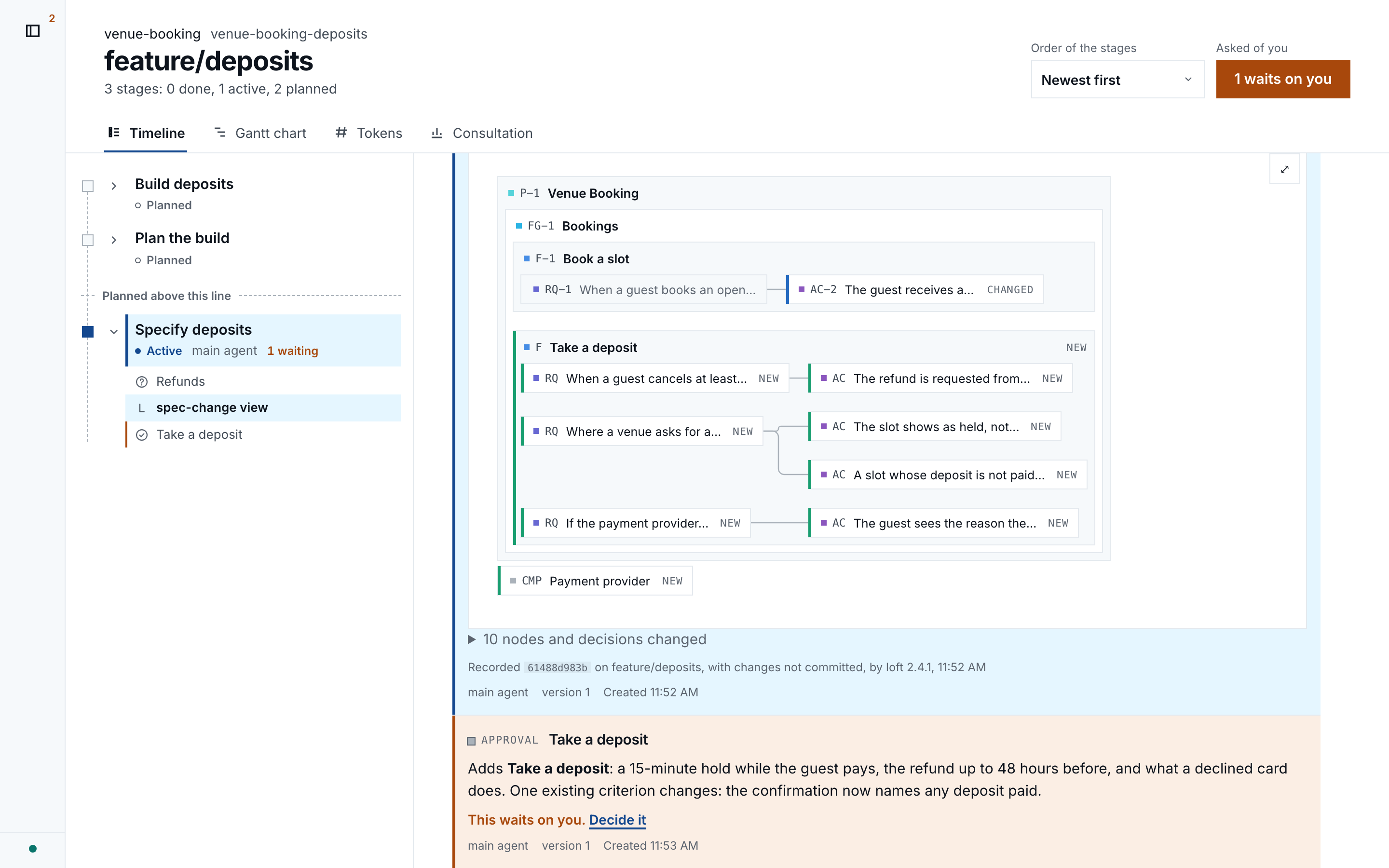
-
Approve the plan. The agent works out the build from the criteria you approved: which criteria each step meets and which tests will show it. You approve the plan before any code is written.
-
Watch the build. The agent works test-first, step by step. Its tasks, the questions it still has and, where your agent reports them, the tokens each step takes show up live on the Yard page. It links each test to the criterion it verifies, so a criterion that changes later marks its tests for review.
-
Review. Read the diff, the notes the agent left for each step, and Loft's reports. "Render the spec" gives you
docs/spec.mdto read as a document. -
Publish. "Merge and publish." On
main,loft publishgives the new nodes their labels (RQ-12,AC-40) and writes the lock that makes this state the contract. CI checks it withloft verify.

Only you can do some of this: say what the product is for and where it ends, choose between the options the agent lays out, and read what it wrote in your name before you accept it. Nothing is merged, pushed or published until you say so.
Why not edit the YAML yourself? A change rarely stays in one place: a reworded rule, a split
Requirement or a new decision touches criteria, edges and citations elsewhere. The agent follows
them, and loft check catches what it misses. A hand edit is held to the same checks, which
suits a typo, not a feature.
A team can connect its document to a Loft server, which then publishes it for everyone: "Connect
this specification to our Loft server at , tenant ." The agent runs
loft remote set with the document's address on that server,
https://<host>/loft/t/<tenant-slug>/api/v2/documents/<documentKey>/remote, taking
<documentKey> from spec/loftspec.yaml. The command signs you in, brings over what the
repository has already published, and records the remote in spec/loftspec.yaml for every
clone. From then on, "publish" works from any branch, the server gives the labels, and when
someone else has published first, loft pull brings your tree up to date. More in
docs/publishing.md.
The Yard page, at http://127.0.0.1:7411/, shows every branch's Yard Log on your machine, live. What waits on you comes first. Answer there or in your agent's own dialog: in Claude Code, whichever you answer first counts, and the other closes. Each branch's Yard Log is committed with its work, so a reviewer can see how the branch was planned, what was asked and what was decided. More in docs/yard.md.
| Page | What it covers |
|---|---|
| Yard | The page, answering, Claude Code and Codex, several agents on one stage |
| Commands | Every loft command, the agent skill, exit codes and JSON output |
| Publishing and merging | Labels and the lock, connecting to a Loft server, the merge driver, two publishes that meet |
| Tracing | Linking tests to criteria with loft.trace.yaml and loft reconcile |
| Telemetry | What loft sends, the update check, and how to switch both off |
| The Format | The Loft Specification Format's own specification, written in the Format |
| Contributing | Building, testing and the Software Plant; AGENTS.md is the full guide |
Changes are in CHANGELOG.md, and security reports go by SECURITY.md.
crates/loftspecandcrates/loftspec-store: the Format (document model, identity, canonical bytes, hashing, merging, publishing) and its stores.crates/yardlogandcrates/yardlog-store: Yard Log's model and its store.crates/loft-commonandcrates/loft-ports: what both share, without and with I/O.crates/loft-cli: theloftbinary, the agent skills' sources and the Yard page.crates/software-plant: simulators of the systems Loft depends on, for tests only.plugins/: the Claude Code and Codex plugins.
loft sends one small event at the end of most commands: which command ran, how it ended and
how long it took, with random tokens and never your specification, code, paths or names. It also
checks GitHub for a newer release at most once a day. It tells you before the first event leaves
your machine. The Claude Code plugin runs loft with both off.
| To | Run or set |
|---|---|
| switch telemetry off | loft telemetry off, or LOFT_TELEMETRY=off |
| switch the update check off | loft update-check off, or LOFT_UPDATE_CHECK=off |
docs/telemetry.md shows an event, every field and how long events are kept.