

Constitutive laws, material-point simulation and mean-field micromechanics for nonlinear and heterogeneous materials.


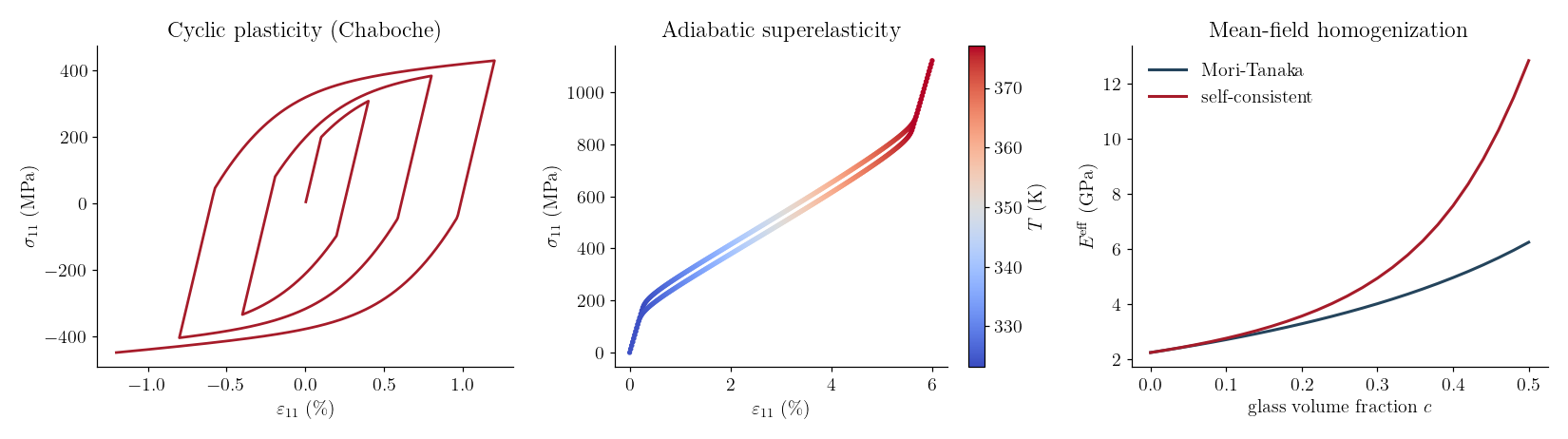
simcoon is a C++ library with a Python interface. It provides constitutive laws (elastoplasticity, viscoelasticity, hyperelasticity, shape memory alloys, damage), a thermomechanical material-point solver under mixed strain and stress control, finite-strain kinematics with several objective rates, and mean-field homogenization of composites. Its laws serve as user materials in fedoo, Abaqus and Ansys, on microstructures generated with microgen.
- Constitutive laws: isotropic and kinematic hardening (Chaboche, Johnson-Cook), anisotropic criteria, Prony viscoelasticity, hyperelastic potentials (Neo-Hookean, Mooney-Rivlin, Ogden, Holzapfel-Gasser-Ogden), shape memory alloys with transformation and reorientation.
- Modular laws: compose elasticity, criteria, hardening, viscoelastic and damage mechanisms from Python, without writing C++.
- Finite strain: logarithmic strain transported by the polar rotation (log_R, the default), Jaumann and Green-Naghdi rates, Kirchhoff stress, consistent tangents.
- Thermomechanics: coupled heat equation at the material point, energy balance.
- Micromechanics: Eshelby tensors, Mori-Tanaka and self-consistent schemes.
- Identification: fit parameters with
scipy.optimizeand the simcoon parameter keys. - Python and ML laws: write a law in Python or plug a trained network into the same solver.
import numpy as np
from simcoon import solver

props = np.array([70000.0, 0.3, 1.0e-5, 300.0, 1000.0, 0.3])  # E, nu, alpha, sigma_Y, k, m
load = solver.StepMeca(control="stress", value=[450.0, 0, 0, 0, 0, 0], ninc=100)
unload = solver.StepMeca(control="stress", value=[0.0, 0, 0, 0, 0, 0], ninc=100)

res = solver.solve(solver.Block(steps=[load, unload], ncycle=3), "EPICP", props, nstatev=8)
print(res["Strain"][0, -1], res["Stress"][0, -1])
solver.solve runs the loading blocks in memory and returns the whole history as
numpy arrays. The gallery of examples
covers every family of laws, and the list of constitutive laws
gives their parameters.
The documentation is online at https://3mah.github.io/simcoon-docs/. To build it locally (Sphinx, breathe and doxygen; the gallery runs the examples):
conda install -c conda-forge doxygen
pip install -r docs/requirements.txt
cd docs && make html # then open _build/html/index.html| microgen | Geometry and periodic meshes of microstructures |
| fedoo | Nonlinear finite elements and periodic homogenization |
| simcoon | Constitutive laws and mean-field micromechanics |
The simplest way to install simcoon is directly with conda:
conda install -c conda-forge -c set3mah simcoonIn case of conflicts, create a new conda environment:
conda create --name simcoon_env
conda activate simcoon_env
conda install -c conda-forge -c set3mah simcoonpip install simcoonPrebuilt wheels are available for:
- Linux (x86_64, aarch64)
- macOS (arm64, requires macOS 14.0+)
- Windows (x64)
If no compatible wheel is available (e.g., older macOS versions), pip will attempt to build from source. In this case, install Armadillo (>= 12.6) first — it is the only system dependency not bundled in the wheels.
Using conda (requires --no-build-isolation so CMake can find conda packages):
conda install -c conda-forge armadillo
pip install scikit-build-core pybind11 numpy  # build dependencies
pip install simcoon --no-binary simcoon --no-build-isolation
Using apt (Debian/Ubuntu):
sudo apt-get install libarmadillo-dev
pip install simcoon --no-binary simcoon
BLAS and LAPACK are found automatically (Accelerate on macOS, system libraries on Linux).
Create and activate a conda environment:
conda create --name simcoon_build
conda activate simcoon_build
Install required dependencies:
# Compilers and build tools
conda install -c conda-forge cxx-compiler fortran-compiler cmake ninja

# Libraries
conda install -c conda-forge armadillo pybind11 numpy gtest

# Python testing
pip install pytest
For x86 architectures, you may also need MKL:
conda install -c conda-forge mkl- Clone or download the repository:
git clone https://github.com/3MAH/simcoon.git
cd simcoon- Install required dependencies using your system's package manager.
- On Debian/Ubuntu:
sudo apt-get install libarmadillo-dev libgtest-dev ninja-build-
On macOS: use the conda environment (
environment_arm64.yml, conda-forge armadillo and gtest). Do not use Homebrew packages inside a conda environment: they bring a second OpenMP runtime (see the installation docs, "Duplicate OpenMP runtimes on macOS"; check withpython -m simcoon.doctor). -
On Windows with vcpkg:
vcpkg install armadillo gtest- Configure and build the project:
For Python users (recommended):
pip install .For C++ development:
# Configure and build
cmake -S . -B build -G Ninja -D CMAKE_BUILD_TYPE=Release
cmake --build build

# Run C++ tests
ctest --test-dir build --output-on-failureFor active development with both C++ and Python:
# Install build dependencies first
uv pip install scikit-build-core pybind11 numpy

# Editable install (uv applies --no-build-isolation automatically via pyproject.toml)
uv pip install -e .[dev]

# After modifying C++ files, rebuild directly
cmake --build build/cp*

# Python changes take effect immediately (no rebuild needed)
The editable install creates a build directory at build/{wheel_tag} (e.g., build/cp312-cp312-linux_x86_64). The [tool.uv] config in pyproject.toml disables build isolation for simcoon, ensuring the CMake cache references your actual Python environment, enabling direct cmake --build commands for incremental rebuilds.
Auto-rebuild on import: Importing simcoon will automatically trigger a cmake rebuild if C++ files have changed:
python -c "import simcoon"  # Rebuilds if needed
uv run python -c "import simcoon" # Also worksNote: If you add new C++ source files, re-run uv pip install -e .[dev] to reconfigure.
SIMCOON_BUILD_TESTS(default: ON) - Build C++ tests (CMake only)
For numpy versions earlier than 1.26.4 using the Accelerate framework:
pip install cython
pip install --no-binary :all: numpysimcoon is developed by the 3MAH group, mainly at Université Grenoble Alpes (TIMC) and the University of Bordeaux (I2M), with contributions from LEM3 (Metz) and TU Bergakademie Freiberg. It is released under the GNU General Public License, version 3.