diff --git a/.github/workflows/qupath-gui.yml b/.github/workflows/qupath-gui.yml
index 3481ffe..c06fdd0 100644
--- a/.github/workflows/qupath-gui.yml
+++ b/.github/workflows/qupath-gui.yml
@@ -1,7 +1,7 @@
name: qupath-gui
# The GUI tests (tests/gui_test_*body.groovy) in a real QuPath 0.7 on a virtual screen (Xvfb), the same way tests/run_gui_test.sh runs
# them locally: the extension jar built from this repo is put on QuPath's class path and each body is run as QuPath's test script.
-# tests/run_gui_ci.sh runs every body, keeps a log per body and fails when any body fails. See README, "Build and test".
+# tests/run_gui_ci.sh runs every body, keeps a log per body and fails when any body fails. See docs/REFERENCE.md, "GUI tests in CI".
on:
pull_request:
workflow_dispatch:
diff --git a/AGENTS.md b/AGENTS.md
new file mode 100644
index 0000000..49c844e
--- /dev/null
+++ b/AGENTS.md
@@ -0,0 +1,13 @@
+# Notes for agents and contributors
+
+LabConstrictor-QuPath is the QuPath 0.7 extension that runs the tools of installed LabConstrictor apps. How to build it and run the tests: [technical reference](docs/REFERENCE.md#build-from-source-and-test).
+
+## Documentation
+
+Each topic of the LabConstrictor ecosystem has exactly one owner page, and every other page links to it instead of copying it. The table of owners is in "Sources of truth" in [LabConstrictor-Site's AGENTS.md](https://github.com/CellMigrationLab/LabConstrictor-Site/blob/main/AGENTS.md).
+
+- This repository owns the **QuPath guide**, `docs/user-guide.md`: what you need, the install steps, the menu path, the current version and the common problems. The site publishes it at .jar` from the [Releases page](https://github.com/CellMigrationLab/LabConstrictor-QuPath/releases), drag it onto the QuPath window (or copy it into the extensions folder shown in QuPath's Preferences) and restart QuPath.
-3. Open **Extensions > LabConstrictor tools...**
-
-For scripters, a second way that needs no jar: download the **single file** `LabConstrictorTools-all.groovy` from the same release (the whole script in one file), open it in QuPath's Script Editor and run it. This all-in-one file is what the Script Editor needs: the script in the repository is split into the part files listed in `parts.txt`, and those do not run on their own in the Script Editor (the jar joins them itself).
-
-Install page for the apps and all three hosts: [Tools `docs/INSTALL.md`](https://github.com/CellMigrationLab/LabConstrictor-Tools/blob/main/docs/INSTALL.md). Apps declare which hosts list them (`hosts:` in their `labconstrictor-app.yaml`; Tools feature `app_hosts_v1`, PROTOCOL.md section App hosts). Apps without a declaration (installed with an older installer) are listed in every host and the Log says so ("declares no hosts"). Intended for QuPath: Playground, NucleiSky, Guess the Condition and StarDist2D. **VLab4Mic is not listed in QuPath** (it is for Napari and Fiji), and CellTracksColab is notebook-only. Report problems in the [issue tracker](https://github.com/CellMigrationLab/LabConstrictor-QuPath/issues).
-
-Every release lists the QuPath version it was built against and the minimum Tools version in its notes; `SHA256SUMS` holds the checksums of the files.
-
-**QuPath versions and systems.** Built against QuPath **0.7.0**; QuPath 0.7 is built with Java 25 and the jar needs it, so older QuPath versions are not supported, and other 0.7.x versions are not tested.
-* **Linux**: tested in CI (QuPath 0.7.0 on a virtual screen: the whole GUI test suite on every pull request, and the smoke test of the exact release jar before a release is published; a broken jar is not published).
-* **macOS (Apple silicon) and Windows**: tried by the release workflow with the same jar in the QuPath 0.7.0 build of that system (menu entry, dialog, a registered app in the list, quoting, trust checks, results folders, clean-up). These runs inform but never block a release; see the job summary of the "release" workflow for the latest result. Last dry run: macOS all steps passed; Windows: the jar loads, the dialog opens and lists the app, the results-folder test passes; three of the test bodies fail there because they use POSIX tools or POSIX file permissions (the Windows trust note: the owner/mode checks of the registry do not exist on Windows, so a group-writable entry is accepted; the clean-up test needs `chmod`), so the clean-up while a results folder is in use is **not** verified on Windows. Not tested by a person on either system.
-
-### Troubleshooting
-* No entry **Extensions > LabConstrictor tools...**: the jar needs QuPath 0.7 (Help > About shows the version); restart QuPath after adding the jar and check that it is in the extensions folder.
-* "No LabConstrictor app is registered on this machine": install a LabConstrictor app first, then press **Rescan apps**.
-* An app is listed as skipped, or a run is refused with "... labconstrictor-tools X is older than the 0.3.0a1 this host needs: update it": update the app (its Tools must be 0.3.0a1 or newer).
-* The log is `~/.labconstrictor/logs/labconstrictor.log` (or `$LC_HOME/logs/`); the status line and **Details** of the window show what failed.
-
-Needs **labconstrictor-tools 0.3.0a1 or newer** in the app's environment (the run record and the clean-up use its helpers and its `prune` command). A run of an app with an older one is refused with `this app's labconstrictor-tools 0.2.0rc1 is older than the 0.3.0a1 this host needs: update it`.
-
-## What it does
-* Pick an app and a tool. Numbers (range, unit), choices, checkboxes, text, files and folders become fields; parameters of a group sit under a heading, advanced ones in a collapsed section, optional ones without a default have a "set" box (unticked = the tool gets nothing), and `enabled_when` greys fields out.
-* **Input help (ⓘ)**: an input with a description has an ⓘ after its label. Hover over the ⓘ (or the label) to read the description; click the ⓘ to keep it open (it closes at a click elsewhere or Escape). Moving into the input with Tab shows it under the input. An input without a description has no ⓘ (Tools #147).
-* **Image inputs**: the image open in QuPath, any image of the open project, or a file. QuPath's image is exported losslessly as TIFF (the whole image, or the part chosen under **Image area**, see below). The pixel size of the chosen image or typed file fills the tool's pixel-size field (see **Pixel size** below).
-* Results open in a window: values, tables (as a table: the first 100 000 rows, then "table 'name' (N rows, first M shown; the full table is in P)", the Napari wording; cells with commas, quotes and line breaks are read as CSV says, by one reader (`LcCsv`) for tables and points: a record is one row or one point however many lines it spans, and a malformed file, a points file without `y` and `x` columns or with a coordinate that is not a finite number is said in one sentence naming the record, never shown or placed partly), images (a preview, the path and an "Open in QuPath" button), alignment matrices, files, messages (also shown under the status line) and points.
-* **Interaction hints** of the manifest: a `choices_from` parameter is a dropdown filled by another tool of the app (a text field when that tool cannot answer), `clear_after_run` parameters are reset after a successful run, a `Collapsed` group is a folded section, and an output with `Replace()` reuses the results window of the tool instead of opening a new one.
-* **Channel selector**: an image input declared with `PickChannel()` gets a Channel chooser (the channel names of the chosen image, or of a file); the tool receives only that channel.
-* **Points** found in the image that is open in QuPath become a point annotation named `:` (replaced by the next run when the output declares `Replace()`); points of any other image are shown as a table.
-* **Outlines** found in the image that is open in QuPath become annotations of classification `:` with their numeric properties as measurements, named `: ` when there are at most 50 of them. Above 50 they get no names, because QuPath draws every name over the image and a segmentation of hundreds of nuclei would be hidden: a numeric label stays the measurement `label`, a text label is kept in the annotation's metadata (`label`), and an outline without a label gets the measurement `outline_index` (its position in the result, never called `label`). QuPath reads `app:output` as a derived class (`app: output`, child of `app`).
-* **What `Replace()` removes.** Every annotation a run draws carries metadata: `labconstrictor.run_id`, `.app`, `.tool` and `.output`. `Replace()` removes only the annotations whose metadata says they are this app's output, whatever their current name or classification, so a result you renamed or reclassified is still replaced, and an annotation of your own is never removed, even with the same classification. Results drawn by earlier versions are recognised by their run metadata plus their old name or class, and results of versions without run metadata by their name `:` (points) or `: ` (outlines).
-* "No match" is a message, not an error. Progress bar, Cancel (a tool that ignores it is killed after 3 s), worker kept between runs (or not), details of the last run, no worker left behind when the window closes.
-* **Trust checks** on every registry entry (same rules as the Python registry and the Fiji script): the entry names its five text fields; the app name is a plain name; the interpreter lies inside the install prefix (which is not a filesystem root); the entry and its schema file are owned by you (in a shared folder also by root) and not writable by group or others; the schema sits next to the entry; the interpreter, its folder and the prefix are not writable by everybody (a sticky folder like `/tmp` excepted); tool ids and parameter names are plain names, parameter names Python identifiers (a parameter name becomes a file name); a `choice` parameter lists its choices and every declared output has a plain name and a text type (the cached schema is checked as far as this host reads it, the Fiji script's rules plus the output shape). An entry that fails is listed under "skipped" with its reason and never started. On Windows the owner and permission checks do not apply.
-* **Results and run records, and their clean-up** (SPEC_WRONG_SCIENCE section 3). Each run makes a results folder `~/.labconstrictor/results/_<6 hex>__` (names made safe, like the command line) and a run record folder `~/.labconstrictor/runs/__`. **This host never deletes anything there.** It writes the two marker files of the spec: `.lc-owner.json` first, when the folder is made (a QuPath that dies mid-run leaves an owned, unfinished folder that nobody removes), and `.lc-done.json` last, atomically, when the run ends: `ok` (completed), `cancelled` (the tool honoured Cancel, or the worker had to be killed after Cancel was pressed, or the window was closed during the run), `failed` (the tool failed, or the worker died with no Cancel pressed). The status comes from the Tools helper `labconstrictor_tools.runs.done_status`. Then it starts `labconstrictor-tools prune` (` -m labconstrictor_tools prune`) in a subprocess and does not wait for it: the newest 20 finished results and the newest 50 run records are kept, and Tools removes the older ones, **only** folders that carry a valid owner marker and a done marker. Folders from older versions (no marker), foreign folders, folders of runs that are still going or that crashed with QuPath (no done marker), links and files are never removed and do not use up the quota. A prune that cannot start, or that fails, is written to the log (`prune could not be started ...` / `prune ended with exit code N`) and never fails or delays the run; the folders then stay until a `prune` works. The older folders written by earlier versions of this script have no marker, so they are never cleaned up automatically (Tools has a follow-up item for an explicit `clean --legacy`).
-* **Run record** `runs/<...>/run.json`: built by the Tools helper `labconstrictor_tools.runs.build_record` and written with `record_json` (this script keeps no copy of the layout), plus `"host": "qupath"`, the `run_id` and `started_utc` of the run, and the `_calibration` input. A crash after Cancel keeps its crash text there (status `CRASHED`). If the record cannot be built (the app's Python cannot start, the helper fails) the status line says `(the run record could not be written (...); its folders stay as they are and are never removed)`. Every log line is also appended to the shared `~/.labconstrictor/logs/labconstrictor.log` (Tools line format, `qupath:` prefix, 1 MB rotation with 5 backups), so `labconstrictor-tools logs` and `support-bundle` see QuPath runs.
-* **Same rules as the other hosts** (the host-parity inventory of labconstrictor-tools): a form shows parameters in the Napari/Fiji order (a group gathered where it first appears; a Collapsed group is folded where it first appears; advanced last); `clear_after_run` resets every type of field; `enabled_when` follows text, number, choice, yes/no and "set" drivers (`""` counts as unset, numbers compare as numbers); a whole-number box holds ±(2^53 - 1) at most, declared limits or not (the largest whole number a double holds exactly, Tools `notebook.MAX_FORM_INTEGER`), a decimal box without declared limits ±1e15, and **a typed number beyond a limit is refused, never put at the limit** (see **Number limits** below); a choice of integers is sent as an integer; a missing input says `'L' is required`; NaN is refused with `'L' must be a finite number`; a folder input must be a folder; a worker that is idle for 10 minutes is closed; a worker ended after Cancel reads `cancelled (worker stopped)`; a worker that died is explained with the Tools sentences (a missing package first, then the exit code; exit code 3 is called an import failure only when the worker's last words contain `cannot import tool module`, Tools PR #124: the Windows C runtime also ends a process with 3 for `abort()` and a raised SIGSEGV); a tool with a parameter type this host does not know is refused alone (`this tool cannot be shown: ...`); two tools with one label are listed as `label (id)` and the apps are sorted by name; `Copy as command` writes Python text the way `repr` does (a newline cannot break the snippet) and says `there is no clipboard to copy to` when there is none; message results show `- ` items as bullets; a result file that is missing, or a result type this version does not know, is said in one sentence.
-
-## Pixel size (calibration)
-A tool parameter linked to an image with `PixelSizeOf` (micrometres per pixel) is a text box with a button "Use the image's calibration". It follows the chosen image, the typed file and the image open in QuPath until you type a value (then your value stays, also when the image changes; press the button, or empty the box, to take the image's calibration again).
-
-* **Unknown is a value.** Only an explicit length unit plus a number is a calibration; the number alone never is. A source without a unit (QuPath's `px`), with a unit that is not a length, with a damaged unit text (U+FFFD) or with pixels that are not square (X and Y differ by more than 0.1 %, relative to the larger) is unknown: the box is emptied (tooltip "not calibrated: 'image' has no pixel size"), a warning goes to the status line, and the value of another image never stays. Within 0.1 % the box takes the mean of X and Y.
-* **Units** come from the unit catalog of the installed labconstrictor-tools (`conformance.json`, loaded with `python -m labconstrictor_tools.conformance --path` of a registered app; this script keeps no list): symbols (`um`, `nm`, the micro sign forms, the Angstrom signs, ...) are matched as exact text, words (`micron`, ` MILLIMETER `, ...) case-insensitively after trimming. When the catalog cannot be loaded every calibration is unknown and the status says so.
-* **Where it comes from.** The image open in QuPath and project images: QuPath's `PixelCalibration` through the catalog. A file input: its own TIFF tags (OME `PhysicalSize` or ImageJ `unit=` first; the resolution tags only for `INCH` or `CENTIMETER` and not when they look like a 72 or 96 dpi default; `NONE` is unknown); other file formats through QuPath's reader. For a TIFF that QuPath itself read (a project image, the open image) and whose calibration was not entered in QuPath, the TIFF rules apply as well, because QuPath's reader turns a 72 dpi tag into 352.8 um per pixel; a calibration entered in QuPath ("Set pixel width/height") is explicit and is kept. A file wins over the open image when the image input is a file.
-* **A run needs a value.** A linked parameter that is not `Optional` and is unset blocks the run: `'pixel_size' needs a value: 'image' has no pixel size. Enter it in um.` (the declared default is never a stand-in). An `Optional[float]` that is unset sends `null`.
-* **The request** carries the number in the manifest parameter and the reserved input `_calibration` (per axis, x and y, in um, with `source` image, file or user and the raw number and unit text); tools never see it, the run record (`run.json`, `inputs`) keeps it. A request with a pixel-size value and no `_calibration` entry is a bug.
-
-## Large images: the Image area and the size guard
-Every image or labels input that uses the image open in QuPath ("Current image: ...") has an **Image area** chooser beside the image chooser:
-
-* **Whole image** (default): as before.
-* **Selected annotation(s)**: the bounding box of the selected annotations (points do not count), widened to whole pixels and clamped to the image; z and t are those of the viewer when the run starts. All selected annotations must lie on that one plane: annotations on different planes are refused (`selection_mixed_planes`), and annotations on another plane than the one shown are refused (`selection_plane_mismatch`); the host never switches the plane for you. The same rule applies to a RegionOf mask ("use the selection").
-* **Current viewport**: the bounds of the region the viewer shows, clamped to the image.
-
-**Stacks and 2D tools.** A tool that declares its axes (`Axes("YX")`) is not given a stack by chance: an image with several z-planes or time points that would be sent whole is refused with the Tools sentence first, `'Image' must be a 2D image (YX) but got 3D with shape (3, 60, 80)`, then the way out ("Choose 'Image area: Current viewport' to send the plane on screen, or use a 2D image"). This is the same refusal (`wrong_dimensions`) the other hosts give; a multi-channel image is refused by the worker with the same sentence. Intended difference: choosing an Image area (selection or viewport) names the plane, the z and t of the viewer, so that run goes through; the durable fix (a `PickPlane` hint) is in the Tools Wave 2 spec.
-
-**Refusals read as the sentence alone.** A refusal the host makes before any tool starts (no selection, no viewer, an area outside the image, a stack for a 2D tool, a region too big) shows the sentence in the status line with no `failed:` and no class name, like Napari and Fiji; it is logged without a stack trace. The size guard and a missing image file are such refusals too (`'Image': file not found: P`, the Napari and Fiji sentence). A missing table or file is not checked by the host: the worker answers it (`failed: ...`, as with Napari and Fiji).
-
-**The plane.** The plane the viewer shows when you press Run is the plane that is exported for the image open in QuPath, whatever Image area is chosen (whole image included), and the plane the results are drawn on: a point or outline without z and t lands on that plane, not on plane 0. A project image or a file has no viewer plane and is exported from plane z=0, t=0.
-
-**The coordinate frame (SPEC_WRONG_SCIENCE section 1).** A result coordinate `x` (pixel centres at integers, `(y, x)` for points, `[x, y]` for outlines) is drawn at `c = x0 + (x + 0.5) * downsample` in full-resolution pixels (pixel `i` of QuPath spans `[i, i+1)`), on the exported plane. `x0` is the left or top edge of the Image area (0 for the whole image); the downsample is 1 for now. A QuPath image has no spatial transform, so there is nothing else to convert. A **file input** is its own pixel frame: its results are never drawn on the open image; the points are a table, the outlines a file, and the status says `file input: results are in the file's pixel frame`. An image or labels result that says `ApplyTo` and has another size than what the tool received is said once in the status line (`'labels' is 6 x 4 but 'Image' was exported as 12 x 8; shown at the pixel origin, not aligned`); QuPath opens such a result as an image of its own and never aligns it.
-
-A project image or a file is always sent whole (the chooser is disabled and its tooltip says why). A missing selection or viewer is reported, never guessed around.
-
-The tool receives only the area; **results come back on the right place of the slide**: outlines (annotations) and points are moved by the area's origin (x0, y0). The offset comes from the image named by the output's `apply_to` (a RegionOf parameter counts as the image it belongs to), else from the first image input. Because results have only one offset, several image inputs must use the same area; a run that mixes different areas (or an area with a whole image or a file) is refused with a message. A RegionOf selection mask is painted over the area only (same crop and offset), so its 100 M pixel cap applies to the cropped size and a selection on a big image works.
-
-**Size guard.** Before an image is exported through QuPath (a path to a file is passed on untouched and is not checked) the number of pixels of one plane of the exported area (width x height) is compared with a budget of 100 000 000 pixels. Above it the run is refused with a message that names the image and its size and gives the two ways out: "choose Image area: Selected annotation(s)", or use a smaller image or a file. Nothing is downsampled or cropped silently. Change the budget with the system property `lc.qupath.max_export_pixels` (a positive whole number of pixels), e.g. `-Dlc.qupath.max_export_pixels=400000000` in QuPath's JVM options; the tests set a tiny value to trigger the guard on a small image. An invalid value is ignored (logged once) and the default is used.
-
-The downsample of an export is 1 for now and is kept next to the offset (`downsample`, always 1.0), so the later resolution step changes one place.
-
-## Tools compatibility (docs/PROTOCOL.md, "Compatibility rules for hosts")
-Every app is checked when the registry is read (start, **Rescan apps**), against the cached schema the app's labconstrictor-tools wrote: `protocol` must be 1, and this host needs **labconstrictor-tools 0.3.0a1 or newer** with the features `app_hosts_v1` (the `hosts` field below), `reserved_inputs_v1` (the `_job_dir` and `_calibration` inputs) and `retention_prune` (the `prune` command; the run-record helpers arrived in 0.3.0a1). The rules are those of `labconstrictor_tools.compat.check_schema`, written in Groovy (`LcCompat`) and tested against every vector of `conformance.json` (`compat`):
-* an app that lacks something is **not offered** and is listed under "skipped" with one sentence, e.g. `runs: this app's labconstrictor-tools 0.2.0rc1 is older than the 0.3.0a1 this host needs: update it`, `... lacks retention_prune: update it`, `... is too old (it lists no features, this host needs app_hosts_v1, reserved_inputs_v1, retention_prune): update it`;
-* an app whose version text is not understood is offered with a warning in the status line;
-* a run is checked again when Run is pressed (an app registered after the window opened is checked at the next Rescan; the run check is the last line).
-
-## Host requirements (docs/PROTOCOL.md, "Host requirements"; feature `host_requirements_v1`)
-An app can declare the oldest QuPath extension it needs (`host_requirements` in its registry entry). `LcHostRequirements` is the Groovy port of `labconstrictor_tools.host_requirements.check`, with the same sentences, and runs when the registry is read: when this extension is older, the app stays listed and the sentence is shown as a warning in the status line; when the app marks the requirement `required: true`, the app is not offered and the sentence is in the "skipped" list. The vectors are the `host_requirements` section of `conformance.json` (`tests/gui_test_host_requirements_body.groovy`).
-
-## Which apps this host lists (docs/PROTOCOL.md, "App hosts"; feature `app_hosts_v1`)
-A registry entry may declare `hosts` (a list of `notebook`, `napari`, `fiji`, `qupath`; the app's `labconstrictor-app.yaml` says it, `register --app-manifest` copies it). QuPath lists an app only if the rule says so: `LcAppHosts` is the Groovy port of `labconstrictor_tools.app_hosts.listed_for(entry, "qupath")`, with the same sentences. It runs when the registry is read, after the trust checks:
-* `qupath` is in `hosts`: listed, nothing to say;
-* `hosts` is valid but has no `qupath`: **not listed**; the sentence `'VLab4Mic' is not listed in qupath: the app declares hosts: notebook, napari, fiji` goes to the Tools log (`/logs/labconstrictor.log`) and into the "skipped" list of the dialog (like the Tools-too-old sentence; it shows at **Rescan apps**, or at start when no app is left);
-* no `hosts` key (an older installer): listed everywhere, and `'App' declares no hosts, so it is listed in every host; register it with --app-manifest (or --hosts) to choose` is logged **every time** the registry is read;
-* `hosts` present but not valid (not a list, `null`, empty, a non-text item, an unknown, wrongly cased or repeated name): not listed, with the sentence that names the problem.
-The command line and the notebooks are never filtered. The vectors are the `app_hosts` section of `conformance.json` (`tests/gui_test_app_hosts_body.groovy` runs them and FAILS when the section is missing). The release sandbox runs the driver `tests/gui_test_listing_body.groovy` (environment `LC_HOME`, `LC_EXPECT_APP`, `LC_EXPECT_LISTED`, `LC_EXPECT_SENTENCE`; it prints one `CHECK qupath_lists_the_app` or `CHECK qupath_does_not_list_the_app` line); the `qupath-gui` job runs it for the app matrix with `tests/run_listing_matrix.sh` (Playground, NucleiSky, GuessTheCondition: listed; VLab4Mic and CellTracksColab: not listed).
-
-## Dynamic choices and the worker (SPEC_WRONG_SCIENCE section 5)
-A `ChoicesFrom` parameter is a dropdown filled by another tool of the app:
-* **Identity of a lookup.** Each question is `(form generation, app, tool, parameter, the values it depends on, request id)`. The generation is process-wide and never reset (it grows whenever a form is built or destroyed); the request id is per window and never reset. An answer is applied **only if all of these still hold** when it arrives (the dependencies are recomputed then, not remembered); otherwise it is dropped, with its error and its tooltip. A tool or app switched while a lookup is out can therefore never put its choices (or its error) on the new form.
-* **A dependency change invalidates at once.** The moment a value the dropdown depends on changes, its choices are marked pending (the dropdown is replaced by the text field with the tooltip "waiting for the choices...") and every older question of it is stale; only the new question waits for the 400 ms pause in the typing.
-* **Bounded work.** One lookup in flight per window (one thread, no thread per lookup); waiting questions are coalesced (one slot per parameter, a newer one replaces an older one that has not started); at most 8 wait, the oldest is dropped and logged; a lookup that takes longer than 60 s is ended with its worker (shortened for tests with `-Dlc.qupath.lookup_timeout_s`; the status says `... did not answer within N s`). These three numbers are `status: default` (not yet confirmed) in `conformance.json`.
-* **One owner for the workers** (`LcWorkers`, one lock). A run or a lookup leases a worker when it is submitted and uses only that one until it ends. A lookup never uses the worker a run holds and never starts while a run is active (it asks again after 1.5 s); a run waits for a lookup that holds its worker. An app switch during a run never replaces the run's worker (the run goes on with it; the new app's worker is made for the next job, and the old one is closed when its last job ends). Cancel goes to the worker of the run. A worker that crashed or hit its time limit is discarded, never reused.
-* **Closing the window** drops the waiting lookups, ends the one in flight, stops the lookup thread and closes every worker (a run in progress is a cancellation, see Results); nothing is started afterwards, and a worker that was being made at that moment is closed too.
-
-## Number limits (SPEC_WRONG_SCIENCE section 6)
-* A whole-number box accepts ±(2^53 - 1) = ±9007199254740991 (`conformance.json` `limits.form_integer_max`) and a decimal box ±1e15 (`limits.unbounded_float`) when the tool declares no `Min` / `Max`; a declared bound is used as declared (a whole-number bound beyond 2^53 - 1 is cut to it).
-* **The text in the box is the value.** A whole number is read as an exact integer (no double ever holds it), a decimal number is compared with the limits as its exact decimal text (so `1.0000000000000002e15` and even `1.00000000000000001e15` are beyond 1e15), and the request carries exactly what was typed (`9007199254740991` stays `9007199254740991`). Surrounding spaces are not part of the number; `+5` and `007` are 5 and 7.
-* **Beyond a limit is refused, never clamped.** A number outside the limits (default or declared) starts no run and sends nothing: the status line says `'L' must be <= 9007199254740991` / `'L' must be >= -9007199254740991` (the worker's templates, `conformance.json` `messages.number_above_maximum` / `number_below_minimum`; a decimal limit is written the Python way, `'L' must be <= 1000000000000000.0`; a declared Max of 10 gives `'L' must be <= 10`). The typed text stays in the box, so what is refused is what is seen. This is said when the box loses focus or Enter is pressed, and again when Run is pressed. The arrows stop at the limits and never change typed text.
-* Text that is not a number is refused too: `'L': '12x' is not a number`, `'L': '5.0' is not a whole number` (a whole-number box), `'L' must be a finite number` (`nan`, `inf`), `'L' is required` (empty). SPEC 6 gives only the integer sentence; the others are this host's wording (the float sentence and the not-a-number sentences are not in the spec).
-* A linked pixel size (`PixelSizeOf`) is its own text field with its own rules (positive and finite, see Pixel size); it does not use these limits.
-
-## Run identity (SPEC_WRONG_SCIENCE section 4)
-A run is placed on the image it was exported from, never on whatever is open when it ends.
-
-* **Frozen at the click.** When Run is pressed (on the FX thread, before any worker call) the host freezes the run: a `run_id` (uuid4), the app and tool, the form values, the plane, the Image areas, the **`ImageData` object** each "Current image" input came from (with its shape: width, height, planes, time points, channels), and the **ROIs of the selected annotations** (ROIs are immutable objects: the copy is by value). The export, the mask of a RegionOf selection, the request, the run record and the placement of the results read this and nothing live: opening another image, selecting other annotations or switching the tool or the app while the tool runs changes nothing that was sent or drawn (RUN-02, RUN-03). The text of the chooser (`Current image: slide A`) is only a name for sentences, never identity.
-* **The chooser follows QuPath.** When the open image changes, the "Current image: ..." entry of every image chooser names the image that is open now (everything else in the form stays). A run whose chooser names another image than the open one is refused (`'Image': 'A' is no longer the image open in QuPath ('B' is): choose the image again`) instead of exporting B under A's name.
-* **Placement checks identity first.** Points and outlines are drawn only on that very `ImageData` (the image the run started on), and only while a viewer still shows it with the shape it was exported with. The image may be in another viewer than the active one: the results go to it, never to the active image. If the image was replaced or closed while the tool ran, nothing is drawn, the files stay in the results folder, the run record is written, and the status line reads (conformance `target_unavailable`): `run on 'A': 'A' is no longer open; results are in `. If it is still shown but has another shape (a script replaced its server; practically only a script can do this in QuPath): `run on 'A': 'A' changed size while the tool ran; results are in `; the two sentences are never swapped, both are logged with the code `target_unavailable`. A run on a project image or a file has no open image to draw on and says so as before.
-* **What a drawn result carries.** Every annotation a run draws has the metadata `labconstrictor.run_id`, `labconstrictor.app` and `labconstrictor.tool` of **that run** (not of the tool the form shows later); the results window keeps the run id as its `userData`; the run record has `run_id` and `started_utc`. A tool or app switched while a run goes on is never cleared or rebound by the finish of that run (`ClearAfterRun` resets only the form the run was started from).
-* RUN-05 (a Napari layer is moved) does not apply: an `ImageData` has no transform.
-
-## Fallbacks (intended)
-Each of these is deliberate and is written once to QuPath's log (logger `labconstrictor`) when it happens. Every other failure is logged with its stack trace and shown to the person (status line or Details).
-
-| Where | What happens | What the person sees |
-|---|---|---|
-| `choices_from` parameter (dropdown twin) | The source tool is not ready (a value it depends on is empty), failed, or did not return a list: the text field stays | The plain text field; after a failure the status line says "The choices for '...' could not be loaded (type the value): reason" (first time only) |
-| `PickChannel` image input | The chosen image has one channel (or none can be read): the channel chooser stays hidden and the tool gets the whole image | No Channel chooser; an unreadable file also shows "Channels of '...' could not be read" in the status line |
-| Image area other than the whole image, in Copy as command | A terminal line cannot name a selection or a viewport: the line sends the whole file | A note line "# image: QuPath sent only the Image area '...' (the command line has no area); the command sends the whole file" before the command |
-| Points / outlines output | The image searched was not the image open in QuPath (a file, or another project image): nothing is added to the open image | The table (points) or the line "Not placed on an image (...)" in the results window |
-
-## Differences from the other hosts that are kept or still open
-* **Kept (intended):** an Image area (selection or viewport) names the plane, so a z-stack is sent from the viewer's plane for a 2D tool; the other hosts have no such chooser (the durable fix is a `PickPlane` hint, Tools Wave 2). The export size has two limits: 4 GiB of data like Napari, and (kept from before) 100 000 000 pixels per plane, set with `-Dlc.qupath.max_export_pixels` (the bytes limit with `-Dlc.qupath.max_export_bytes`). The no-cause crash sentence ("the worker process stopped unexpectedly") has no counterpart in the Tools text (which says nothing then).
-* **Copy as command, Windows:** a word is quoted by the rules of the C runtime (backslashes literal, except in front of a double quote or at the end of the text; the result for each case is listed in `tests/quote_vectors.json`, the file of labconstrictor-tools, `command.quote` being the reference); `%NAME%` is still expanded by cmd.exe inside quotes, and PowerShell reads quotes by its own rules (use the Python snippet there).
-
-## Not done yet
-* Images are exported at full resolution only (no downsample or pixel-size choice yet); RGB / brightfield images are exported as RGB TIFF.
-* Label images are shown as a preview, not converted to QuPath annotations/detections, and tables are not added to the measurements.
-* No headless/script API, no menu entry per tool. Windows/macOS: informative release-run checks only.
+
-## Build from source, and test
-Users get the jar from the Releases page (see Install). Developers: `QUPATH=/path/to/QuPath JAVA_HOME= ./build.sh` writes `target/labconstrictor-qupath-0.1.0.jar` (set `LC_QUPATH_VERSION` for another version) and `target/LabConstrictorTools-all.groovy`.
+*The StarDist2D app's "Segment nuclei (H&E / RGB)" tool, run from QuPath: the nuclei it found are annotations on the open image.*
-**Releases.** `.github/workflows/release.yml` runs when a release is published: it builds `labconstrictor-qupath-.jar` (the tag is the version in the jar's manifest), starts that jar in QuPath 0.7.0 on a virtual screen (`tests/smoke_jar.sh`: the menu entry exists and the dialog opens), and only then attaches the jar, `LabConstrictorTools-all.groovy` and `SHA256SUMS` to the release and appends the QuPath and Tools versions to its notes. Run it by hand (Actions > release > Run workflow, with a tag name) for a dry run: same build and smoke test, files kept as workflow artifacts, no release. The same jar is then tried on Windows and macOS (`os-smoke` jobs, `tests/smoke_os.sh`, apps registered by `tests/ci_setup_os.sh`): best effort, they never block the release (`publish` waits for the Linux job only).
+> **Experimental.** This is an alpha pre-release for **QuPath 0.7** (built and tested with QuPath 0.7.0; older QuPath versions are not supported). It has been tested on Linux, Windows and macOS, but expect bugs and changes. Please [tell us](https://github.com/CellMigrationLab/LabConstrictor-QuPath/issues) what you find.
- QUPATH=/path/to/QuPath JAVA_HOME= ./build.sh # QuPath 0.7 is built with Java 25
- QUPATH=/path/to/QuPath LC_HOME= BODY=gui_test_playground_body.groovy tests/run_gui_test.sh # needs xvfb; one body (all of them: tests/run_gui_ci.sh, below)
-
-**The GUI test harness modifies the QuPath installation you point `QUPATH` at**: `tests/run_gui_test.sh` copies the jar into `$QUPATH/lib/app/` and edits `$QUPATH/lib/app/QuPath.cfg` (it adds the jar to `app.classpath`). Use a disposable copy of QuPath, not the one you work in.
-
-`BODY=gui_test_interactions_body.groovy tests/run_gui_test.sh` runs the interaction hints, messages and points against the example app of labconstrictor-tools (`labconstrictor_tools.examples.interactions`, registered in `LC_HOME`; 9 checks).
-
-`BODY=gui_test_playground_body.groovy tests/run_gui_test.sh` runs the tools of the LabConstrictor Playground app (check, device dropdown, big image, crash, no memory, 200 000 points; 8 checks; register the Playground in `LC_HOME` first).
-
-`BODY=gui_test_channel_body.groovy tests/run_gui_test.sh` checks the channel chooser of `PickChannel` inputs with a 3-channel TIFF (the tool receives only the chosen channel; 4 checks).
-
-`BODY=gui_test_adversarial_body.groovy tests/run_gui_test.sh` throws odd input at the hints (a broken or malformed source tool, 5000 unicode options, a default the source does not list, empty and 50 000 points, a very long message, a failing run); register `tests/adversarial_app` as `adv` first (12 checks).
-
-``BODY=gui_test_fallbacks_body.groovy tests/run_gui_test.sh` checks that failures that used to be silent are reported (bad number typed into a field, unreadable value in Copy as command, host failure with stack trace in Details, unreadable channel file, intended fallbacks logged; 13 checks; needs the `interactions` example app in `LC_HOME`).
-`BODY=gui_test_frame_body.groovy tests/run_gui_test.sh` runs the coordinate-frame cases of `conformance.json` (CF-01, 07, 08, 09, 10, 11, 12, 14; CF-02..06 and CF-13 do not apply to QuPath) against the `frame` test app (`tests/frame_app`, registered by `tests/ci_setup_apps.sh`), a real worker that reports what it received; the cases are read from the conformance file of labconstrictor-tools (`LC_CONFORMANCE`, else `python -m labconstrictor_tools.conformance --path`).
-
-`BODY=gui_test_area_body.groovy tests/run_gui_test.sh` checks the Image area and the size guard against the `interactions` example app and the blobs fixture (guard at and one pixel over the budget, the exported area equals the server region, outlines and points land at the blobs' full-image coordinates, the viewport area, RegionOf over an area, differing areas refused, Copy as command note; 48 checks).
-
-The `gui_test_parity_*` bodies need the registered `interactions` app (its Python also writes the test images and runs `labconstrictor-tools`; the Playground app for the cancel body). The bodies that write their own registry and results (trust, form, host, lifecycle, pixel, support) empty their `LC_HOME` first, so that one must be a scratch folder with the name given below, and `LC_SHARED_HOME` must name the registry that holds `interactions`; `tests/run_gui_ci.sh` sets both for every body.
-
-`BODY=gui_test_parity_trust_body.groovy LC_HOME= tests/run_gui_test.sh` writes registry entries that break each trust check and checks that each one is refused with its reason and that a good entry loads (56 checks in CI). The owner checks (an entry or schema file owned by another user, a root-owned entry in your own folder) need a second user `tester` and root or passwordless sudo to `chown`; without them they are skipped with a NOTE, and `LC_REQUIRE_OWNER_CHECKS=1` turns that skip into a failure. CI creates the user and sets the variable, so there the owner checks always run.
-
-`BODY=gui_test_parity_messages_body.groovy tests/run_gui_test.sh` opens a 3-plane TIFF (written with tifffile by the Python of the registered `interactions` app) and checks that a refusal is the sentence alone, that a z-stack is refused for a `YX` tool with the Tools sentence and the way out, that a series, z, t and channel counts are named, and when nothing is refused (18 checks).
-
-`BODY=gui_test_parity_results_body.groovy tests/run_gui_test.sh` builds result tables of 150 000, 100 000, 2 001 and a few rows, with quoted commas, doubled quotes and multi-line cells, and checks the rows shown and the sentence, then the CSV reader on points files and malformed files (issue 17) (12 + 14 checks).
-
-`BODY=gui_test_calibration_body.groovy tests/run_gui_test.sh` runs CAL-01..CAL-20 and CAL-T1..CAL-T9 of `conformance.json` through the form (a file input, project images and the image open in QuPath, one real worker run each for a required and an optional field) and checks the request and the `_calibration` input, not only the field; the images are written by `tests/calibration_fixtures.py` (tifffile) with the Python of the registered `frame` app.
-
-`BODY=gui_test_parity_pixel_body.groovy LC_HOME= tests/run_gui_test.sh` reads the pixel size of files (ImageJ unit, centimetre TIFF unit), keeps a typed value, says non-square pixels, reports an unreadable file (15 checks).
-
-`BODY=gui_test_conformance_body.groovy tests/run_gui_test.sh` reads `conformance.json` (`LC_CONFORMANCE`, else `python -m labconstrictor_tools.conformance --path`): it validates the file with Tools' own `--validate`, compares **every** limit, message template and host-internal code of the file with this script's constants (a key this script does not know fails: a new rule is a failing test until the host follows it), runs every `compat` vector through `LcCompat`, runs the done-status rule through the real Tools helper for every way a run can end, and keeps a ledger: every fixture id of the file is mapped to the body that runs it or to the reason it does not apply to QuPath (an id that is in the file and not in the ledger fails; the ones that cannot run here are printed as `UNSUPPORTED`).
-
-`BODY=gui_test_async_body.groovy LC_HOME= tests/run_gui_test.sh` runs ASY-01..08 of `conformance.json` through the real dialog with the gated source tools of the `runs` test app (a gate file is the barrier; the dependency of the dropdown is the gate path): a delayed answer that comes back after a tool switch, a dependency change and a failure, 50 changes in a second, 12 questions at once, two dropdowns, a run followed by an app switch and a lookup, a lookup past its time limit, closing the window with a lookup in flight (also while a worker is being made), and three threads leasing, releasing, reaping and closing fake workers at fixed and random interleavings.
-
-`BODY=gui_test_numbers_body.groovy LC_HOME= tests/run_gui_test.sh` runs NUM-01..05 of `conformance.json` against the `Numbers` tool of the `runs` test app (it reports the text and the Python type of what its request carried): the limits and the sentences are read from the conformance file, a typed number beyond a limit is refused with no run and no request and its text stays in the box, a declared Max, decimals that a double cannot tell apart, the text rules, an optional number, Enter and focus lost, and the arrows.
-
-`BODY=gui_test_parity_form_body.groovy LC_HOME= tests/run_gui_test.sh` registers a synthetic app and checks the form order, ClearAfterRun for every type, EnabledWhen for every driver, number limits (whole numbers up to 2^53 - 1, held; a typed number beyond the limit refused), integer choices, required and non-finite inputs (55 checks).
-
-`BODY=gui_test_parity_host_body.groovy LC_HOME= tests/run_gui_test.sh` checks the tool chooser, an unsupported parameter type, folder inputs, the Python literal (also read back by Python), bullets, missing result files, a failing clipboard and the crash sentences (fake interpreters that print and exit); a missing image file is refused with the sentence, a missing table is left to the worker, a clipboard that refuses or throws is said (49 checks).
-
-`BODY=gui_test_retention_body.groovy LC_HOME= tests/run_gui_test.sh` runs HRET-01..06, RET-10 and RET-11 of `conformance.json` against the `runs` test app (`tests/runs_app`, registered by `tests/ci_setup_apps.sh`): the markers, their validity judged by Tools itself (`prune --dry-run --json`), the `prune` subprocess replaced by a recorder, by a failing and by a missing command, 60 runs with foreign and old folders that must survive, the REAL `prune` (newest 20 and 50 kept; legacy, foreign, unfinished, renamed and linked folders untouched), a worker killed after Cancel (`cancelled`) and one that dies (`failed`), the Tools-too-old refusals, and a scan that the script has no code that deletes under `results/` or `runs/`.
-
-`BODY=gui_test_identity_body.groovy LC_HOME= tests/run_gui_test.sh` runs RUN-01..04, 06 and 07 of `conformance.json` through the real dialog with the delayed tool of the `runs` app (a gate file is the barrier): the image is changed, closed or kept in a second viewer, the selection is changed during the export (a hook on the run thread), the tool and the app are switched while the run goes, and the shape of the image is changed (by reflection: nothing else can do it).
-
-`BODY=gui_test_parity_lifecycle_body.groovy LC_HOME= tests/run_gui_test.sh` checks results folder names and that no folder is ever deleted, the byte limit, the shapes cap sentence and the idle worker (28 checks).
-
-`BODY=gui_test_parity_cancel_body.groovy tests/run_gui_test.sh` cancels the Playground's "ignores Cancel" tool and checks `cancelled (worker stopped)` (9 checks; needs the Playground in `LC_HOME`).
-
-`BODY=gui_test_parity_support_body.groovy LC_HOME= tests/run_gui_test.sh` checks the shared log (format, rotation, read by `labconstrictor-tools logs`) and the run records (also in `support-bundle`) (25 checks).
-
-`BODY=gui_test_parity_quote_body.groovy LC_HOME= tests/run_gui_test.sh` (from the repository folder) checks `shellQuote` against every case of `tests/quote_vectors.json` (the file of labconstrictor-tools, copied here), reads the quoted text back with independent readers (the C runtime rules for Windows, a POSIX word reader) and checks the terminal command of the dialog with the operating system set to Windows (13 checks).
-
-`BODY=gui_test_buttons_body.groovy tests/run_gui_test.sh` clicks "Rescan apps" and "Restart worker" (3 checks).
+## Install
-### Lint (runs in CI) and what CI does not run
+Drag the jar from the [Releases page](https://github.com/CellMigrationLab/LabConstrictor-QuPath/releases) onto QuPath and restart it. Every step, what you need first and what to do when something goes wrong: [QuPath guide](https://cellmigrationlab.github.io/LabConstrictor-Site/guides/qupath/).
-`.github/workflows/lint.yml` lints the script (the files listed in `parts.txt`, joined into one file, which is what the extension runs) with `npm-groovy-lint` (pinned version, CodeNarc rules, config in `.groovylintrc.json`; each disabled rule has its reason there). It fails on any finding, including info. Run it locally (needs Node and Java):
+## Apps that work in QuPath
- mkdir -p lint-input && cp target/LabConstrictorTools-all.groovy lint-input/ # ./build.sh writes it (the files of parts.txt joined)
- npx --yes npm-groovy-lint@18.0.0 --path lint-input --files "**/*.groovy" --config .groovylintrc.json --failon info
+| App | What it does |
+|---|---|
+| [StarDist2D](https://cellmigrationlab.github.io/LabConstrictor-Site/apps/stardist2d/) | Segment nuclei and cells in 2D images with StarDist |
+| [NucleiSky](https://cellmigrationlab.github.io/LabConstrictor-Site/apps/nucleisky/) | Align microscopy images by matching the pattern of their nuclei |
+| [Guess the Condition](https://cellmigrationlab.github.io/LabConstrictor-Site/apps/guessthecondition/) | A blinded test of whether conditions can be told apart by eye |
+| [Playground](https://cellmigrationlab.github.io/LabConstrictor-Site/apps/labconstrictor-playground/) | Check your computer and try every feature of the extension |
-The same workflow fails when a part file (all but the older main script) has 600 lines or more: new code goes into a new file listed in `parts.txt`.
+Any LabConstrictor app that declares QuPath as one of its hosts appears in the window; no extra extension is needed per app. The [App Centre](https://cellmigrationlab.github.io/LabConstrictor-Site/apps/?host=qupath) has the current list.
-### GUI tests in CI
+## Getting help
-`.github/workflows/qupath-gui.yml` (job `qupath-gui`; on every pull request, on demand and nightly) runs the GUI tests headless on Linux: it downloads QuPath 0.7.0 (pinned by version and SHA-256, cached), builds the jar from the repo with `build.sh` (Java 25), installs LabConstrictor-Tools from its `main` branch (a tag pin comes later: `TOOLS_REF` in the workflow), registers the apps with `tests/ci_setup_apps.sh` and runs every body under Xvfb through `tests/run_gui_ci.sh`, which calls `tests/run_gui_test.sh` once per body. A body fails the job when QuPath exits non-zero, a check prints `FAIL`, or the body never reaches its result line (crash or timeout, 15 minutes per body). Logs and screenshots are uploaded as the artifact `qupath-gui-logs`. Locally the same:
+- **Something does not work?** The [QuPath guide](https://cellmigrationlab.github.io/LabConstrictor-Site/guides/qupath/#if-something-does-not-work) lists the common problems and what to do.
+- **Guides:** the [LabConstrictor website](https://cellmigrationlab.github.io/LabConstrictor-Site/) and its [guides](https://cellmigrationlab.github.io/LabConstrictor-Site/guides/).
+- **Bugs and questions:** the [issue tracker](https://github.com/CellMigrationLab/LabConstrictor-QuPath/issues).
- QUPATH=/path/to/QuPath JAVA_HOME= ./build.sh
- tests/ci_setup_apps.sh /tmp/lc main # venvs + registry in /tmp/lc/home (needs Python 3.12; PYTHON=python3.12)
- QUPATH=/path/to/QuPath LC_HOME=/tmp/lc/home tests/run_gui_ci.sh [body.groovy ...]
+## More detail
-Apps in CI: `interactions` (example app of labconstrictor-tools), `adv` (`tests/adversarial_app`) and the Playground (from its `main`, with CPU PyTorch). The sample images of the bodies are in `tests/fixtures` (`-Dlc.test.fixtures`).
+- [Technical reference](docs/REFERENCE.md): every rule the extension follows (large images and the Image area, pixel size, channels, annotations, number limits) and what is not done yet.
+- The same apps also run in [napari](https://github.com/CellMigrationLab/LabConstrictor-napari) and [Fiji](https://github.com/CellMigrationLab/LabConstrictor-Fiji). To make your own app, start at the [LabConstrictor website](https://cellmigrationlab.github.io/LabConstrictor-Site/).
-### UI audit (not in CI)
+## For developers
-`tests/gui_test_ui_audit_body.groovy`, started by `tests/run_ui_audit.sh`, presses every control of the window with real mouse events, opens the form of every tool of ONE installed app, runs each tool with the cases of the app's own `lc_tests/cases.json` and writes a matrix of PASS / FAIL / NOT_RUN / HUMAN rows. It starts one QuPath per phase and per tool (minutes per app), so no CI job runs it: `tests/run_gui_ci.sh` leaves it out of the default list, and named on the command line it starts `tests/run_ui_audit.sh` (exit status 1 on any FAIL or NOT_RUN). Like the other GUI tests it modifies the QuPath installation (see above). Example, with the example app and a private registry:
+Build the jar with JDK 25 (QuPath 0.7 is built with Java 25), then run a GUI test on a virtual screen (Linux):
- LC_HOME=/tmp/lc/home tests/ci_setup_apps.sh /tmp/lc main
- QUPATH=/path/to/QuPath LC_HOME=/tmp/lc/home LC_APP=interactions LC_APP_TESTS=tests/ui_audit_apps/interactions/lc_tests LC_SHOTS=/tmp/audit tests/run_ui_audit.sh
+```bash
+QUPATH=/path/to/QuPath JAVA_HOME=/path/to/jdk-25 ./build.sh
+tests/ci_setup_apps.sh /tmp/lc main # test apps and a private registry
+QUPATH=/path/to/QuPath LC_HOME=/tmp/lc/home tests/run_gui_ci.sh # every GUI test
+```
-`tests/ui_audit_apps/` holds the `lc_tests` of the test apps (`gated`, whose parameters are enabled by other parameters, is registered from `tests/ui_audit_apps/gated/app`). All variables, the control table, the check ids and the negative controls (`tests/run_ui_audit_negative.sh`) are in [docs/UI_AUDIT.md](docs/UI_AUDIT.md).
+The GUI tests change the QuPath installation they are pointed at, so use a disposable copy. What each test covers, and the lint: [technical reference](docs/REFERENCE.md#build-from-source-and-test).
diff --git a/docs/REFERENCE.md b/docs/REFERENCE.md
new file mode 100644
index 0000000..0535f49
--- /dev/null
+++ b/docs/REFERENCE.md
@@ -0,0 +1,218 @@
+# Technical reference: the QuPath extension
+
+Details for developers and curious users: every rule the extension follows, large images, calibration, the intended fallbacks, how to build it and how to test it. To install and use the extension, read the [QuPath guide](https://cellmigrationlab.github.io/LabConstrictor-Site/guides/qupath/).
+
+The form is generated from the tool's declared schema ([LabConstrictor-Tools](https://github.com/CellMigrationLab/LabConstrictor-Tools), `docs/PROTOCOL.md`); the tool runs in the app's own Python environment through the LabConstrictor worker (JSON lines on stdin/stdout),
+so QuPath never imports the app's packages and needs no Python of its own.
+
+## Install and supported systems
+How to install, open and check the extension, and what to do when something does not work: [QuPath guide](https://cellmigrationlab.github.io/LabConstrictor-Site/guides/qupath/). Installing an app is a separate step: [install an app](https://cellmigrationlab.github.io/LabConstrictor-Site/guides/install/).
+
+For developers, about the install without the jar that the guide mentions: the Script Editor needs the all-in-one file `LabConstrictorTools-all.groovy` of a release, because the script in the repository is split into the part files listed in `parts.txt`, and those do not run on their own in the Script Editor (the jar joins them itself).
+
+Apps declare which hosts list them (`hosts:` in their `labconstrictor-app.yaml`; Tools feature `app_hosts_v1`, PROTOCOL.md section App hosts). Apps without a declaration (installed with an older installer) are listed in every host and the Log says so ("declares no hosts"). Intended for QuPath: Playground, NucleiSky, Guess the Condition and StarDist2D. **VLab4Mic is not listed in QuPath** (it is for Napari and Fiji), and CellTracksColab is notebook-only. Report problems in the [issue tracker](https://github.com/CellMigrationLab/LabConstrictor-QuPath/issues).
+
+Every release lists the QuPath version it was built against and the minimum Tools version in its notes; `SHA256SUMS` holds the checksums of the files.
+
+**QuPath versions and systems.** Built against QuPath **0.7.0**; QuPath 0.7 is built with Java 25 and the jar needs it, so older QuPath versions are not supported, and other 0.7.x versions are not tested. The extension has been tested on Linux, Windows and macOS. What runs automatically:
+* **Linux**: the whole GUI test suite in CI on every pull request (QuPath 0.7.0 on a virtual screen), and the smoke test of the exact release jar before a release is published; a broken jar is not published.
+* **macOS (Apple silicon) and Windows**: the release workflow also tries the same jar in the QuPath 0.7.0 build of that system (menu entry, dialog, a registered app in the list, quoting, trust checks, results folders, clean-up). These runs never block a release; see the job summary of the "release" workflow for the latest result. On Windows three of the test bodies fail because they use POSIX tools or POSIX file permissions (the owner/mode checks of the registry do not exist on Windows, so a group-writable entry is accepted; the clean-up test needs `chmod`), so that run does not check the clean-up while a results folder is in use.
+
+The log is `~/.labconstrictor/logs/labconstrictor.log` (or `$LC_HOME/logs/`); the status line and **Details** of the window show what failed.
+
+Needs **labconstrictor-tools 0.3.0a1 or newer** in the app's environment (the run record and the clean-up use its helpers and its `prune` command). A run of an app with an older one is refused with `this app's labconstrictor-tools 0.2.0rc1 is older than the 0.3.0a1 this host needs: update it`.
+
+## What it does
+* Pick an app and a tool. Numbers (range, unit), choices, checkboxes, text, files and folders become fields; parameters of a group sit under a heading, advanced ones in a collapsed section, optional ones without a default have a "set" box (unticked = the tool gets nothing), and `enabled_when` greys fields out.
+* **Input help (ⓘ)**: an input with a description has an ⓘ after its label. Hover over the ⓘ (or the label) to read the description; click the ⓘ to keep it open (it closes at a click elsewhere or Escape). Moving into the input with Tab shows it under the input. An input without a description has no ⓘ.
+* **Image inputs**: the image open in QuPath, any image of the open project, or a file. QuPath's image is exported losslessly as TIFF (the whole image, or the part chosen under **Image area**, see below). The pixel size of the chosen image or typed file fills the tool's pixel-size field (see **Pixel size** below).
+* Results open in a window: values, tables (as a table: the first 100 000 rows, then "table 'name' (N rows, first M shown; the full table is in P)", the Napari wording; cells with commas, quotes and line breaks are read as CSV says, by one reader (`LcCsv`) for tables and points: a record is one row or one point however many lines it spans, and a malformed file, a points file without `y` and `x` columns or with a coordinate that is not a finite number is said in one sentence naming the record, never shown or placed partly), images (a preview, the path and an "Open in QuPath" button), alignment matrices, files, messages (also shown under the status line) and points.
+* **Interaction hints** of the manifest: a `choices_from` parameter is a dropdown filled by another tool of the app (a text field when that tool cannot answer), `clear_after_run` parameters are reset after a successful run, a `Collapsed` group is a folded section, and an output with `Replace()` reuses the results window of the tool instead of opening a new one.
+* **Channel selector**: an image input declared with `PickChannel()` gets a Channel chooser (the channel names of the chosen image, or of a file); the tool receives only that channel.
+* **Points** found in the image that is open in QuPath become a point annotation named `:` (replaced by the next run when the output declares `Replace()`); points of any other image are shown as a table.
+* **Outlines** found in the image that is open in QuPath become annotations of classification `:` with their numeric properties as measurements, named `: ` when there are at most 50 of them. Above 50 they get no names, because QuPath draws every name over the image and a segmentation of hundreds of nuclei would be hidden: a numeric label stays the measurement `label`, a text label is kept in the annotation's metadata (`label`), and an outline without a label gets the measurement `outline_index` (its position in the result, never called `label`). QuPath reads `app:output` as a derived class (`app: output`, child of `app`).
+* **What `Replace()` removes.** Every annotation a run draws carries metadata: `labconstrictor.run_id`, `.app`, `.tool` and `.output`. `Replace()` removes only the annotations whose metadata says they are this app's output, whatever their current name or classification, so a result you renamed or reclassified is still replaced, and an annotation of your own is never removed, even with the same classification. Results drawn by earlier versions are recognised by their run metadata plus their old name or class, and results of versions without run metadata by their name `:` (points) or `: ` (outlines).
+* "No match" is a message, not an error. Progress bar, Cancel (a tool that ignores it is killed after 3 s), worker kept between runs (or not), details of the last run, no worker left behind when the window closes.
+* **Trust checks** on every registry entry (same rules as the Python registry and the Fiji script): the entry names its five text fields; the app name is a plain name; the interpreter lies inside the install prefix (which is not a filesystem root); the entry and its schema file are owned by you (in a shared folder also by root) and not writable by group or others; the schema sits next to the entry; the interpreter, its folder and the prefix are not writable by everybody (a sticky folder like `/tmp` excepted); tool ids and parameter names are plain names, parameter names Python identifiers (a parameter name becomes a file name); a `choice` parameter lists its choices and every declared output has a plain name and a text type (the cached schema is checked as far as this host reads it, the Fiji script's rules plus the output shape). An entry that fails is listed under "skipped" with its reason and never started. On Windows the owner and permission checks do not apply.
+* **Results and run records, and their clean-up** (SPEC_WRONG_SCIENCE section 3). Each run makes a results folder `~/.labconstrictor/results/_<6 hex>__` (names made safe, like the command line) and a run record folder `~/.labconstrictor/runs/__`. **This host never deletes anything there.** It writes the two marker files of the spec: `.lc-owner.json` first, when the folder is made (a QuPath that dies mid-run leaves an owned, unfinished folder that nobody removes), and `.lc-done.json` last, atomically, when the run ends: `ok` (completed), `cancelled` (the tool honoured Cancel, or the worker had to be killed after Cancel was pressed, or the window was closed during the run), `failed` (the tool failed, or the worker died with no Cancel pressed). The status comes from the Tools helper `labconstrictor_tools.runs.done_status`. Then it starts `labconstrictor-tools prune` (` -m labconstrictor_tools prune`) in a subprocess and does not wait for it: the newest 20 finished results and the newest 50 run records are kept, and Tools removes the older ones, **only** folders that carry a valid owner marker and a done marker. Folders from older versions (no marker), foreign folders, folders of runs that are still going or that crashed with QuPath (no done marker), links and files are never removed and do not use up the quota. A prune that cannot start, or that fails, is written to the log (`prune could not be started ...` / `prune ended with exit code N`) and never fails or delays the run; the folders then stay until a `prune` works. The older folders written by earlier versions of this script have no marker, so they are never cleaned up automatically (Tools has a follow-up item for an explicit `clean --legacy`).
+* **Run record** `runs/<...>/run.json`: built by the Tools helper `labconstrictor_tools.runs.build_record` and written with `record_json` (this script keeps no copy of the layout), plus `"host": "qupath"`, the `run_id` and `started_utc` of the run, and the `_calibration` input. A crash after Cancel keeps its crash text there (status `CRASHED`). If the record cannot be built (the app's Python cannot start, the helper fails) the status line says `(the run record could not be written (...); its folders stay as they are and are never removed)`. Every log line is also appended to the shared `~/.labconstrictor/logs/labconstrictor.log` (Tools line format, `qupath:` prefix, 1 MB rotation with 5 backups), so `labconstrictor-tools logs` and `support-bundle` see QuPath runs.
+* **Same rules as the other hosts** (the host-parity inventory of labconstrictor-tools): a form shows parameters in the Napari/Fiji order (a group gathered where it first appears; a Collapsed group is folded where it first appears; advanced last); `clear_after_run` resets every type of field; `enabled_when` follows text, number, choice, yes/no and "set" drivers (`""` counts as unset, numbers compare as numbers); a whole-number box holds ±(2^53 - 1) at most, declared limits or not (the largest whole number a double holds exactly, Tools `notebook.MAX_FORM_INTEGER`), a decimal box without declared limits ±1e15, and **a typed number beyond a limit is refused, never put at the limit** (see **Number limits** below); a choice of integers is sent as an integer; a missing input says `'L' is required`; NaN is refused with `'L' must be a finite number`; a folder input must be a folder; a worker that is idle for 10 minutes is closed; a worker ended after Cancel reads `cancelled (worker stopped)`; a worker that died is explained with the Tools sentences (a missing package first, then the exit code; exit code 3 is called an import failure only when the worker's last words contain `cannot import tool module`: the Windows C runtime also ends a process with 3 for `abort()` and a raised SIGSEGV); a tool with a parameter type this host does not know is refused alone (`this tool cannot be shown: ...`); two tools with one label are listed as `label (id)` and the apps are sorted by name; `Copy as command` writes Python text the way `repr` does (a newline cannot break the snippet) and says `there is no clipboard to copy to` when there is none; message results show `- ` items as bullets; a result file that is missing, or a result type this version does not know, is said in one sentence.
+
+## Pixel size (calibration)
+A tool parameter linked to an image with `PixelSizeOf` (micrometres per pixel) is a text box with a button "Use the image's calibration". It follows the chosen image, the typed file and the image open in QuPath until you type a value (then your value stays, also when the image changes; press the button, or empty the box, to take the image's calibration again).
+
+* **Unknown is a value.** Only an explicit length unit plus a number is a calibration; the number alone never is. A source without a unit (QuPath's `px`), with a unit that is not a length, with a damaged unit text (U+FFFD) or with pixels that are not square (X and Y differ by more than 0.1 %, relative to the larger) is unknown: the box is emptied (tooltip "not calibrated: 'image' has no pixel size"), a warning goes to the status line, and the value of another image never stays. Within 0.1 % the box takes the mean of X and Y.
+* **Units** come from the unit catalog of the installed labconstrictor-tools (`conformance.json`, loaded with `python -m labconstrictor_tools.conformance --path` of a registered app; this script keeps no list): symbols (`um`, `nm`, the micro sign forms, the Angstrom signs, ...) are matched as exact text, words (`micron`, ` MILLIMETER `, ...) case-insensitively after trimming. When the catalog cannot be loaded every calibration is unknown and the status says so.
+* **Where it comes from.** The image open in QuPath and project images: QuPath's `PixelCalibration` through the catalog. A file input: its own TIFF tags (OME `PhysicalSize` or ImageJ `unit=` first; the resolution tags only for `INCH` or `CENTIMETER` and not when they look like a 72 or 96 dpi default; `NONE` is unknown); other file formats through QuPath's reader. For a TIFF that QuPath itself read (a project image, the open image) and whose calibration was not entered in QuPath, the TIFF rules apply as well, because QuPath's reader turns a 72 dpi tag into 352.8 um per pixel; a calibration entered in QuPath ("Set pixel width/height") is explicit and is kept. A file wins over the open image when the image input is a file.
+* **A run needs a value.** A linked parameter that is not `Optional` and is unset blocks the run: `'pixel_size' needs a value: 'image' has no pixel size. Enter it in um.` (the declared default is never a stand-in). An `Optional[float]` that is unset sends `null`.
+* **The request** carries the number in the manifest parameter and the reserved input `_calibration` (per axis, x and y, in um, with `source` image, file or user and the raw number and unit text); tools never see it, the run record (`run.json`, `inputs`) keeps it. A request with a pixel-size value and no `_calibration` entry is a bug.
+
+## Large images: the Image area and the size guard
+Every image or labels input that uses the image open in QuPath ("Current image: ...") has an **Image area** chooser beside the image chooser:
+
+* **Whole image** (default): as before.
+* **Selected annotation(s)**: the bounding box of the selected annotations (points do not count), widened to whole pixels and clamped to the image; z and t are those of the viewer when the run starts. All selected annotations must lie on that one plane: annotations on different planes are refused (`selection_mixed_planes`), and annotations on another plane than the one shown are refused (`selection_plane_mismatch`); the host never switches the plane for you. The same rule applies to a RegionOf mask ("use the selection").
+* **Current viewport**: the bounds of the region the viewer shows, clamped to the image.
+
+**Stacks and 2D tools.** A tool that declares its axes (`Axes("YX")`) is not given a stack by chance: an image with several z-planes or time points that would be sent whole is refused with the Tools sentence first, `'Image' must be a 2D image (YX) but got 3D with shape (3, 60, 80)`, then the way out ("Choose 'Image area: Current viewport' to send the plane on screen, or use a 2D image"). This is the same refusal (`wrong_dimensions`) the other hosts give; a multi-channel image is refused by the worker with the same sentence. Intended difference: choosing an Image area (selection or viewport) names the plane, the z and t of the viewer, so that run goes through; the durable fix (a `PickPlane` hint) is in the Tools Wave 2 spec.
+
+**Refusals read as the sentence alone.** A refusal the host makes before any tool starts (no selection, no viewer, an area outside the image, a stack for a 2D tool, a region too big) shows the sentence in the status line with no `failed:` and no class name, like Napari and Fiji; it is logged without a stack trace. The size guard and a missing image file are such refusals too (`'Image': file not found: P`, the Napari and Fiji sentence). A missing table or file is not checked by the host: the worker answers it (`failed: ...`, as with Napari and Fiji).
+
+**The plane.** The plane the viewer shows when you press Run is the plane that is exported for the image open in QuPath, whatever Image area is chosen (whole image included), and the plane the results are drawn on: a point or outline without z and t lands on that plane, not on plane 0. A project image or a file has no viewer plane and is exported from plane z=0, t=0.
+
+**The coordinate frame (SPEC_WRONG_SCIENCE section 1).** A result coordinate `x` (pixel centres at integers, `(y, x)` for points, `[x, y]` for outlines) is drawn at `c = x0 + (x + 0.5) * downsample` in full-resolution pixels (pixel `i` of QuPath spans `[i, i+1)`), on the exported plane. `x0` is the left or top edge of the Image area (0 for the whole image); the downsample is 1 for now. A QuPath image has no spatial transform, so there is nothing else to convert. A **file input** is its own pixel frame: its results are never drawn on the open image; the points are a table, the outlines a file, and the status says `file input: results are in the file's pixel frame`. An image or labels result that says `ApplyTo` and has another size than what the tool received is said once in the status line (`'labels' is 6 x 4 but 'Image' was exported as 12 x 8; shown at the pixel origin, not aligned`); QuPath opens such a result as an image of its own and never aligns it.
+
+A project image or a file is always sent whole (the chooser is disabled and its tooltip says why). A missing selection or viewer is reported, never guessed around.
+
+The tool receives only the area; **results come back on the right place of the slide**: outlines (annotations) and points are moved by the area's origin (x0, y0). The offset comes from the image named by the output's `apply_to` (a RegionOf parameter counts as the image it belongs to), else from the first image input. Because results have only one offset, several image inputs must use the same area; a run that mixes different areas (or an area with a whole image or a file) is refused with a message. A RegionOf selection mask is painted over the area only (same crop and offset), so its 100 M pixel cap applies to the cropped size and a selection on a big image works.
+
+**Size guard.** Before an image is exported through QuPath (a path to a file is passed on untouched and is not checked) the number of pixels of one plane of the exported area (width x height) is compared with a budget of 100 000 000 pixels. Above it the run is refused with a message that names the image and its size and gives the two ways out: "choose Image area: Selected annotation(s)", or use a smaller image or a file. Nothing is downsampled or cropped silently. Change the budget with the system property `lc.qupath.max_export_pixels` (a positive whole number of pixels), e.g. `-Dlc.qupath.max_export_pixels=400000000` in QuPath's JVM options; the tests set a tiny value to trigger the guard on a small image. An invalid value is ignored (logged once) and the default is used.
+
+The downsample of an export is 1 for now and is kept next to the offset (`downsample`, always 1.0), so the later resolution step changes one place.
+
+## Tools compatibility (docs/PROTOCOL.md, "Compatibility rules for hosts")
+Every app is checked when the registry is read (start, **Rescan apps**), against the cached schema the app's labconstrictor-tools wrote: `protocol` must be 1, and this host needs **labconstrictor-tools 0.3.0a1 or newer** with the features `app_hosts_v1` (the `hosts` field below), `reserved_inputs_v1` (the `_job_dir` and `_calibration` inputs) and `retention_prune` (the `prune` command; the run-record helpers arrived in 0.3.0a1). The rules are those of `labconstrictor_tools.compat.check_schema`, written in Groovy (`LcCompat`) and tested against every vector of `conformance.json` (`compat`):
+* an app that lacks something is **not offered** and is listed under "skipped" with one sentence, e.g. `runs: this app's labconstrictor-tools 0.2.0rc1 is older than the 0.3.0a1 this host needs: update it`, `... lacks retention_prune: update it`, `... is too old (it lists no features, this host needs app_hosts_v1, reserved_inputs_v1, retention_prune): update it`;
+* an app whose version text is not understood is offered with a warning in the status line;
+* a run is checked again when Run is pressed (an app registered after the window opened is checked at the next Rescan; the run check is the last line).
+
+## Host requirements (docs/PROTOCOL.md, "Host requirements"; feature `host_requirements_v1`)
+An app can declare the oldest QuPath extension it needs (`host_requirements` in its registry entry). `LcHostRequirements` is the Groovy port of `labconstrictor_tools.host_requirements.check`, with the same sentences, and runs when the registry is read: when this extension is older, the app stays listed and the sentence is shown as a warning in the status line; when the app marks the requirement `required: true`, the app is not offered and the sentence is in the "skipped" list. The vectors are the `host_requirements` section of `conformance.json` (`tests/gui_test_host_requirements_body.groovy`).
+
+## Which apps this host lists (docs/PROTOCOL.md, "App hosts"; feature `app_hosts_v1`)
+A registry entry may declare `hosts` (a list of `notebook`, `napari`, `fiji`, `qupath`; the app's `labconstrictor-app.yaml` says it, `register --app-manifest` copies it). QuPath lists an app only if the rule says so: `LcAppHosts` is the Groovy port of `labconstrictor_tools.app_hosts.listed_for(entry, "qupath")`, with the same sentences. It runs when the registry is read, after the trust checks:
+* `qupath` is in `hosts`: listed, nothing to say;
+* `hosts` is valid but has no `qupath`: **not listed**; the sentence `'VLab4Mic' is not listed in qupath: the app declares hosts: notebook, napari, fiji` goes to the Tools log (`/logs/labconstrictor.log`) and into the "skipped" list of the dialog (like the Tools-too-old sentence; it shows at **Rescan apps**, or at start when no app is left);
+* no `hosts` key (an older installer): listed everywhere, and `'App' declares no hosts, so it is listed in every host; register it with --app-manifest (or --hosts) to choose` is logged **every time** the registry is read;
+* `hosts` present but not valid (not a list, `null`, empty, a non-text item, an unknown, wrongly cased or repeated name): not listed, with the sentence that names the problem.
+The command line and the notebooks are never filtered. The vectors are the `app_hosts` section of `conformance.json` (`tests/gui_test_app_hosts_body.groovy` runs them and FAILS when the section is missing). The release sandbox runs the driver `tests/gui_test_listing_body.groovy` (environment `LC_HOME`, `LC_EXPECT_APP`, `LC_EXPECT_LISTED`, `LC_EXPECT_SENTENCE`; it prints one `CHECK qupath_lists_the_app` or `CHECK qupath_does_not_list_the_app` line); the `qupath-gui` job runs it for the app matrix with `tests/run_listing_matrix.sh` (Playground, NucleiSky, GuessTheCondition: listed; VLab4Mic and CellTracksColab: not listed).
+
+## Dynamic choices and the worker (SPEC_WRONG_SCIENCE section 5)
+A `ChoicesFrom` parameter is a dropdown filled by another tool of the app:
+* **Identity of a lookup.** Each question is `(form generation, app, tool, parameter, the values it depends on, request id)`. The generation is process-wide and never reset (it grows whenever a form is built or destroyed); the request id is per window and never reset. An answer is applied **only if all of these still hold** when it arrives (the dependencies are recomputed then, not remembered); otherwise it is dropped, with its error and its tooltip. A tool or app switched while a lookup is out can therefore never put its choices (or its error) on the new form.
+* **A dependency change invalidates at once.** The moment a value the dropdown depends on changes, its choices are marked pending (the dropdown is replaced by the text field with the tooltip "waiting for the choices...") and every older question of it is stale; only the new question waits for the 400 ms pause in the typing.
+* **Bounded work.** One lookup in flight per window (one thread, no thread per lookup); waiting questions are coalesced (one slot per parameter, a newer one replaces an older one that has not started); at most 8 wait, the oldest is dropped and logged; a lookup that takes longer than 60 s is ended with its worker (shortened for tests with `-Dlc.qupath.lookup_timeout_s`; the status says `... did not answer within N s`). These three numbers are `status: default` (not yet confirmed) in `conformance.json`.
+* **One owner for the workers** (`LcWorkers`, one lock). A run or a lookup leases a worker when it is submitted and uses only that one until it ends. A lookup never uses the worker a run holds and never starts while a run is active (it asks again after 1.5 s); a run waits for a lookup that holds its worker. An app switch during a run never replaces the run's worker (the run goes on with it; the new app's worker is made for the next job, and the old one is closed when its last job ends). Cancel goes to the worker of the run. A worker that crashed or hit its time limit is discarded, never reused.
+* **Closing the window** drops the waiting lookups, ends the one in flight, stops the lookup thread and closes every worker (a run in progress is a cancellation, see Results); nothing is started afterwards, and a worker that was being made at that moment is closed too.
+
+## Number limits (SPEC_WRONG_SCIENCE section 6)
+* A whole-number box accepts ±(2^53 - 1) = ±9007199254740991 (`conformance.json` `limits.form_integer_max`) and a decimal box ±1e15 (`limits.unbounded_float`) when the tool declares no `Min` / `Max`; a declared bound is used as declared (a whole-number bound beyond 2^53 - 1 is cut to it).
+* **The text in the box is the value.** A whole number is read as an exact integer (no double ever holds it), a decimal number is compared with the limits as its exact decimal text (so `1.0000000000000002e15` and even `1.00000000000000001e15` are beyond 1e15), and the request carries exactly what was typed (`9007199254740991` stays `9007199254740991`). Surrounding spaces are not part of the number; `+5` and `007` are 5 and 7.
+* **Beyond a limit is refused, never clamped.** A number outside the limits (default or declared) starts no run and sends nothing: the status line says `'L' must be <= 9007199254740991` / `'L' must be >= -9007199254740991` (the worker's templates, `conformance.json` `messages.number_above_maximum` / `number_below_minimum`; a decimal limit is written the Python way, `'L' must be <= 1000000000000000.0`; a declared Max of 10 gives `'L' must be <= 10`). The typed text stays in the box, so what is refused is what is seen. This is said when the box loses focus or Enter is pressed, and again when Run is pressed. The arrows stop at the limits and never change typed text.
+* Text that is not a number is refused too: `'L': '12x' is not a number`, `'L': '5.0' is not a whole number` (a whole-number box), `'L' must be a finite number` (`nan`, `inf`), `'L' is required` (empty). SPEC 6 gives only the integer sentence; the others are this host's wording (the float sentence and the not-a-number sentences are not in the spec).
+* A linked pixel size (`PixelSizeOf`) is its own text field with its own rules (positive and finite, see Pixel size); it does not use these limits.
+
+## Run identity (SPEC_WRONG_SCIENCE section 4)
+A run is placed on the image it was exported from, never on whatever is open when it ends.
+
+* **Frozen at the click.** When Run is pressed (on the FX thread, before any worker call) the host freezes the run: a `run_id` (uuid4), the app and tool, the form values, the plane, the Image areas, the **`ImageData` object** each "Current image" input came from (with its shape: width, height, planes, time points, channels), and the **ROIs of the selected annotations** (ROIs are immutable objects: the copy is by value). The export, the mask of a RegionOf selection, the request, the run record and the placement of the results read this and nothing live: opening another image, selecting other annotations or switching the tool or the app while the tool runs changes nothing that was sent or drawn (RUN-02, RUN-03). The text of the chooser (`Current image: slide A`) is only a name for sentences, never identity.
+* **The chooser follows QuPath.** When the open image changes, the "Current image: ..." entry of every image chooser names the image that is open now (everything else in the form stays). A run whose chooser names another image than the open one is refused (`'Image': 'A' is no longer the image open in QuPath ('B' is): choose the image again`) instead of exporting B under A's name.
+* **Placement checks identity first.** Points and outlines are drawn only on that very `ImageData` (the image the run started on), and only while a viewer still shows it with the shape it was exported with. The image may be in another viewer than the active one: the results go to it, never to the active image. If the image was replaced or closed while the tool ran, nothing is drawn, the files stay in the results folder, the run record is written, and the status line reads (conformance `target_unavailable`): `run on 'A': 'A' is no longer open; results are in `. If it is still shown but has another shape (a script replaced its server; practically only a script can do this in QuPath): `run on 'A': 'A' changed size while the tool ran; results are in `; the two sentences are never swapped, both are logged with the code `target_unavailable`. A run on a project image or a file has no open image to draw on and says so as before.
+* **What a drawn result carries.** Every annotation a run draws has the metadata `labconstrictor.run_id`, `labconstrictor.app` and `labconstrictor.tool` of **that run** (not of the tool the form shows later); the results window keeps the run id as its `userData`; the run record has `run_id` and `started_utc`. A tool or app switched while a run goes on is never cleared or rebound by the finish of that run (`ClearAfterRun` resets only the form the run was started from).
+* RUN-05 (a Napari layer is moved) does not apply: an `ImageData` has no transform.
+
+## Fallbacks (intended)
+Each of these is deliberate and is written once to QuPath's log (logger `labconstrictor`) when it happens. Every other failure is logged with its stack trace and shown to the person (status line or Details).
+
+| Where | What happens | What the person sees |
+|---|---|---|
+| `choices_from` parameter (dropdown twin) | The source tool is not ready (a value it depends on is empty), failed, or did not return a list: the text field stays | The plain text field; after a failure the status line says "The choices for '...' could not be loaded (type the value): reason" (first time only) |
+| `PickChannel` image input | The chosen image has one channel (or none can be read): the channel chooser stays hidden and the tool gets the whole image | No Channel chooser; an unreadable file also shows "Channels of '...' could not be read" in the status line |
+| Image area other than the whole image, in Copy as command | A terminal line cannot name a selection or a viewport: the line sends the whole file | A note line "# image: QuPath sent only the Image area '...' (the command line has no area); the command sends the whole file" before the command |
+| Points / outlines output | The image searched was not the image open in QuPath (a file, or another project image): nothing is added to the open image | The table (points) or the line "Not placed on an image (...)" in the results window |
+
+## Differences from the other hosts that are kept or still open
+* **Kept (intended):** an Image area (selection or viewport) names the plane, so a z-stack is sent from the viewer's plane for a 2D tool; the other hosts have no such chooser (the durable fix is a `PickPlane` hint, Tools Wave 2). The export size has two limits: 4 GiB of data like Napari, and (kept from before) 100 000 000 pixels per plane, set with `-Dlc.qupath.max_export_pixels` (the bytes limit with `-Dlc.qupath.max_export_bytes`). The no-cause crash sentence ("the worker process stopped unexpectedly") has no counterpart in the Tools text (which says nothing then).
+* **Copy as command, Windows:** a word is quoted by the rules of the C runtime (backslashes literal, except in front of a double quote or at the end of the text; the result for each case is listed in `tests/quote_vectors.json`, the file of labconstrictor-tools, `command.quote` being the reference); `%NAME%` is still expanded by cmd.exe inside quotes, and PowerShell reads quotes by its own rules (use the Python snippet there).
+
+## Not done yet
+* Images are exported at full resolution only (no downsample or pixel-size choice yet); RGB / brightfield images are exported as RGB TIFF.
+* Label images are shown as a preview, not converted to QuPath annotations/detections, and tables are not added to the measurements.
+* No headless/script API, no menu entry per tool. Pull requests run the GUI tests on Linux only; the release workflow's runs on Windows and macOS never block a release.
+
+## Build from source, and test
+To install the extension, read the [QuPath guide](https://cellmigrationlab.github.io/LabConstrictor-Site/guides/qupath/). Developers: `QUPATH=/path/to/QuPath JAVA_HOME= ./build.sh` writes `target/labconstrictor-qupath-0.1.0.jar` (set `LC_QUPATH_VERSION` for another version) and `target/LabConstrictorTools-all.groovy`.
+
+**Releases.** `.github/workflows/release.yml` runs when a release is published: it builds `labconstrictor-qupath-.jar` (the tag is the version in the jar's manifest), starts that jar in QuPath 0.7.0 on a virtual screen (`tests/smoke_jar.sh`: the menu entry exists and the dialog opens), and only then attaches the jar, `LabConstrictorTools-all.groovy` and `SHA256SUMS` to the release and appends the QuPath and Tools versions to its notes. Run it by hand (Actions > release > Run workflow, with a tag name) for a dry run: same build and smoke test, files kept as workflow artifacts, no release. The same jar is then tried on Windows and macOS (`os-smoke` jobs, `tests/smoke_os.sh`, apps registered by `tests/ci_setup_os.sh`): best effort, they never block the release (`publish` waits for the Linux job only).
+
+ QUPATH=/path/to/QuPath JAVA_HOME= ./build.sh # QuPath 0.7 is built with Java 25
+ QUPATH=/path/to/QuPath LC_HOME= BODY=gui_test_playground_body.groovy tests/run_gui_test.sh # needs xvfb; one body (all of them: tests/run_gui_ci.sh, below)
+
+**The GUI test harness modifies the QuPath installation you point `QUPATH` at**: `tests/run_gui_test.sh` copies the jar into `$QUPATH/lib/app/` and edits `$QUPATH/lib/app/QuPath.cfg` (it adds the jar to `app.classpath`). Use a disposable copy of QuPath, not the one you work in.
+
+`BODY=gui_test_interactions_body.groovy tests/run_gui_test.sh` runs the interaction hints, messages and points against the example app of labconstrictor-tools (`labconstrictor_tools.examples.interactions`, registered in `LC_HOME`; 9 checks).
+
+`BODY=gui_test_playground_body.groovy tests/run_gui_test.sh` runs the tools of the LabConstrictor Playground app (check, device dropdown, big image, crash, no memory, 200 000 points; 8 checks; register the Playground in `LC_HOME` first).
+
+`BODY=gui_test_channel_body.groovy tests/run_gui_test.sh` checks the channel chooser of `PickChannel` inputs with a 3-channel TIFF (the tool receives only the chosen channel; 4 checks).
+
+`BODY=gui_test_adversarial_body.groovy tests/run_gui_test.sh` throws odd input at the hints (a broken or malformed source tool, 5000 unicode options, a default the source does not list, empty and 50 000 points, a very long message, a failing run); register `tests/adversarial_app` as `adv` first (12 checks).
+
+``BODY=gui_test_fallbacks_body.groovy tests/run_gui_test.sh` checks that failures that used to be silent are reported (bad number typed into a field, unreadable value in Copy as command, host failure with stack trace in Details, unreadable channel file, intended fallbacks logged; 13 checks; needs the `interactions` example app in `LC_HOME`).
+`BODY=gui_test_frame_body.groovy tests/run_gui_test.sh` runs the coordinate-frame cases of `conformance.json` (CF-01, 07, 08, 09, 10, 11, 12, 14; CF-02..06 and CF-13 do not apply to QuPath) against the `frame` test app (`tests/frame_app`, registered by `tests/ci_setup_apps.sh`), a real worker that reports what it received; the cases are read from the conformance file of labconstrictor-tools (`LC_CONFORMANCE`, else `python -m labconstrictor_tools.conformance --path`).
+
+`BODY=gui_test_area_body.groovy tests/run_gui_test.sh` checks the Image area and the size guard against the `interactions` example app and the blobs fixture (guard at and one pixel over the budget, the exported area equals the server region, outlines and points land at the blobs' full-image coordinates, the viewport area, RegionOf over an area, differing areas refused, Copy as command note; 48 checks).
+
+The `gui_test_parity_*` bodies need the registered `interactions` app (its Python also writes the test images and runs `labconstrictor-tools`; the Playground app for the cancel body). The bodies that write their own registry and results (trust, form, host, lifecycle, pixel, support) empty their `LC_HOME` first, so that one must be a scratch folder with the name given below, and `LC_SHARED_HOME` must name the registry that holds `interactions`; `tests/run_gui_ci.sh` sets both for every body.
+
+`BODY=gui_test_parity_trust_body.groovy LC_HOME= tests/run_gui_test.sh` writes registry entries that break each trust check and checks that each one is refused with its reason and that a good entry loads (56 checks in CI). The owner checks (an entry or schema file owned by another user, a root-owned entry in your own folder) need a second user `tester` and root or passwordless sudo to `chown`; without them they are skipped with a NOTE, and `LC_REQUIRE_OWNER_CHECKS=1` turns that skip into a failure. CI creates the user and sets the variable, so there the owner checks always run.
+
+`BODY=gui_test_parity_messages_body.groovy tests/run_gui_test.sh` opens a 3-plane TIFF (written with tifffile by the Python of the registered `interactions` app) and checks that a refusal is the sentence alone, that a z-stack is refused for a `YX` tool with the Tools sentence and the way out, that a series, z, t and channel counts are named, and when nothing is refused (18 checks).
+
+`BODY=gui_test_parity_results_body.groovy tests/run_gui_test.sh` builds result tables of 150 000, 100 000, 2 001 and a few rows, with quoted commas, doubled quotes and multi-line cells, and checks the rows shown and the sentence, then the CSV reader on points files and malformed files (12 + 14 checks).
+
+`BODY=gui_test_calibration_body.groovy tests/run_gui_test.sh` runs CAL-01..CAL-20 and CAL-T1..CAL-T9 of `conformance.json` through the form (a file input, project images and the image open in QuPath, one real worker run each for a required and an optional field) and checks the request and the `_calibration` input, not only the field; the images are written by `tests/calibration_fixtures.py` (tifffile) with the Python of the registered `frame` app.
+
+`BODY=gui_test_parity_pixel_body.groovy LC_HOME= tests/run_gui_test.sh` reads the pixel size of files (ImageJ unit, centimetre TIFF unit), keeps a typed value, says non-square pixels, reports an unreadable file (15 checks).
+
+`BODY=gui_test_conformance_body.groovy tests/run_gui_test.sh` reads `conformance.json` (`LC_CONFORMANCE`, else `python -m labconstrictor_tools.conformance --path`): it validates the file with Tools' own `--validate`, compares **every** limit, message template and host-internal code of the file with this script's constants (a key this script does not know fails: a new rule is a failing test until the host follows it), runs every `compat` vector through `LcCompat`, runs the done-status rule through the real Tools helper for every way a run can end, and keeps a ledger: every fixture id of the file is mapped to the body that runs it or to the reason it does not apply to QuPath (an id that is in the file and not in the ledger fails; the ones that cannot run here are printed as `UNSUPPORTED`).
+
+`BODY=gui_test_async_body.groovy LC_HOME= tests/run_gui_test.sh` runs ASY-01..08 of `conformance.json` through the real dialog with the gated source tools of the `runs` test app (a gate file is the barrier; the dependency of the dropdown is the gate path): a delayed answer that comes back after a tool switch, a dependency change and a failure, 50 changes in a second, 12 questions at once, two dropdowns, a run followed by an app switch and a lookup, a lookup past its time limit, closing the window with a lookup in flight (also while a worker is being made), and three threads leasing, releasing, reaping and closing fake workers at fixed and random interleavings.
+
+`BODY=gui_test_numbers_body.groovy LC_HOME= tests/run_gui_test.sh` runs NUM-01..05 of `conformance.json` against the `Numbers` tool of the `runs` test app (it reports the text and the Python type of what its request carried): the limits and the sentences are read from the conformance file, a typed number beyond a limit is refused with no run and no request and its text stays in the box, a declared Max, decimals that a double cannot tell apart, the text rules, an optional number, Enter and focus lost, and the arrows.
+
+`BODY=gui_test_parity_form_body.groovy LC_HOME= tests/run_gui_test.sh` registers a synthetic app and checks the form order, ClearAfterRun for every type, EnabledWhen for every driver, number limits (whole numbers up to 2^53 - 1, held; a typed number beyond the limit refused), integer choices, required and non-finite inputs (55 checks).
+
+`BODY=gui_test_parity_host_body.groovy LC_HOME= tests/run_gui_test.sh` checks the tool chooser, an unsupported parameter type, folder inputs, the Python literal (also read back by Python), bullets, missing result files, a failing clipboard and the crash sentences (fake interpreters that print and exit); a missing image file is refused with the sentence, a missing table is left to the worker, a clipboard that refuses or throws is said (49 checks).
+
+`BODY=gui_test_retention_body.groovy LC_HOME= tests/run_gui_test.sh` runs HRET-01..06, RET-10 and RET-11 of `conformance.json` against the `runs` test app (`tests/runs_app`, registered by `tests/ci_setup_apps.sh`): the markers, their validity judged by Tools itself (`prune --dry-run --json`), the `prune` subprocess replaced by a recorder, by a failing and by a missing command, 60 runs with foreign and old folders that must survive, the REAL `prune` (newest 20 and 50 kept; legacy, foreign, unfinished, renamed and linked folders untouched), a worker killed after Cancel (`cancelled`) and one that dies (`failed`), the Tools-too-old refusals, and a scan that the script has no code that deletes under `results/` or `runs/`.
+
+`BODY=gui_test_identity_body.groovy LC_HOME= tests/run_gui_test.sh` runs RUN-01..04, 06 and 07 of `conformance.json` through the real dialog with the delayed tool of the `runs` app (a gate file is the barrier): the image is changed, closed or kept in a second viewer, the selection is changed during the export (a hook on the run thread), the tool and the app are switched while the run goes, and the shape of the image is changed (by reflection: nothing else can do it).
+
+`BODY=gui_test_parity_lifecycle_body.groovy LC_HOME= tests/run_gui_test.sh` checks results folder names and that no folder is ever deleted, the byte limit, the shapes cap sentence and the idle worker (28 checks).
+
+`BODY=gui_test_parity_cancel_body.groovy tests/run_gui_test.sh` cancels the Playground's "ignores Cancel" tool and checks `cancelled (worker stopped)` (9 checks; needs the Playground in `LC_HOME`).
+
+`BODY=gui_test_parity_support_body.groovy LC_HOME= tests/run_gui_test.sh` checks the shared log (format, rotation, read by `labconstrictor-tools logs`) and the run records (also in `support-bundle`) (25 checks).
+
+`BODY=gui_test_parity_quote_body.groovy LC_HOME= tests/run_gui_test.sh` (from the repository folder) checks `shellQuote` against every case of `tests/quote_vectors.json` (the file of labconstrictor-tools, copied here), reads the quoted text back with independent readers (the C runtime rules for Windows, a POSIX word reader) and checks the terminal command of the dialog with the operating system set to Windows (13 checks).
+
+`BODY=gui_test_buttons_body.groovy tests/run_gui_test.sh` clicks "Rescan apps" and "Restart worker" (3 checks).
+
+### Lint (runs in CI) and what CI does not run
+
+`.github/workflows/lint.yml` lints the script (the files listed in `parts.txt`, joined into one file, which is what the extension runs) with `npm-groovy-lint` (pinned version, CodeNarc rules, config in `.groovylintrc.json`; each disabled rule has its reason there). It fails on any finding, including info. Run it locally (needs Node and Java):
+
+ mkdir -p lint-input && cp target/LabConstrictorTools-all.groovy lint-input/ # ./build.sh writes it (the files of parts.txt joined)
+ npx --yes npm-groovy-lint@18.0.0 --path lint-input --files "**/*.groovy" --config .groovylintrc.json --failon info
+
+The same workflow fails when a part file (all but the older main script) has 600 lines or more: new code goes into a new file listed in `parts.txt`.
+
+### GUI tests in CI
+
+`.github/workflows/qupath-gui.yml` (job `qupath-gui`; on every pull request, on demand and nightly) runs the GUI tests headless on Linux: it downloads QuPath 0.7.0 (pinned by version and SHA-256, cached), builds the jar from the repo with `build.sh` (Java 25), installs LabConstrictor-Tools from its `main` branch (a tag pin comes later: `TOOLS_REF` in the workflow), registers the apps with `tests/ci_setup_apps.sh` and runs every body under Xvfb through `tests/run_gui_ci.sh`, which calls `tests/run_gui_test.sh` once per body. A body fails the job when QuPath exits non-zero, a check prints `FAIL`, or the body never reaches its result line (crash or timeout, 15 minutes per body). Logs and screenshots are uploaded as the artifact `qupath-gui-logs`. Locally the same:
+
+ QUPATH=/path/to/QuPath JAVA_HOME= ./build.sh
+ tests/ci_setup_apps.sh /tmp/lc main # venvs + registry in /tmp/lc/home (needs Python 3.12; PYTHON=python3.12)
+ QUPATH=/path/to/QuPath LC_HOME=/tmp/lc/home tests/run_gui_ci.sh [body.groovy ...]
+
+Apps in CI: `interactions` (example app of labconstrictor-tools), `adv` (`tests/adversarial_app`) and the Playground (from its `main`, with CPU PyTorch). The sample images of the bodies are in `tests/fixtures` (`-Dlc.test.fixtures`).
+
+### UI audit (not in CI)
+
+`tests/gui_test_ui_audit_body.groovy`, started by `tests/run_ui_audit.sh`, presses every control of the window with real mouse events, opens the form of every tool of ONE installed app, runs each tool with the cases of the app's own `lc_tests/cases.json` and writes a matrix of PASS / FAIL / NOT_RUN / HUMAN rows. It starts one QuPath per phase and per tool (minutes per app), so no CI job runs it: `tests/run_gui_ci.sh` leaves it out of the default list, and named on the command line it starts `tests/run_ui_audit.sh` (exit status 1 on any FAIL or NOT_RUN). Like the other GUI tests it modifies the QuPath installation (see above). Example, with the example app and a private registry:
+
+ LC_HOME=/tmp/lc/home tests/ci_setup_apps.sh /tmp/lc main
+ QUPATH=/path/to/QuPath LC_HOME=/tmp/lc/home LC_APP=interactions LC_APP_TESTS=tests/ui_audit_apps/interactions/lc_tests LC_SHOTS=/tmp/audit tests/run_ui_audit.sh
+
+`tests/ui_audit_apps/` holds the `lc_tests` of the test apps (`gated`, whose parameters are enabled by other parameters, is registered from `tests/ui_audit_apps/gated/app`). All variables, the control table, the check ids and the negative controls (`tests/run_ui_audit_negative.sh`) are in [UI_AUDIT.md](UI_AUDIT.md).
diff --git a/docs/UI_AUDIT.md b/docs/UI_AUDIT.md
index 995bdb5..a4e4891 100644
--- a/docs/UI_AUDIT.md
+++ b/docs/UI_AUDIT.md
@@ -19,7 +19,7 @@ A driver that presses every control of the LabConstrictor window in QuPath, open
| `LC_UI_RUN_VIA` | `click` (default) or `call` (`dlg.run()` is called instead of a mouse click on Run; diagnostic) |
| `LC_UI_SEED` | negative controls only |
-The harness modifies the QuPath installation (README): `tests/run_gui_test.sh` copies the jar to `lib/app/labconstrictor-qupath-0.1.0.jar`, edits `lib/app/QuPath.cfg` and keeps the first copy of it as `QuPath.cfg.before_lc_tests`. To restore: move that file back and delete the jar.
+The harness modifies the QuPath installation ([technical reference](REFERENCE.md#build-from-source-and-test)): `tests/run_gui_test.sh` copies the jar to `lib/app/labconstrictor-qupath-0.1.0.jar`, edits `lib/app/QuPath.cfg` and keeps the first copy of it as `QuPath.cfg.before_lc_tests`. To restore: move that file back and delete the jar.
## How it works
* **One QuPath launch per phase and per tool** (`panel`, `panel_run`, one `tool` launch per tool) on a COPY of `lc_tests` (a tool that writes into the fixtures cannot spoil the next launch), each under `timeout`. A launch that hangs or crashes becomes FAIL rows for every id of its phase, and the next launch starts. A run that exceeds `LC_UI_TOOL_TIMEOUT` is cancelled, the worker killed and the row is FAIL.
diff --git a/docs/img/qupath-form.png b/docs/img/qupath-form.png
new file mode 100644
index 0000000..8d8850e
Binary files /dev/null and b/docs/img/qupath-form.png differ
diff --git a/docs/img/qupath-stardist.png b/docs/img/qupath-stardist.png
new file mode 100644
index 0000000..450de6e
Binary files /dev/null and b/docs/img/qupath-stardist.png differ
diff --git a/docs/labconstrictor-project.yaml b/docs/labconstrictor-project.yaml
index 6c723f7..b0ff587 100644
--- a/docs/labconstrictor-project.yaml
+++ b/docs/labconstrictor-project.yaml
@@ -1,5 +1,5 @@
-# yaml-language-server: $schema=https://labconstrictor.cellmig.org/schema/labconstrictor-project.schema.json
+# yaml-language-server: $schema=https://cellmigrationlab.github.io/LabConstrictor-Site/schema/labconstrictor-project.schema.json
# How this project is listed on the LabConstrictor website's Ecosystem page. Keep the status true.
name: QuPath
-summary: 'Extensions > LabConstrictor tools for QuPath 0.7: pick an app and a tool and get a form generated from the tool''s declaration.'
+summary: 'Run the tools of your LabConstrictor apps in QuPath 0.7: pick an app and a tool and get a form generated from the tool''s declaration.'
status: Experimental
diff --git a/docs/user-guide.md b/docs/user-guide.md
index 0e5976a..9ea53f4 100644
--- a/docs/user-guide.md
+++ b/docs/user-guide.md
@@ -1,45 +1,60 @@
# Install the QuPath extension
-The extension runs the tools of every installed LabConstrictor app from QuPath, with a form generated from each tool's declaration.
+Run the tools of your LabConstrictor apps from QuPath: one window lists every installed app, you pick a tool and press Run, and outlines and points come back as annotations on your image.
> [!WARNING]
-> **Under heavy construction.** This plugin is untested and unlikely to be stable. Expect bugs, missing features and changes without notice. Do not rely on it for work you cannot redo.
->
-> For QuPath 0.7 (tested with 0.7.0 on Linux; Windows and macOS get informative checks in the release run, not tested by a person). The jar is attached to each release.
+> **Experimental.** This extension is an alpha pre-release for QuPath 0.7. It has been tested with QuPath 0.7.0 on Linux, Windows and macOS, but expect bugs and changes, and do not rely on it for work you cannot redo.
+
+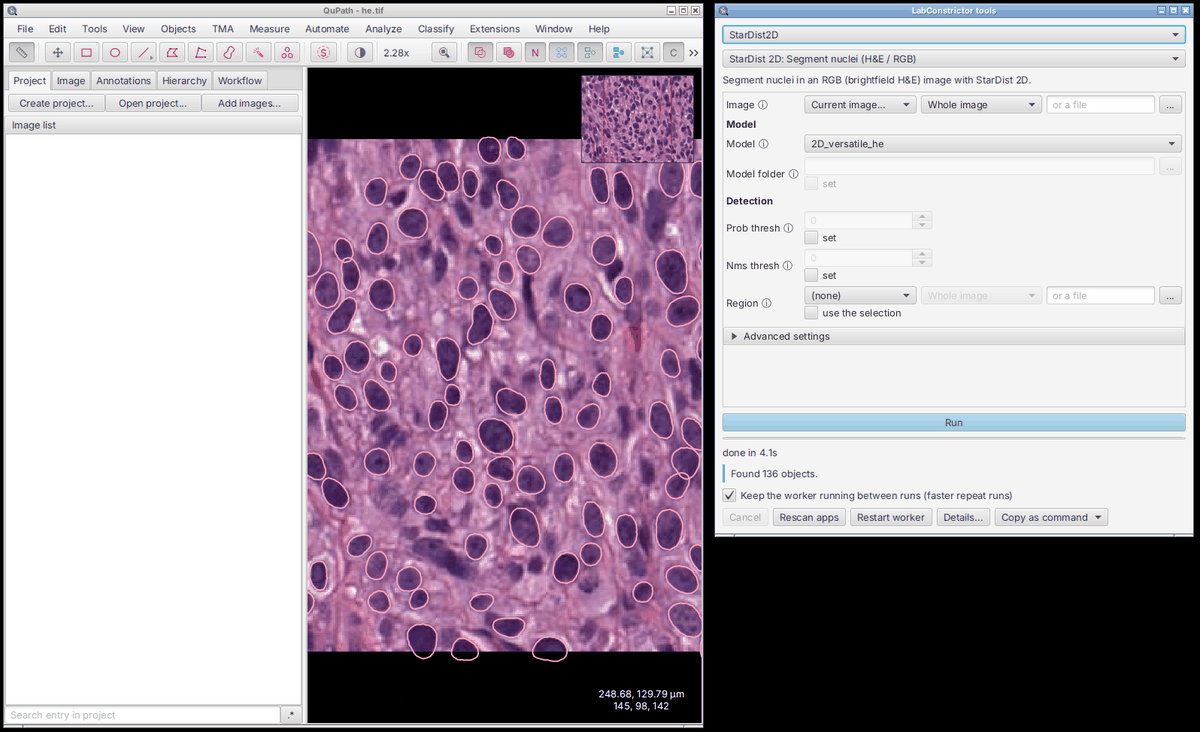
## What you need
-- [QuPath](https://qupath.github.io) 0.7.
-- At least one LabConstrictor app installed on your computer. The app's installer registers it, which is how the extension finds it. Apps declare which hosts list them (`hosts:` in their `labconstrictor-app.yaml`). Apps without a declaration (installed with an older installer) are listed in every host and the Log says so ("declares no hosts"). Intended for QuPath: Playground, NucleiSky, Guess the Condition and StarDist2D. **VLab4Mic is not listed in QuPath** (it is for Napari and Fiji), and CellTracksColab is notebook-only.
-- Only to build the jar yourself: JDK 25 (QuPath 0.7 is built with Java 25), as described in the repository's README.
+- [QuPath](https://qupath.github.io) 0.7. Older QuPath versions are not supported.
+- At least one LabConstrictor app that works in QuPath. The [App Centre](https://cellmigrationlab.github.io/LabConstrictor-Site/apps/?host=qupath) lists them. Installing the app and installing this extension are two separate steps: the app's installer registers the app on your computer, which is how the extension finds it.
+- Nothing else: you do not need Java or Python of your own.
## Install
-1. Download `labconstrictor-qupath-.jar` from the [Releases page](https://github.com/CellMigrationLab/LabConstrictor-QuPath/releases).
-2. Drop the jar onto the QuPath window, or put it in the QuPath extensions folder (shown in QuPath's Preferences), and restart QuPath.
-
-Without the jar: download the **single file** `LabConstrictorTools-all.groovy` from the same release, open it in QuPath's Script Editor and run it. The Script Editor needs this all-in-one file; the script in the repository is split into part files that do not run on their own there.
+1. Download the extension's jar. The current version is `v0.1.0-alpha.7`: [download `labconstrictor-qupath-v0.1.0-alpha.7.jar`](https://github.com/CellMigrationLab/LabConstrictor-QuPath/releases/download/v0.1.0-alpha.7/labconstrictor-qupath-v0.1.0-alpha.7.jar). A newer version, when there is one, is at the top of the [Releases page](https://github.com/CellMigrationLab/LabConstrictor-QuPath/releases).
+2. Drag the file onto the QuPath window, or copy it into the extensions folder shown in QuPath's Preferences.
+3. Restart QuPath.
-Full install page for the apps and all three hosts: [Tools `docs/INSTALL.md`](https://github.com/CellMigrationLab/LabConstrictor-Tools/blob/main/docs/INSTALL.md). To help test, report what you find in the [issue tracker](https://github.com/CellMigrationLab/LabConstrictor-QuPath/issues).
+Without the jar: download the single file `LabConstrictorTools-all.groovy` from the same release, open it in QuPath's Script Editor and run it.
## Open it
-Choose **Extensions > LabConstrictor tools...**, pick an app and a tool, and press Run.
+1. Open an image in QuPath.
+2. Choose **Extensions > LabConstrictor tools...**
+3. Pick an app, then a tool. The form shows the tool's settings; hover over an **ⓘ** to read what a setting means.
+4. Press **Run**.
+
+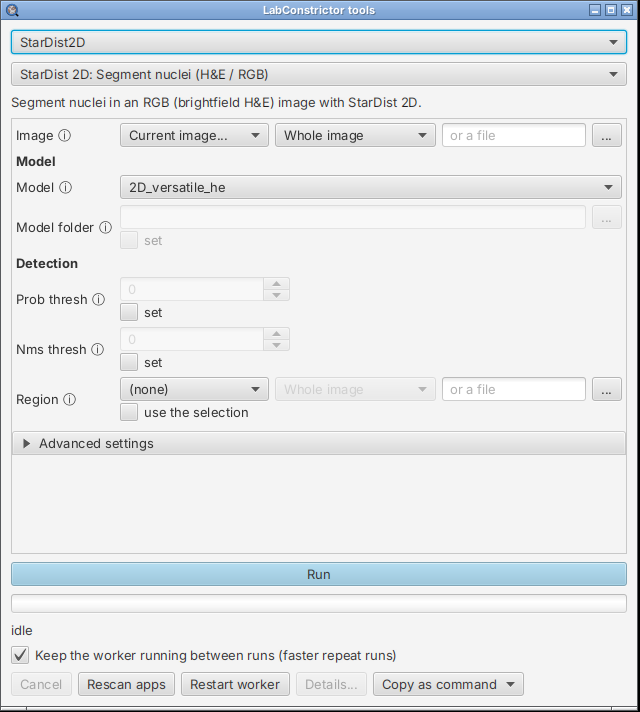
+
+Good to know:
+
+- An image input can be the image open in QuPath, another image of the open project, or a file.
+- For a large image, choose the **Image area** to send: the whole image, the selected annotations, or what the viewer shows. Results come back on the right place of the slide. An area of more than 100 million pixels is refused with a message, never shrunk silently: choose a smaller area.
+- Outlines and points found in the open image become annotations, named and classified after the app and the result (for example `StarDist2D:stardist_outlines`). When a tool finds more than 50 outlines they get no names, so that the names do not hide the image.
+- When you run a tool again, it replaces only the annotations it drew itself. Your own annotations are never removed.
+- Tables, values, messages and result images open in a results window. A result image has an **Open in QuPath** button.
+- A progress bar and a **Cancel** button are there while a tool runs.
+- A pixel-size setting is filled in from the image when the image says its pixel size. If it does not, the field stays empty and you type the value.
+- A number outside the allowed range is refused with a message such as `'Threshold' must be <= 10`. It is never changed to fit.
+- If you install another app while QuPath is open, press **Rescan apps**.
+
+## Check that it worked
-- An image input can be the image open in QuPath, any image of the open project, or a file.
-- For large images, choose the **Image area**: the whole image, the selected annotations, or the current viewport. Results come back on the right place of the slide.
-- Points and outlines found in the open image become annotations named after the app and the output. Outlines also get the classification `:`; above 50 outlines they get no names (QuPath would draw every name over the image) and are found by their classification, with their label as a measurement (`outline_index` when they have no label). A tool whose result replaces the previous one removes only the annotations it drew itself (they carry LabConstrictor metadata): your own annotations are never removed, even with the same classification.
-- Results open in a window. Cancel stops a run.
+Install the [Playground](https://cellmigrationlab.github.io/LabConstrictor-Site/apps/labconstrictor-playground/) app, pick it in the window and run its **Feature tour** tool without choosing an image: it makes its own small demo image. You should get the message "Found 16 blob(s)" and a results window with a label image and tables.
## If something does not work
-- The status line and **Details** show what failed. The log is `~/.labconstrictor/logs/labconstrictor.log`.
-- Results and run records are kept in `~/.labconstrictor/results` and `~/.labconstrictor/runs`. The extension never deletes them; after each run it starts `labconstrictor-tools prune`, which keeps the newest 20 results and 50 run records and removes only folders LabConstrictor made and finished. Folders from older versions of the extension are not removed automatically.
-- The app's `labconstrictor-tools` must be 0.3.0a1 or newer; with an older one the run is refused and the status line says to update it.
-- If you open another image while a tool runs, the results are not drawn on the new image: the status line says where the files are.
-- An app whose `labconstrictor-tools` is older than 0.3.0a1 is not offered; the status line (or the list of skipped apps after **Rescan apps**) says to update it.
-- An app can declare the oldest QuPath extension it needs. If yours is older, the status line warns and names the version to get; if the app marks it as required, the app is not offered (it is in the list of skipped apps) until you update the extension.
-- A number you type that is outside the allowed range (or is not a number) is refused with a sentence like `'Threshold' must be <= 10`; it is never changed to fit, and the run does not start.
-- `labconstrictor-tools doctor` shows which apps are registered.
+- **No menu entry.** The extension needs QuPath 0.7 (**Help > About** shows your version). Check that the jar is in the extensions folder and restart QuPath.
+- **"No LabConstrictor app is registered on this machine".** Install a LabConstrictor app, then press **Rescan apps**.
+- **An app is missing from the list.** Press **Rescan apps**: the list of skipped apps says why. The app may not offer its tools in QuPath, it may have been installed with an old installer (install its newest version), or it may need a newer version of this extension (the message names the version to get).
+- **A run fails.** The status line says what failed; **Details...** shows the full report. The log file is `~/.labconstrictor/logs/labconstrictor.log`.
+- **You opened another image while a tool was running.** The results are not drawn on the new image; the status line says where the result files are.
+- **You wonder where results are kept.** In `~/.labconstrictor/results` and `~/.labconstrictor/runs`. Only the newest 20 results and 50 run records are kept; older ones are removed automatically, and only folders that LabConstrictor itself made.
+- **You want to know which apps are found.** `labconstrictor-tools doctor`, run in a terminal, shows which apps are registered.
+- **You want to report a bug.** Open an [issue](https://github.com/CellMigrationLab/LabConstrictor-QuPath/issues) with what you ran and what you saw.
-Source and issues: [LabConstrictor-QuPath](https://github.com/CellMigrationLab/LabConstrictor-QuPath).
+Every rule the extension follows: [technical reference](https://github.com/CellMigrationLab/LabConstrictor-QuPath/blob/main/docs/REFERENCE.md). Source code and issues: [LabConstrictor-QuPath](https://github.com/CellMigrationLab/LabConstrictor-QuPath).
diff --git a/tests/gui_test_conformance_body.groovy b/tests/gui_test_conformance_body.groovy
index 257360f..89d825e 100644
--- a/tests/gui_test_conformance_body.groovy
+++ b/tests/gui_test_conformance_body.groovy
@@ -108,7 +108,7 @@ Thread.start("lc-gui-test") {
idsOf(WS.run_identity.fixtures) + idsOf(WS.async_lookups.fixtures) + idsOf(WS.number_limits.cases)) as List
def LEDGER = [:]
["CF-01", "CF-07", "CF-08", "CF-09", "CF-10", "CF-11", "CF-12", "CF-14"].each { LEDGER[it] = "gui_test_frame_body" }
- ["CF-02", "CF-03", "CF-04", "CF-05", "CF-06", "CF-13"].each { LEDGER[it] = "n/a: QuPath has no spatial transform (README, coordinate frame)" }
+ ["CF-02", "CF-03", "CF-04", "CF-05", "CF-06", "CF-13"].each { LEDGER[it] = "n/a: QuPath has no spatial transform (docs/REFERENCE.md, coordinate frame)" }
(1..20).each { LEDGER[String.format("CAL-%02d", it)] = "gui_test_calibration_body" }
(1..9).each { LEDGER["CAL-T" + it] = "gui_test_calibration_body" }
[1, 2, 3, 4, 5, 6, 7, 8, 9, 12, 13].each { LEDGER[String.format("RET-%02d", it)] = "n/a: run against Tools' retention.prune and its CLI, not a host test (the real prune is exercised by gui_test_retention_body)" }